
Professional Online Music Mastering: From Finished Mix to Release-Ready Audio
A practical guide to professional online mastering: mix preparation, EQ, dynamics, loudness, true peak, audio delivery, and a real walkthrough of GYSNOIZE Studio Master.
A practical guide to mastering a track online: what mastering does, how to prepare a mix for it, what EQ, dynamics, loudness and true peak mean for your release, and how GYSNOIZE Studio Master works, step by step.
Your mix is finished. It sounds right in the studio, but next to commercial releases it feels quieter, less even, or a little harsh. Mastering is the last creative and technical step between that mix and the file you release. Online, it ranges from instant automatic processing to a person working through real equipment. This guide explains what happens in either case and what you can control before you send anything.
What is mastering?
Mastering takes a finished stereo mix and prepares it for release. It balances the overall tone, controls dynamics, sets the final loudness and peak level, and checks that the track translates to headphones, car speakers, phones and club systems. It does not fix a bad mix: a vocal that is too quiet or a kick that fights the bass is a mixing problem, and it is cheaper to solve there.
How to prepare your mix for mastering
- Export a stereo WAV or AIFF at 24-bit. Avoid MP3 or other lossy files.
- Leave headroom. Peaks around −6 dBFS give the mastering chain room to work.
- Take the limiter off the master bus. A mix that is already limited leaves nothing to shape.
- Check the start and the end. No clicks, no cut reverb tails, no silence you do not want.
- Listen once more on another system. Headphones and a small speaker reveal what the studio hides.
Before mastering, a measurement can tell you where to listen. Our guide to audio analysis explains LUFS, true peak, loudness range and mono compatibility, and how to read a real report.
The main stages of a mastering chain
| Stage | What it does |
|---|---|
| EQ | Corrects and shapes the overall tone: a little less low-mid mud, a little more air. |
| Resonance control | Tames harsh or ringing frequencies that build up across a track. |
| Compression | Holds the dynamics together so the track feels even and punchy. |
| Multiband dynamics | Controls one frequency range without touching the others. |
| Saturation and tape | Adds harmonics and density that make a mix feel finished. |
| Limiting | Sets the final loudness and stops peaks from going over the ceiling. |
Loudness, LUFS and true peak
LUFS measures perceived loudness over time, following ITU-R BS.1770. Streaming services turn loud tracks down to their own playback level, so a master pushed to the extreme is not louder on a playlist; it only has less dynamics. Club music is often mastered louder because it is played next to other loud records. Around −14 LUFS is a common reference for streaming, but it is not a mandatory mastering target.
True peak estimates the level between samples, which can go over 0 dBFS after conversion or encoding even when the samples do not. Keeping true peak a little below 0 dBTP leaves room for that. The EBU R 128 recommendations explain both measurements in detail.
Automatic or studio mastering?
Automatic online mastering processes a file in seconds with software. Studio mastering runs a mix through a chain set up by a person, often on dedicated hardware, and takes longer. Neither is right for everyone. What matters is that you can hear the result against your mix before you pay, and that the delivered file is ready for your distributor.
Inside GYSNOIZE Studio Master: A Real Walkthrough
Studio Master is in Mastering, in the Artist area of a GYSNOIZE account, and in the For Labels workspace. The screenshots come from the live site. No mix was sent, no try was made and nothing was paid for this guide.
Step 1: Know the terms
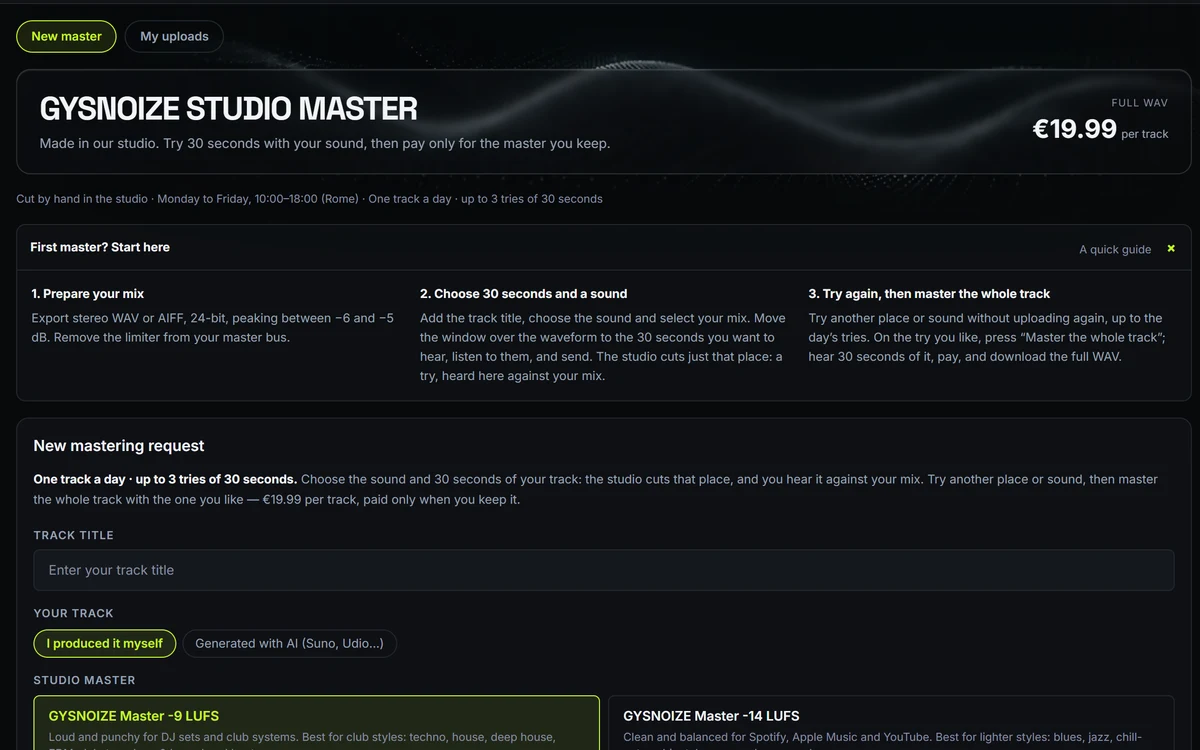
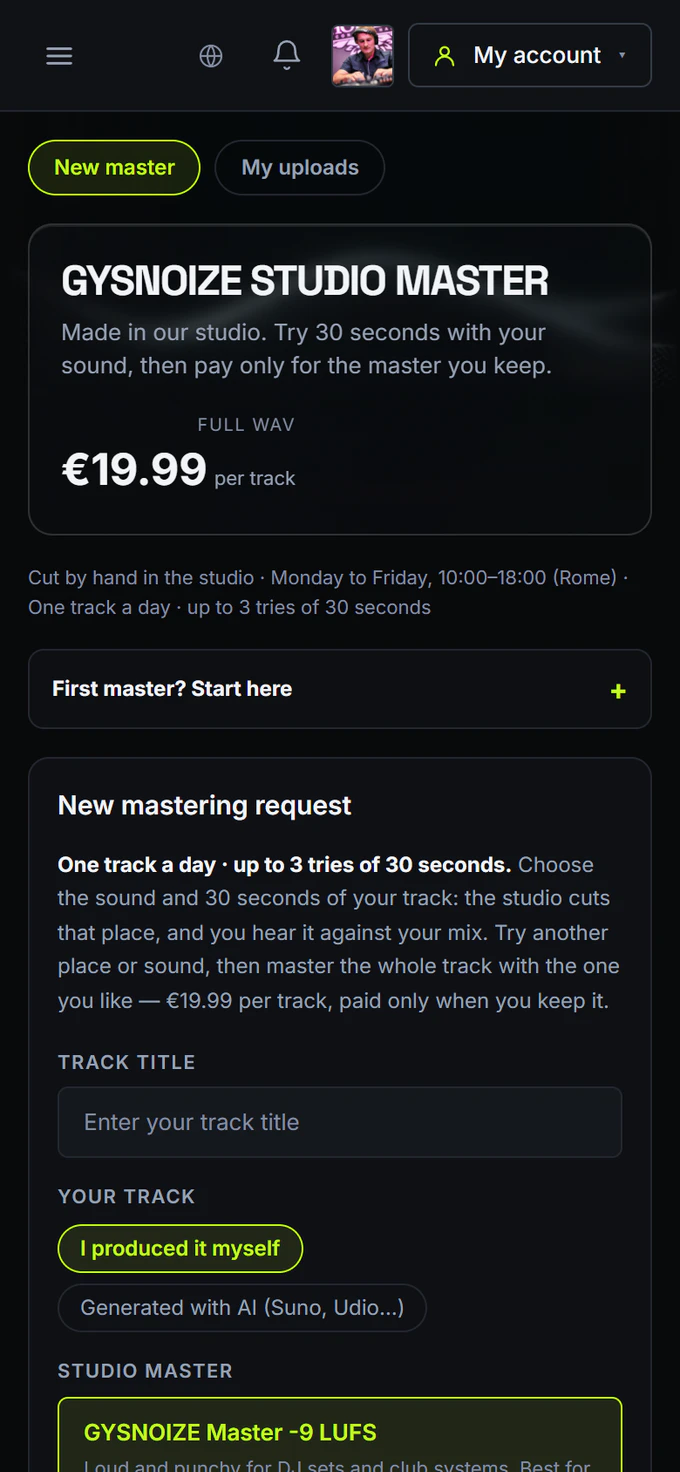
The header gives the deal: a full WAV master for €19.99 per track, cut by hand in the studio, Monday to Friday, 10:00–18:00 Rome time. One track a day, with up to three tries of 30 seconds. First master? Start here opens a three-step guide: prepare your mix, choose 30 seconds and a sound, then try again or master the whole track.
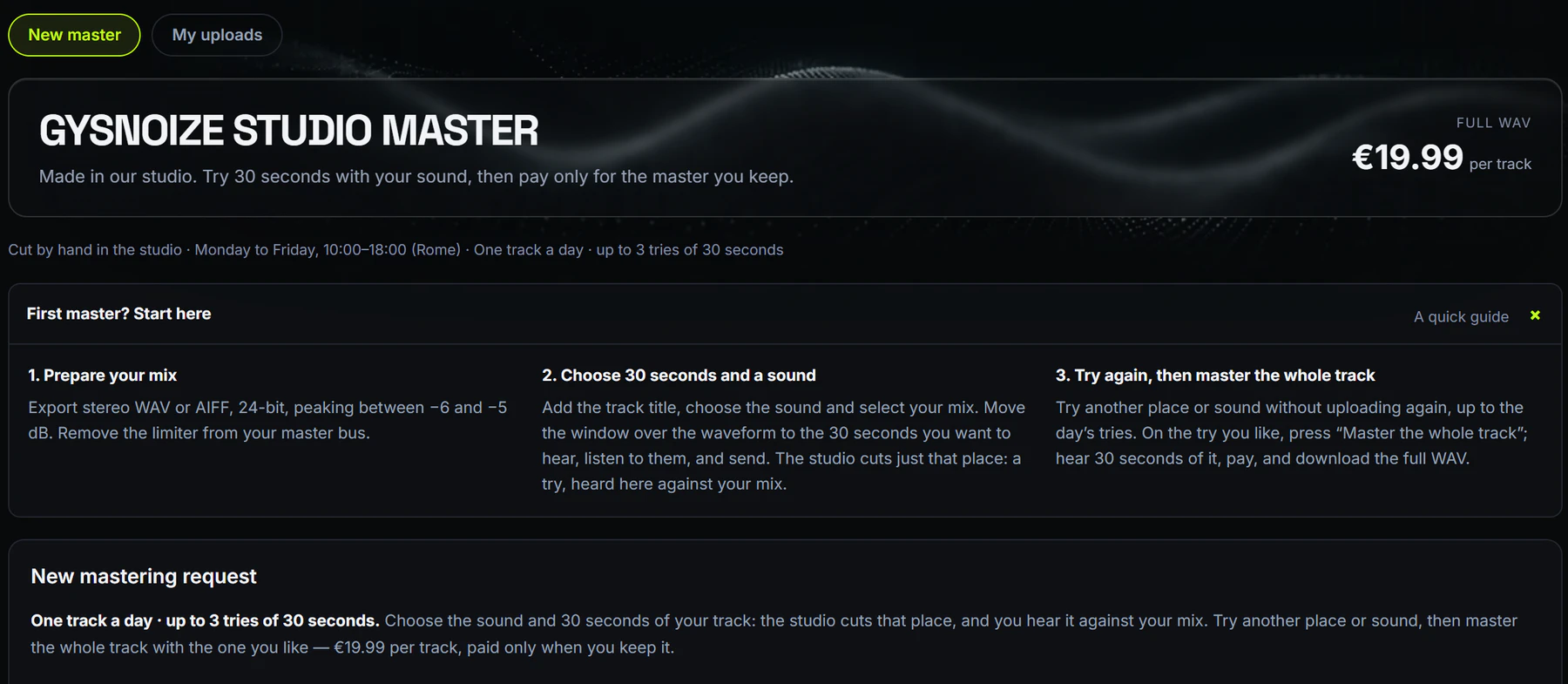
Step 2: Describe your track and choose a sound
Give the track title and say whether you produced it yourself or generated it with AI (Suno, Udio and similar). For your own track the sounds are GYSNOIZE Master -9 LUFS, loud and punchy for DJ sets and club systems, and GYSNOIZE Master -14 LUFS, clean and balanced for streaming. AI tracks have their own two sounds at the same levels, set up for the harsh highs and muddy low end those tracks often have. The master itself is never made by AI.
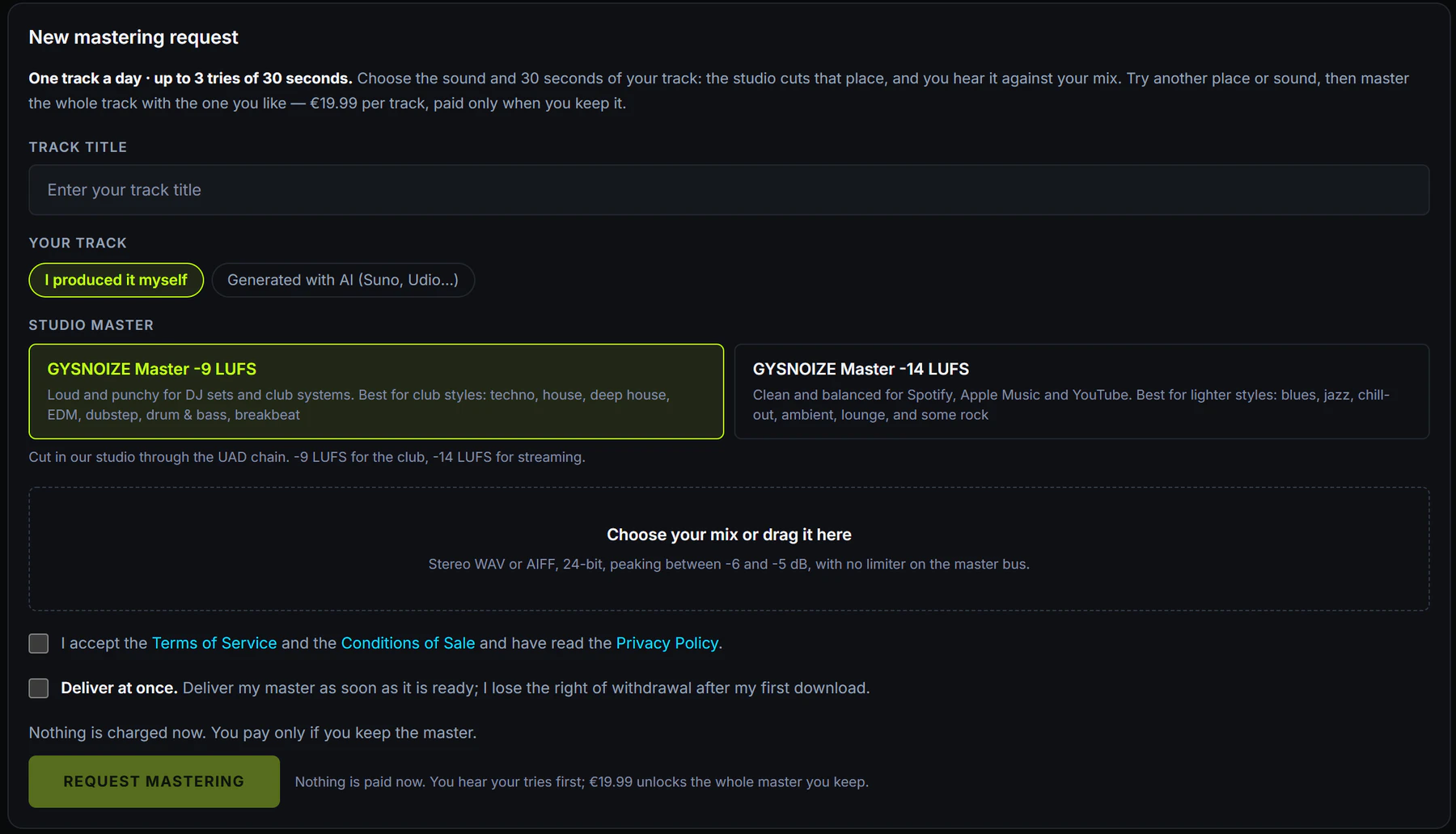
Step 3: Add your mix and pick 30 seconds
The form asks for a stereo WAV or AIFF, 24-bit, peaking between −6 and −5 dB, with no limiter on the master bus. Once the mix is chosen it is read in your browser and a 30-second window lands on its loudest part. Drag it anywhere and listen to the selection before you send.
Step 4: Request mastering and hear a try
Accept the terms and press Request mastering. Nothing is charged now. The studio cuts just those 30 seconds and the try appears on the page, A/B against your mix. Try another place or another sound without uploading again, up to three tries for the track that day. A card shows whether the studio's UAD-2 Satellite DUO is on and free.
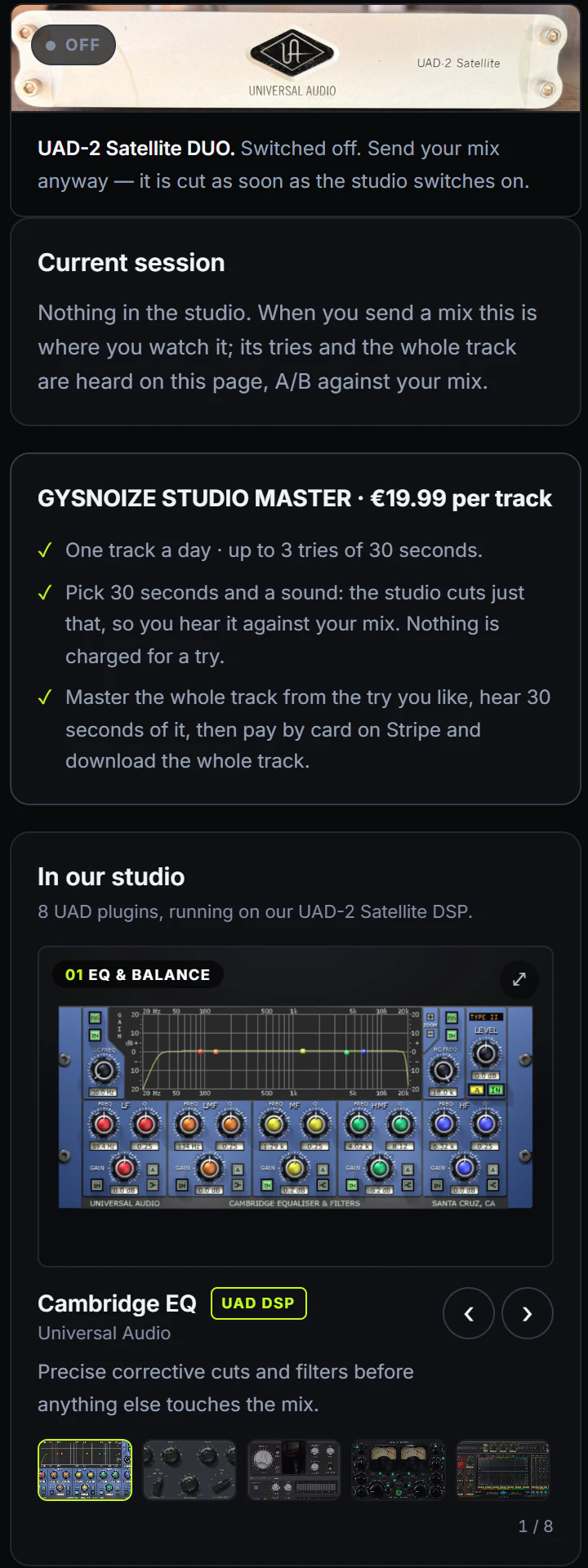
In our studio shows the rack: eight UAD plugins running on the studio's UAD-2 Satellite DSP, including the Cambridge EQ and Pultec for balance, bx_refinement for harshness, the Shadow Hills compressor and Precision Multiband for dynamics, Vertigo for harmonics, an Ampex tape machine and the Precision Maximizer for loudness. When a cut is done, the plugins used on your track and what each did appear on the page.
Step 5: Master the whole track and pay only if you keep it
Like a try? Master the whole track with that sound. The whole track is cut in the studio's working hours, so a request on Friday evening is cut on Monday. You hear 30 seconds of the full master, and only then pay €19.99 by card on Stripe and download the full WAV. If you do not keep it, you pay nothing.
Step 6: Find your files in My uploads
My uploads lists your mixes, tries and masters. Mixes, tries and masters you do not buy are deleted automatically within 24 hours. A master you paid for can be downloaded for 30 days, then its audio is deleted too, so download your WAV and keep it.

On a phone the page stacks: the price and hours at the top, then the quick guide and the request form.
What We Verified
| GYSNOIZE Studio Master | |
|---|---|
| Price | €19.99 per track for the full WAV, paid only for the master you keep. |
| Your mix | Stereo WAV or AIFF, 24-bit, peaks between −6 and −5 dB, no master-bus limiter. |
| Sounds | -9 LUFS for the club, -14 LUFS for streaming, each also in a version for AI tracks. |
| Tries | One track a day, up to three 30-second tries, heard A/B against your mix. |
| Studio | Cut by hand on UAD hardware, Monday to Friday, 10:00–18:00 Rome. |
| Files | Unbought audio deleted within 24 hours; paid masters downloadable for 30 days. |
Frequently asked questions
Is GYSNOIZE Studio Master automatic?
No. Every try and every master is cut in the studio through UAD hardware, which is why it is not instant.
Do I pay for the tries?
No charge is made for a try. You pay €19.99 only for the whole master you decide to keep.
Which sound should I choose?
-9 LUFS for DJ sets and club styles, -14 LUFS for lighter styles and streaming. If you are unsure, use your tries to compare both.
Can I master a track made with AI?
Yes. Choose Generated with AI and one of the two sounds for AI tracks. The master is still cut in the studio, not by AI.
Should I analyse my mix first?
It helps. Audio Analysis measures your mix in the browser, and your first full report comes with your account.
Prepare Your Next Release with GYSNOIZE Studio Master
Send a clean mix with headroom, choose the sound that fits where your track will be played, listen to the tries against your mix, and keep only the master you want.