
How to Check if a Track Is Club-Ready: LUFS, Bass, Stereo & DJ Set Consistency
A practical guide to evaluating music for DJ sets: loudness, true peak, dynamic range, bass balance, stereo compatibility, and what Club Check can actually measure.
A practical guide for DJs: which measurements help before a gig, what they can and cannot tell you, and how to check a whole crate for level jumps, peaks and bass that falls apart in mono.
You find a track, it sounds great in headphones, and in the club it is three decibels quieter than the one before it, or its bass vanishes on a mono system. Most surprises like these can be spotted at home. A few numbers will not tell you whether a track is good, but they will tell you where to listen more carefully before you play it.
What does «club-ready» actually mean?
A club-ready track plays cleanly on a large system and sits at a level close to the rest of your set. Its low end holds together when the venue sums it to mono, its peaks do not clip after conversion, and its energy fits the moment you plan to play it. Club-ready does not mean as loud as possible. It means predictable.
Integrated LUFS: overall loudness
LUFS (Loudness Units relative to Full Scale) measures perceived loudness across the whole track. Electronic club music released today often measures somewhere between about −10 and −6 LUFS integrated, depending on genre and style. The −23 LUFS figure you may have read about is a broadcast standard, and −14 LUFS is a streaming normalisation reference; neither is a target for club tracks.
Does every club track need the same LUFS?
No. Genres differ, and so do records inside one genre. What matters to a DJ is the difference between the tracks you play in sequence, because a download store does not even them out: that difference is the gain you will reach for on the mixer.
Short-term loudness and loudness range
Short-term loudness looks at a window of about three seconds and shows how loud the strongest moments get. Loudness range (LRA, in LU) describes how much the level moves through the track. A low LRA means a steady wall of sound; a higher one means breakdowns and drops with real contrast. Neither is better on its own; both help you plan where a track goes in a set.
True peak (dBTP): beyond sample peaks
Digital audio can rebuild peaks between samples that are higher than any single sample. True-peak measurement estimates them, usually by oversampling. A track that reads −0.1 dBTP is right at the ceiling, and lossy encoding or a sample-rate conversion in the playback chain can push it over. There is no single correct club ceiling, but a little headroom is safer than none. True peak is a measurement, not a verdict on quality.
RMS: another view of level
RMS averages the signal power without the hearing curve that LUFS applies. It is less related to perceived loudness, but it is a quick way to compare tracks that were all made the same way.
Bass balance and the spectrum
A spectrum shows how the energy is spread across frequencies. In club music much of it sits below 120 Hz, and that is normal. Comparing a track's spectrum with records of the same genre shows whether it leans heavier or lighter in the low end. A spectrum cannot tell you whether the track will sound good in a particular room; it tells you which direction the mix takes.
Mono bass and stereo correlation
Many club systems run the subwoofers in mono. If the left and right low end are out of phase, part of the bass cancels out when they are summed. Stereo correlation measures this: +1 means both channels are identical, 0 means unrelated, and negative values mean they work against each other. For bass, a value close to +1 is what you want. Wide, moving stereo above the bass is a creative choice, not a fault.
Clipping, distortion and false alarms
A count of clipped samples is a hint, not a sentence. Some loud masters clip on purpose and sound fine; some never clip and still distort. Always confirm a warning by ear.
A practical pre-gig check
- Choose the tracks that need attention — new downloads, promos, your own edits.
- Check the source — a lossless file from the store or the label, not a rip.
- Compare loudness — note the tracks that are much quieter or louder than the rest.
- Check true peak — find the files sitting right at 0 dBTP.
- Look at the bass — spectrum and low-end correlation.
- Listen in mono — a quick button on many mixers and headphone amps.
- Try the transitions in your own DJ software or on your own equipment.
- Decide — play it, adjust the gain, or replace it.
An illustrative comparison of two tracks
| Track A | Track B | |
|---|---|---|
| Integrated loudness | −7.5 LUFS | −10.5 LUFS |
| True peak | −0.1 dBTP | −1.0 dBTP |
| Loudness range | 3 LU | 7 LU |
| Low-end correlation | +0.98 | +0.60 |
| What a DJ might do | Watch the peak level | Add gain; check the bass in mono |
How to Use GYSNOIZE Club Check: A Real Product Walkthrough
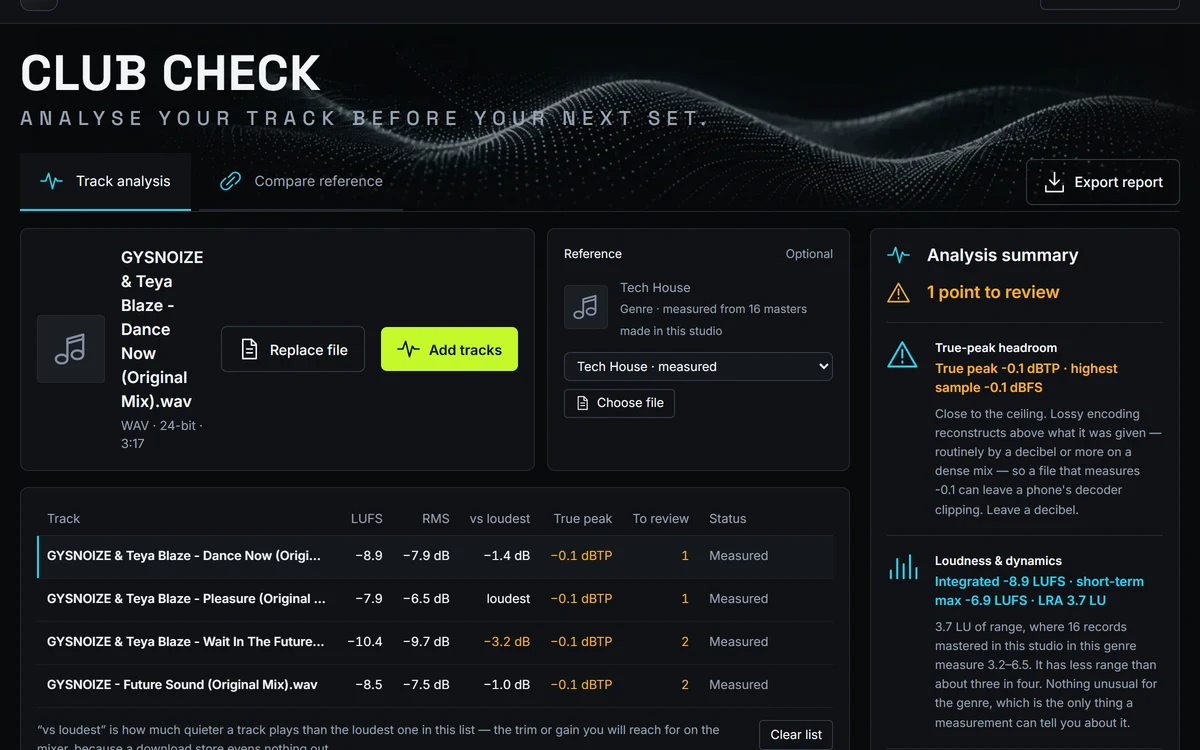
Club Check is in the DJ area of a GYSNOIZE account. The screenshots below come from the live site on 12 November 2026, with four GYSNOIZE tracks loaded from a local folder.
Step 1: Add one track or a whole crate
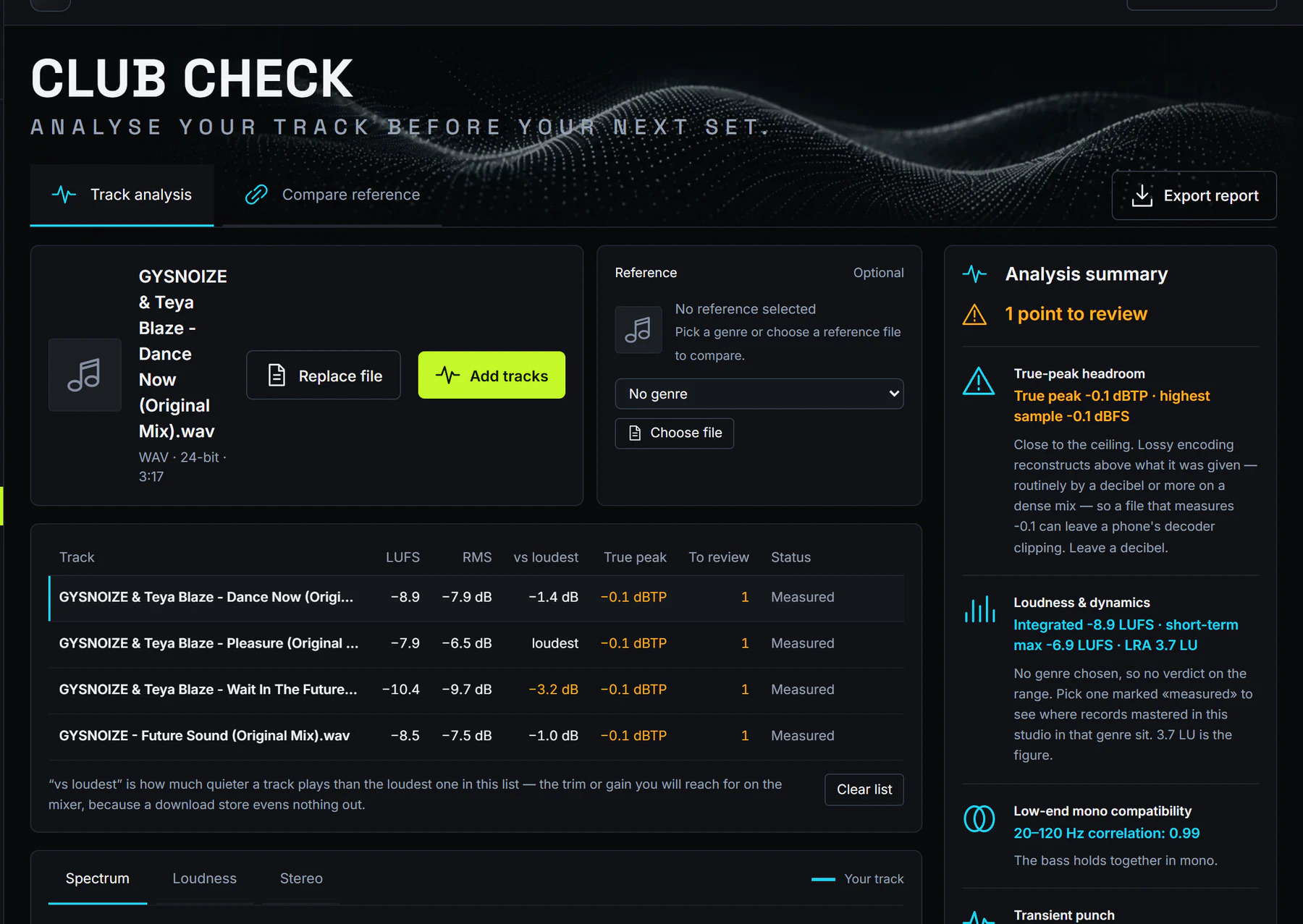
Club Check accepts WAV, AIFF, FLAC or MP3, one track or many, and measures them one at a time in the browser: «Your files are never uploaded and nothing is kept». We checked this while measuring the four tracks: the page made no request that carried the audio. Each file appears in a table with its integrated LUFS, RMS, true peak, the number of points to review and its status. vs loudest shows how much quieter each track plays than the loudest in the list — here from −1.0 to −3.2 dB, the trim you would reach for on the mixer.
Step 2: Read the analysis of one track
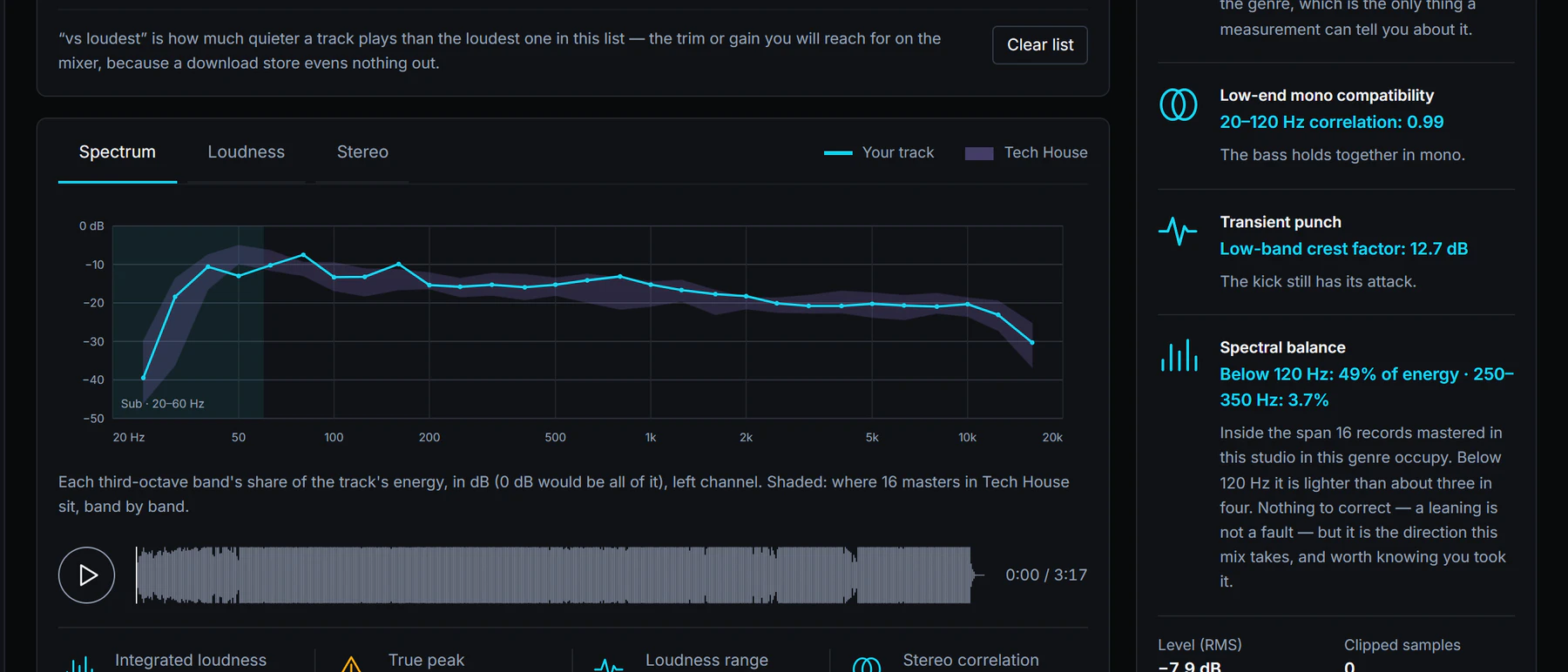
Selecting a track shows its detail. For «Dance Now» the integrated loudness is −8.9 LUFS, the short-term maximum −6.9 LUFS, the loudness range 3.7 LU and the true peak −0.1 dBTP; low-end correlation between 20 and 120 Hz is 0.99, so «the bass holds together in mono». The one point to review is headroom: at −0.1 dBTP Club Check suggests leaving a decibel, because lossy decoding can clip. Three tabs show the spectrum, the loudness over time and the stereo image.
Step 3: Compare with a genre or a reference
Reference compares the track with a genre or with a reference file you choose. Genres marked «measured» come from masters made in the GYSNOIZE studio; Tech House, for example, from 16 of them. The shaded area on the spectrum shows where those records sit, band by band, and the text puts the numbers in context: the track's 3.7 LU of range against 3.2–6.5 LU for that set of masters.
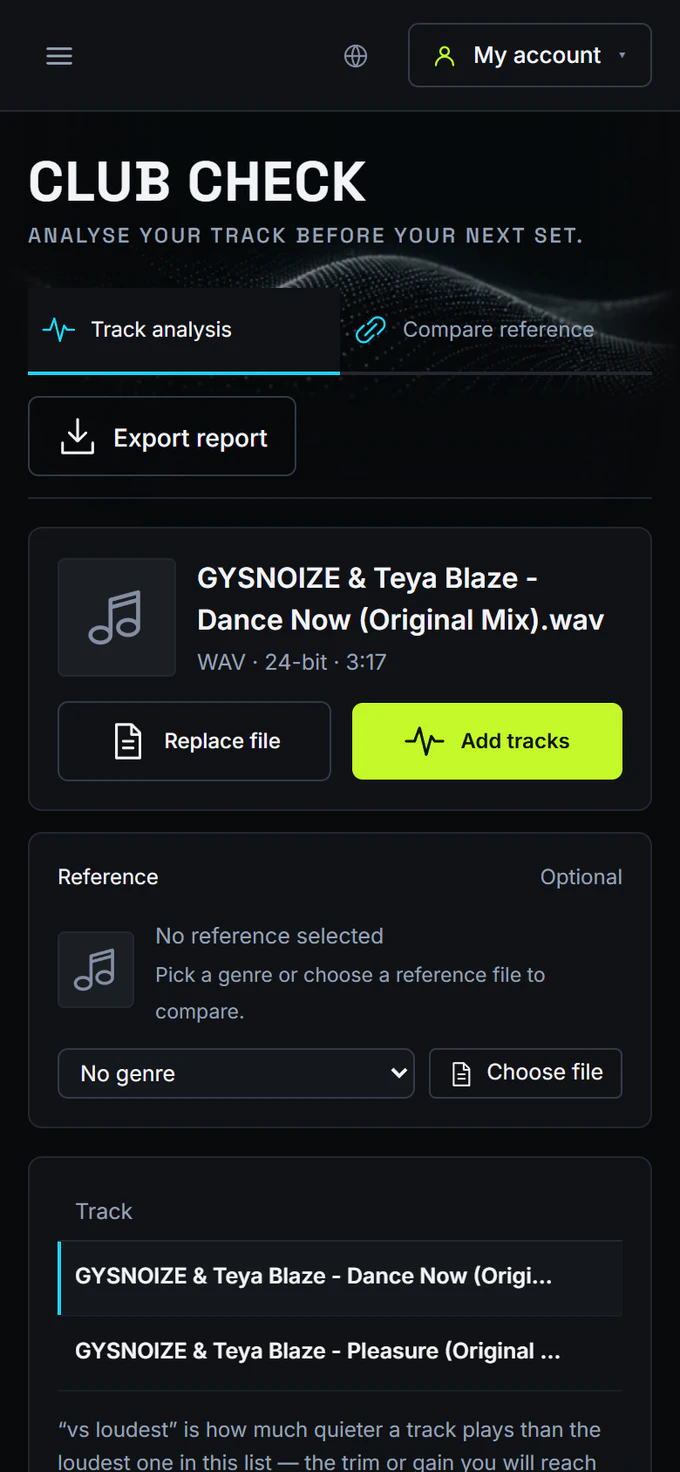
The third tab is Export report. On a phone the same check works in one column.
What We Verified
| GYSNOIZE Club Check | |
|---|---|
| Where | The DJ area of a GYSNOIZE account. |
| Files | WAV, AIFF, FLAC or MP3; one track or a whole crate. |
| Audio | Measured in the browser; not uploaded, nothing kept. |
| Measurements | Integrated and short-term LUFS, LRA, RMS, true peak, clipped samples, spectrum, low-end and stereo correlation. |
| Comparison | Loudest track in the list; a genre measured from studio masters or a reference file. |
| What it does not do | It does not change, master or fix the audio. |
Club Check and the other GYSNOIZE tools
DJ Crates organises the music you might play. Set Builder puts it in order and uses the same measuring engine for tempo, key and energy. Club Check looks at the technical side of each file. Audio Analysis is the artist's version, for a mix before release, and Studio Master is a separate mastering service; Club Check only measures.
Common mistakes
- Chasing one LUFS number — the gap between tracks matters more than the number itself.
- Assuming louder means stronger — a crushed master can sound smaller on a big system.
- Ignoring mono bass — the most common cause of a weak low end in a club.
- Treating stereo width as a score — width is taste; low-end phase is physics.
- Using streaming targets as club rules — −14 LUFS describes a streaming platform, not a dance floor.
- Treating an analyser as a venue — numbers do not know the room.
- Forgetting to listen — measurement points the way; your ears decide.
Frequently asked questions
What LUFS should a DJ track be?
There is no single value. Many club releases sit between about −10 and −6 LUFS integrated; what matters in a set is how close your tracks are to each other.
What does negative stereo correlation mean?
That the two channels partly cancel each other. In the bass this means lost energy on a mono system.
Does a club check replace mastering?
No. It measures a finished file; it does not change it.
Does GYSNOIZE Club Check upload my files?
No. The files are measured in your browser and nothing is kept.
Can Club Check analyse several tracks at once?
Yes. Add a whole crate; the tracks are measured one after another and shown in one list.
Is Club Check included in my plan?
The DJ plans and what each includes are listed on the For DJs page.
Check Your Tracks Before the Next Set
Ten minutes with your new tracks at home saves a level jump or a missing bass line in front of a crowd.