
How to Build a DJ Set: Track Selection, BPM, Key, Energy & Transitions
A practical guide to building better DJ sets: organize tracks, shape energy, plan transitions, and explore the real GYSNOIZE Set Builder workflow.
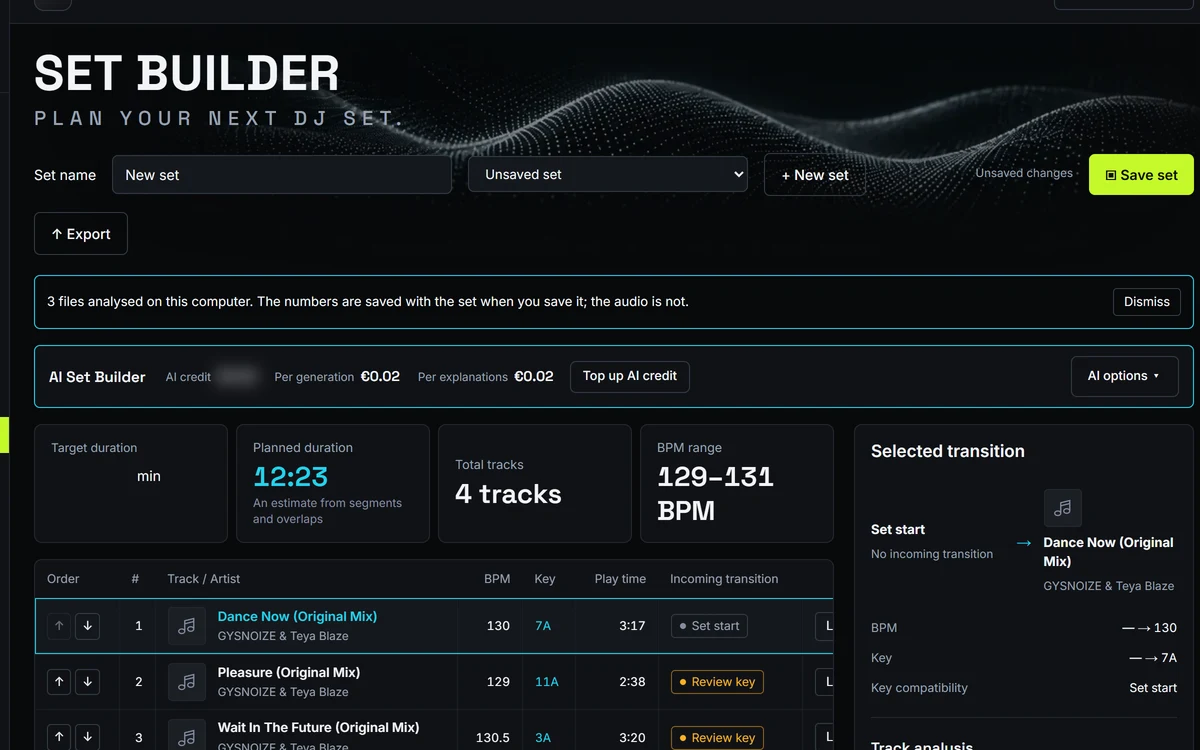
A practical guide to planning a DJ set: choosing the pool, shaping the energy, using tempo and key as guides, preparing transitions, and the real GYSNOIZE Set Builder workflow.
A good set feels effortless on the night because the thinking happened before it. Planning does not mean playing a fixed list; it means knowing your material, having a direction, and having a second option ready when the room asks for something else.
What is a DJ set builder?
A set builder is a planning tool. It holds an ordered list of tracks with the details that help you choose the next one: tempo, key, energy, length and notes. It is not a live mixer and it does not play your gig; that still happens in your DJ software or on your decks.
Crates and setlists are not the same
A crate is a pool of music you might play. A setlist is an intentional order for one performance. You build crates over months; you build a setlist for a night, from those crates. Our guide to DJ crates covers the first part.
Step 1: Understand the event
Who plays before and after you? Is it a warm-up, a peak-time slot or a closing set? How long, and on what kind of system? An opening hour and a headline set need different music even in the same genre.
Step 2: Build a pool of candidate tracks
Bring two or three times more tracks than the slot needs. Include a few safe choices, a few risks, and tracks that can turn the set in another direction.
Step 3: Plan the energy curve
- Opening — set a direction and invite people in.
- Development — more movement, more detail.
- Peak — the strongest moments, matched to the room and your slot.
- Contrast — a breath, an unexpected texture, a reset of tension.
- Closing — an ending that fits the next act or the end of the night.
Constant maximum intensity rarely feels like a journey; the peak lands harder when something came before it.
Step 4: Use BPM as a guide
Small tempo changes between neighbours are easy to hide; large jumps need a plan, such as a breakdown, an echo out or a deliberate change of style. Tempo tells you nothing about mood, so do not order a set by BPM alone.
Step 5: Use key as a guide too
Harmonic mixing pairs keys that sit close on the Camelot wheel, such as 8A to 8A, 9A or 8B, so melodies do not clash in a long blend. Detected keys can be wrong, and a compatible label does not guarantee a good mix. Harmonic mixing is musical decision-making, not a formula.
Step 6: Think in phrases
Dance music is built in phrases of 8, 16 or 32 bars. Starting a new track at the start of a phrase, and ending the old one at the end of its phrase, makes a transition feel natural. Note where each track has a usable intro and outro.
Step 7: Calculate the real duration
Nobody plays every track from start to finish. Count the part you will actually play, minus the overlaps. Ten tracks of six minutes rarely make sixty minutes; with long blends they may make forty-five.
Step 8: Keep the order flexible
Mark the tracks that must play and the ones that can move, and prepare one alternative at each turning point. A plan is there so you can leave it with confidence.
How to prepare transitions without overplanning
- Play the two tracks together in your own DJ software or on your equipment.
- Find a transition window that fits the phrases.
- Listen to how the two low ends sit together.
- Check for clashing vocals or melodies.
- Choose the technique: a long blend, a short cut, an echo out, a bass swap.
- Write a short note you can read in a dark booth.
What to look for in set planning software
- A clear running order that is easy to change.
- Accurate track details — tempo, key, length and energy, only when they are reliable.
- Saved sets you can come back to.
- Exports in formats you can actually use, without assuming a direct sync with your DJ software.
- Privacy for unreleased promos and your own edits.
- A clear line between planning and live mixing.
How to Plan a DJ Set with GYSNOIZE Set Builder — Real Product Walkthrough
Set Builder is in the DJ area of a GYSNOIZE account. The screenshots come from the live site on 12 November 2026, with four GYSNOIZE releases loaded from a local folder. Nothing was saved and no AI option was used for this article.
Step 1: Add tracks
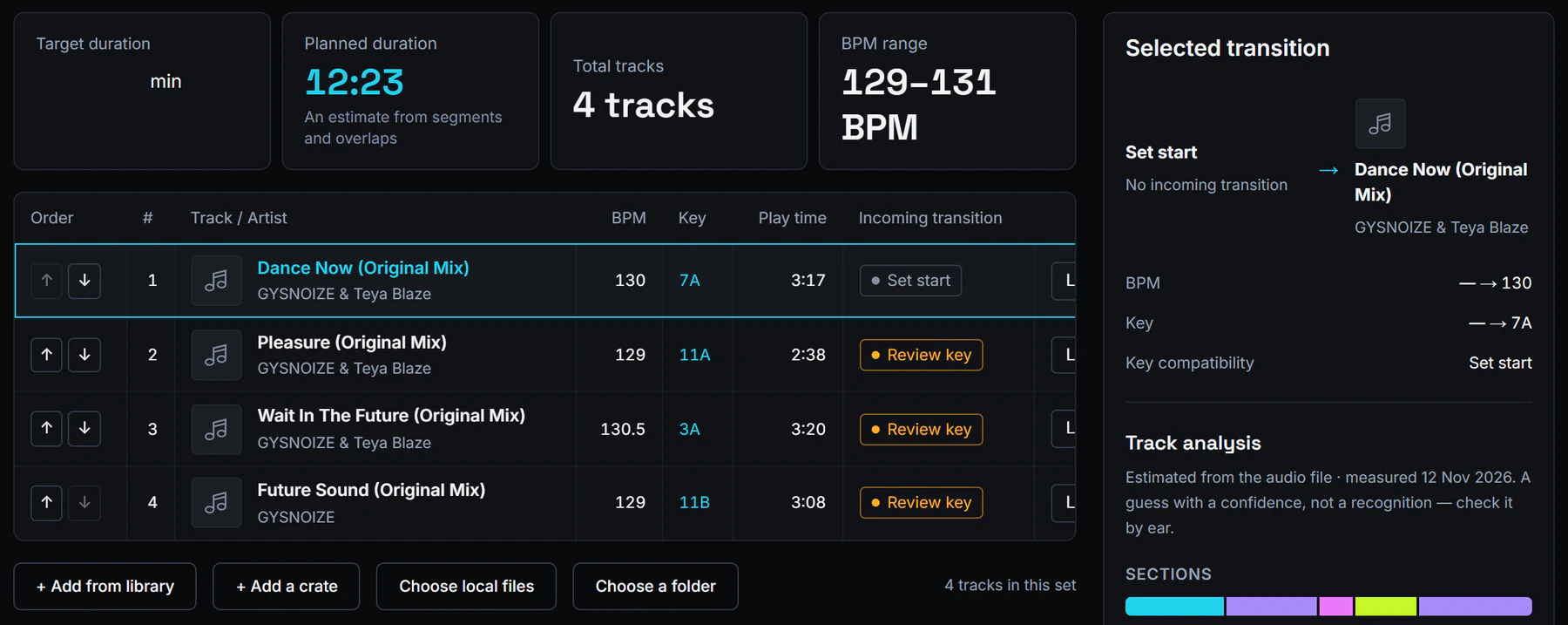
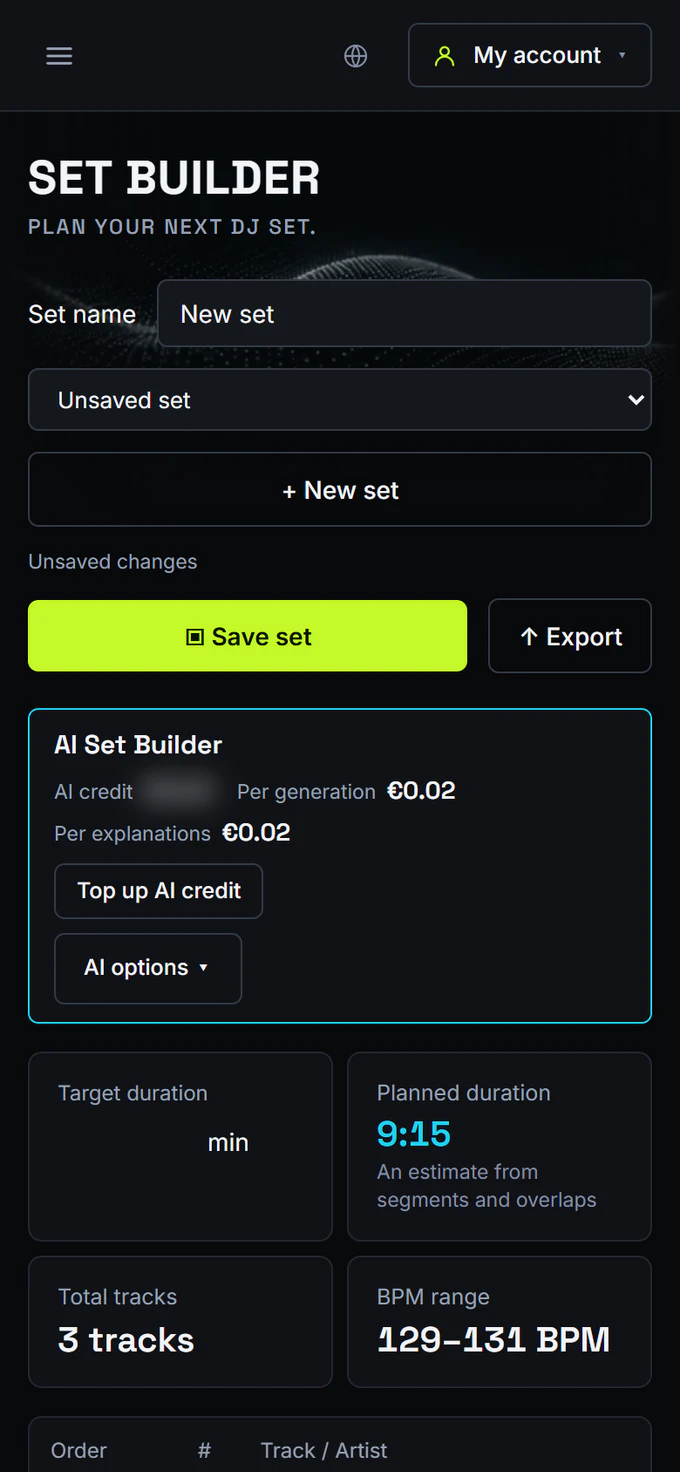
Tracks come from your library, a whole crate, a folder or local files. Local files «are read on this computer — only the title, tags, length and your tempo, key and energy go to your account, never the audio». The table shows each track's order, tempo, key, play time and the incoming transition, with arrows to move it and a lock to keep it in place. Above it: target and planned duration, the number of tracks and the BPM range.
Step 2: Analyse the audio
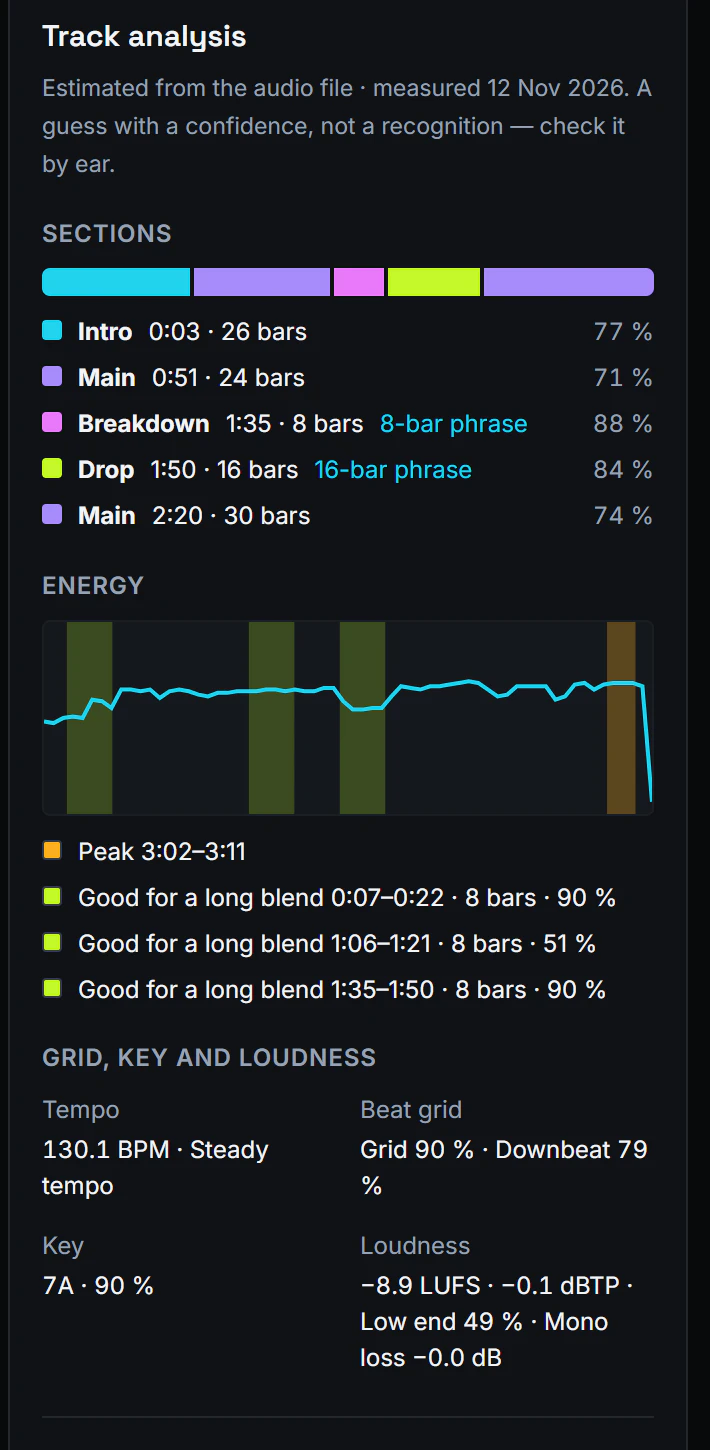
Analyse audio measures each file in the browser with the same engine as Club Check: tempo and beat grid, key, energy, sections and loudness. Selecting a track shows what was found — for «Dance Now» an intro, a main part, a breakdown, a drop and a second main part, each with its length in bars, plus the energy peak and the stretches that are good for a long blend. The panel calls it «a guess with a confidence, not a recognition — check it by ear».
Step 3: Arrange by shape
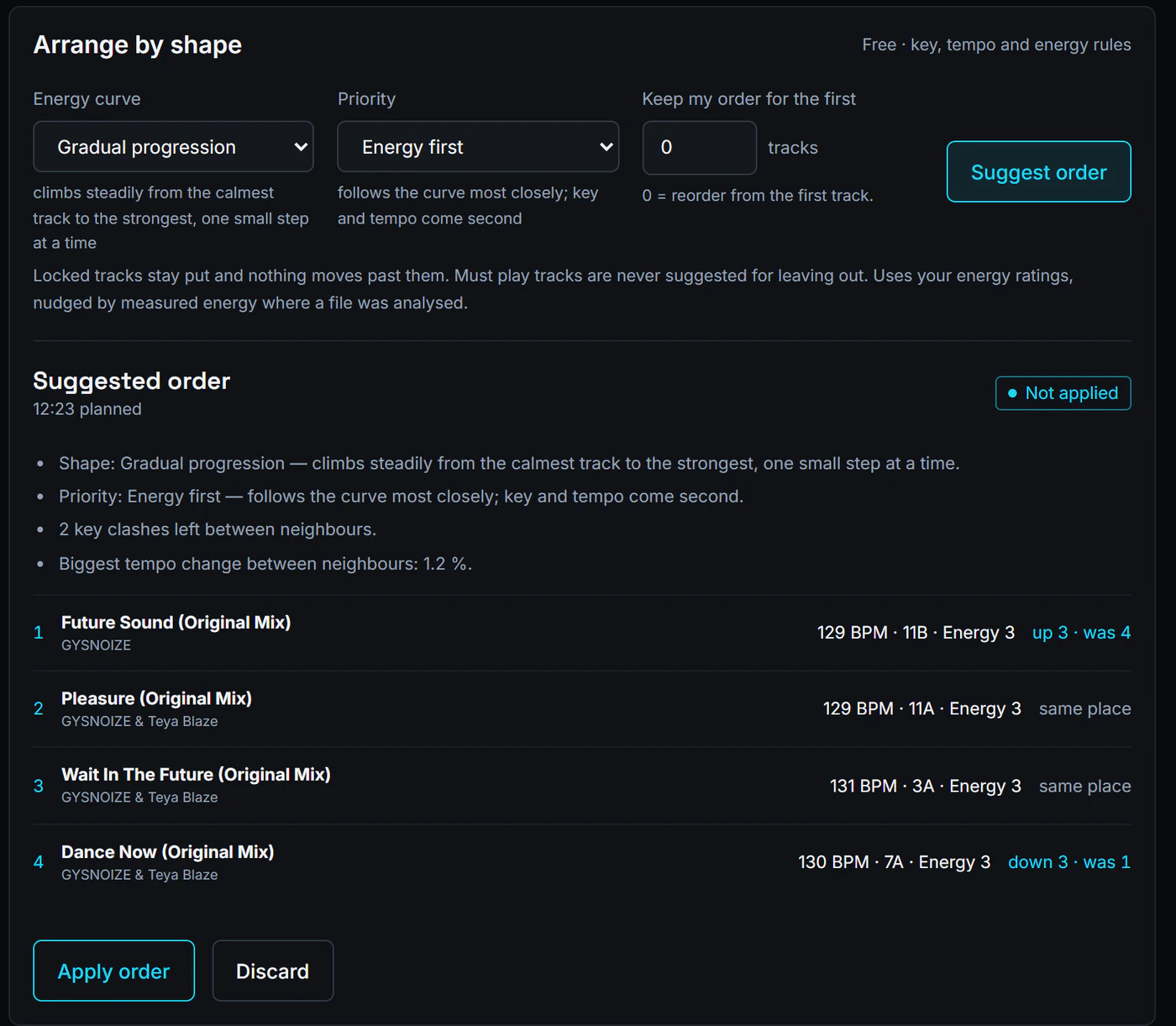
Arrange by shape is free and works from key, tempo and energy rules. Choose an energy curve (gradual progression, build to the peak, peak and cool down, cool down, or keep it level), a priority (energy, BPM or harmonic) and how many opening tracks to keep. Suggest order lists every move before anything changes; Apply order or Discard decides.
An optional AI Set Builder proposes its own order for a small amount of AI credit; the price is shown before you use it.
Step 4: Plan the transitions
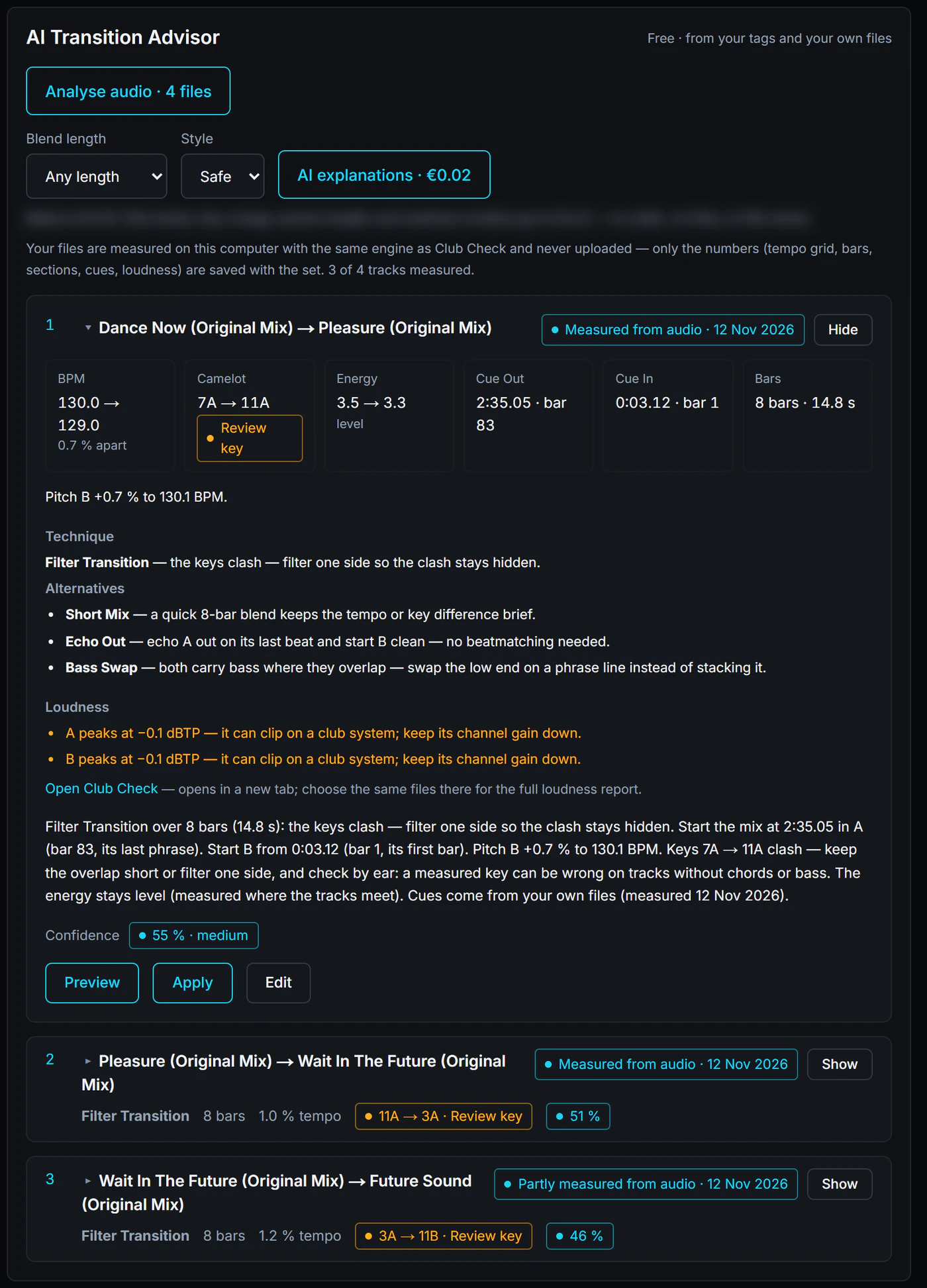
The Transition Advisor, also free, plans each mix from your tags and files: the tempo gap, the Camelot keys, the energy, cue out and cue in down to the bar, the blend length, a suggested technique with alternatives, loudness warnings and a confidence. In the example it proposes a filter transition, because the keys 7A and 11A clash. Preview plays the blend from your own files in the browser, and Edit lets you make your own version.
Step 5: Save and export
Save set stores the order, the numbers and your notes in your account, not the audio. Export offers CSV, JSON, a printable PDF and an M3U8 playlist. These are files you import yourself; Set Builder does not sync with Rekordbox or Serato. On a phone the set and its buttons fit one column.
What GYSNOIZE Set Builder Actually Supports
| Feature | Status |
|---|---|
| Tracks from library, crates, folders or local files | Supported |
| Tempo, beat grid, key, energy and sections from the audio | Supported, measured in the browser |
| Arrange by shape and Suggest order | Supported, free |
| Transition Advisor with Preview of the blend | Supported, free |
| AI Set Builder and AI explanations | Paid with AI credit, price shown first |
| Export to CSV, JSON, PDF and M3U8 | Supported |
| Direct sync with Rekordbox or Serato | Not available |
| Live mixing or recording a set | Not available — it is a planner |
| Which DJ plans include Set Builder | Not verified for this article; see the For DJs page |
Common set planning mistakes
- Ordering by BPM alone — tempo says nothing about mood.
- Trusting detected keys blindly — check by ear.
- Planning too many tracks for the time you have.
- Planning no alternatives — the room may want something else.
- Forgetting to rehearse the transitions that matter.
- Confusing a setlist with a mix — a plan is not a recording.
- Forgetting rights — owning a file or receiving a promo does not by itself allow recording or uploading a mix.
Frequently asked questions
How many tracks are in a one-hour set?
Often 12 to 20, depending on genre and how long you play each one. Count the time you actually play, not the full lengths.
Should I order a set by BPM?
Use tempo as one guide among several. Energy and mood usually matter more.
Does harmonic mixing guarantee smooth transitions?
No. It reduces clashes in long blends, but arrangement, sound and timing decide the rest.
Does Set Builder export to Rekordbox or Serato?
It exports an M3U8 playlist and CSV, JSON and PDF files that you import yourself. There is no direct sync.
Does Set Builder upload my audio?
No. Local files are read in your browser; only the title, tags, length and the numbers are saved with the set.
Plan It, Hear It, Play It
Your selection is personal; your preparation can be professional. Put the music in order, hear the transitions before the gig, and take a plan to the booth that still leaves room to change it.