
Demo Submission Management for Record Labels: How to Receive, Review & Manage Artist Demos
A practical guide to receiving music demos, organizing an A&R inbox, reviewing tracks, communicating with artists and choosing demo management software.
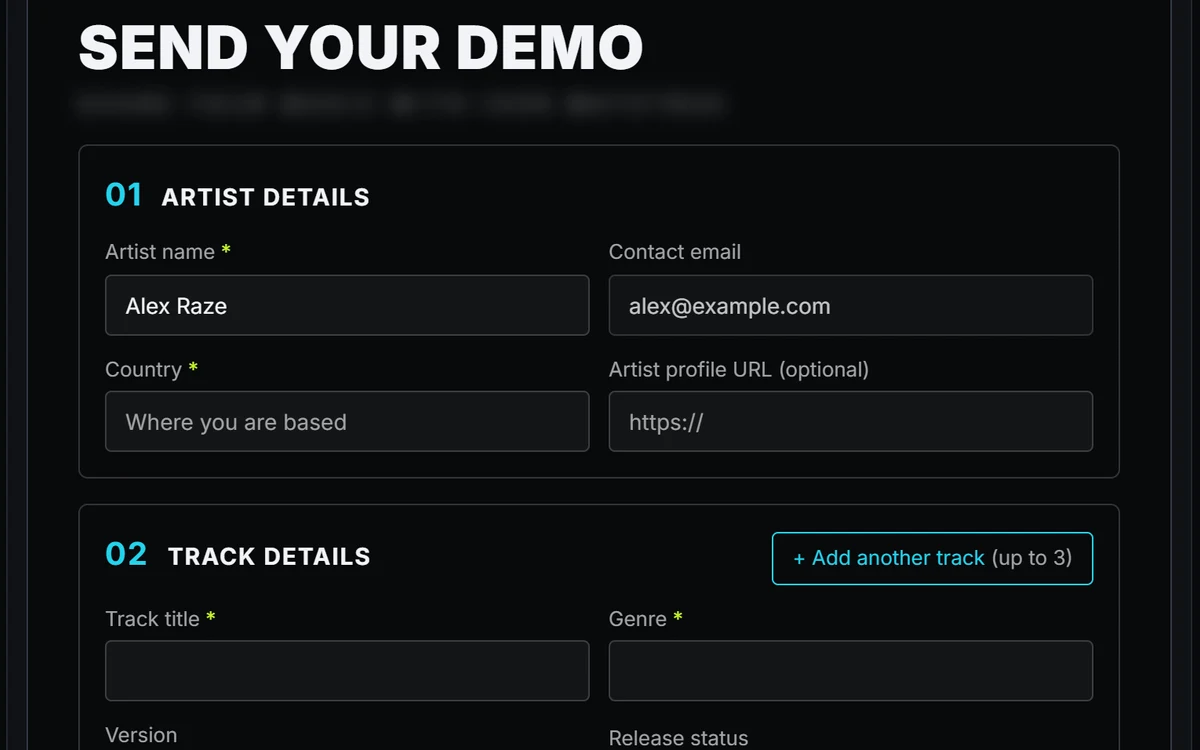
A practical guide for independent labels: how to receive demos in one place, review them fairly, keep track of every decision and answer artists without losing a week to email.
Every label that releases music receives demos. They arrive by email, in direct messages, as links in comments and through friends of friends. Some are exactly what the label is looking for; many are not. Without a system, the good ones get lost with the rest, artists wait months for an answer that never comes, and nobody on the team remembers who listened to what.
What is demo submission management?
Demo management is the operational side of A&R: receiving submissions, checking that they are complete, listening, recording an outcome and telling the artist. A&R itself is broader, the work of finding and developing artists. Promotion, distribution and royalty accounting come later, once a track has been chosen; they are separate jobs with their own tools.
Why independent labels need an organised demo inbox
- Scattered submissions — a track sent to a personal inbox on a Sunday is easy to forget by Monday.
- Missing information — no contact address, no track title, a link that has expired.
- Unclear status — was it heard? Did someone like it? Was the artist answered?
- Inconsistent replies — some artists get a warm note, others get silence.
- No team view — two people listen to the same demo while ten others wait.
A professional demo workflow, from first contact to decision
- Define what you accept — genres, released or unreleased, how many tracks, which link services.
- Give one entry point — a single page or link instead of five inboxes.
- Receive and organise — every submission with the same fields, in one list.
- Check the basics before listening — the link opens, the title and contact are there.
- Listen and evaluate — in a quiet moment, on the system you trust, more than once if it matters.
- Record an internal outcome — in review, shortlisted, not for us, with a short private note.
- Communicate — a clear, polite reply, even when the answer is no.
- Retain or close — decide how long demos and personal details are kept, and delete them when that time is up.
What artists should include in a demo
A label needs very little to start listening: the artist name and a contact email, the country, the track title, genre and version, whether it is released or unreleased, and a private listening link that works without asking for access. A short message of two or three sentences is enough; a full biography can wait until the label asks. An invented example:
Hi, I'm an electronic producer from Lisbon. This is «Night Signal», an unreleased melodic techno track, 6:12, original mix. I think it fits your recent releases. Thanks for listening.
How artists can prepare a demo before sending it
- Choose the right label — listen to what it releases before sending.
- Send your strongest version — usually the original mix, not the radio edit.
- Make it listenable — a clean mixdown matters more than loudness; the audio analysis guide explains what to check.
- Make sure you may share it — samples cleared, co-producers agree.
- Test the link from a private browser window before sending.
- Respect the submission rules — if the label asks for three tracks, do not send ten.
What makes a fair A&R review
A good review looks at more than the first thirty seconds. Does the track have its own identity? Does it fit the catalogue, or open a direction the label wants? Is the production close to release, or would it need serious work? Is the artist ready to work on a release, and is there something to develop over several records? Writing one line on each point keeps the decision honest, especially when the whole team reviews.
Review statuses: why clear decisions matter
A small set of statuses makes the inbox readable at a glance. The table below is an illustrative example of how a label might use them; the exact names in any tool may differ.
| Status | What it means | Next step |
|---|---|---|
| New | Received, not heard yet | Listen within your stated time |
| In review | Someone is listening and taking notes | Decide or shortlist |
| Shortlisted | Strong candidate | Team listen, then reply |
| Replied | The artist has an answer | Archive or follow up |
| Archived | Closed | Delete when the retention period ends |
How to give professional feedback
Artists remember how a label treated them. A reply does not need to be long; it needs to be clear and kind. «Thanks for sending us your music. It is not the right fit for the label right now, but we wish you the best with it» is a complete answer. When a track is interesting but incomplete, ask one precise question: «Could you share more about your release plans?»
Security, copyright and privacy
- Unreleased music is not public content — keep listening links private and the inbox closed to outsiders.
- Sending a demo transfers no rights — the artist keeps the copyright until a contract says otherwise.
- Limit access — only the people who review need to see artist details.
- Respect personal data — collect what you need to reply, and nothing more.
- A submission is not marketing consent — do not add artists to a newsletter because they sent a demo.
- Handle unknown links carefully — do not run downloaded programs or open unexpected attachments.
How to choose demo management software
- Is there one clear entry point for artists?
- Does it accept the link services or formats your label actually uses?
- Can you tell at once which track belongs to which artist?
- Is there a consistent status for new, reviewed and closed demos?
- Can you reply without losing the context of the submission?
- Are internal notes private to the label?
- Are unreleased recordings protected from public exposure?
- How long are demos and personal details kept, and who decides?
- Does the price fit the volume of demos you receive?
- Is it comfortable enough to use every week?
Demo handling is one part of running a label; our guide to record label management software covers the rest of the workspace.
A Real Product Walkthrough: Using GYSNOIZE Demo Management
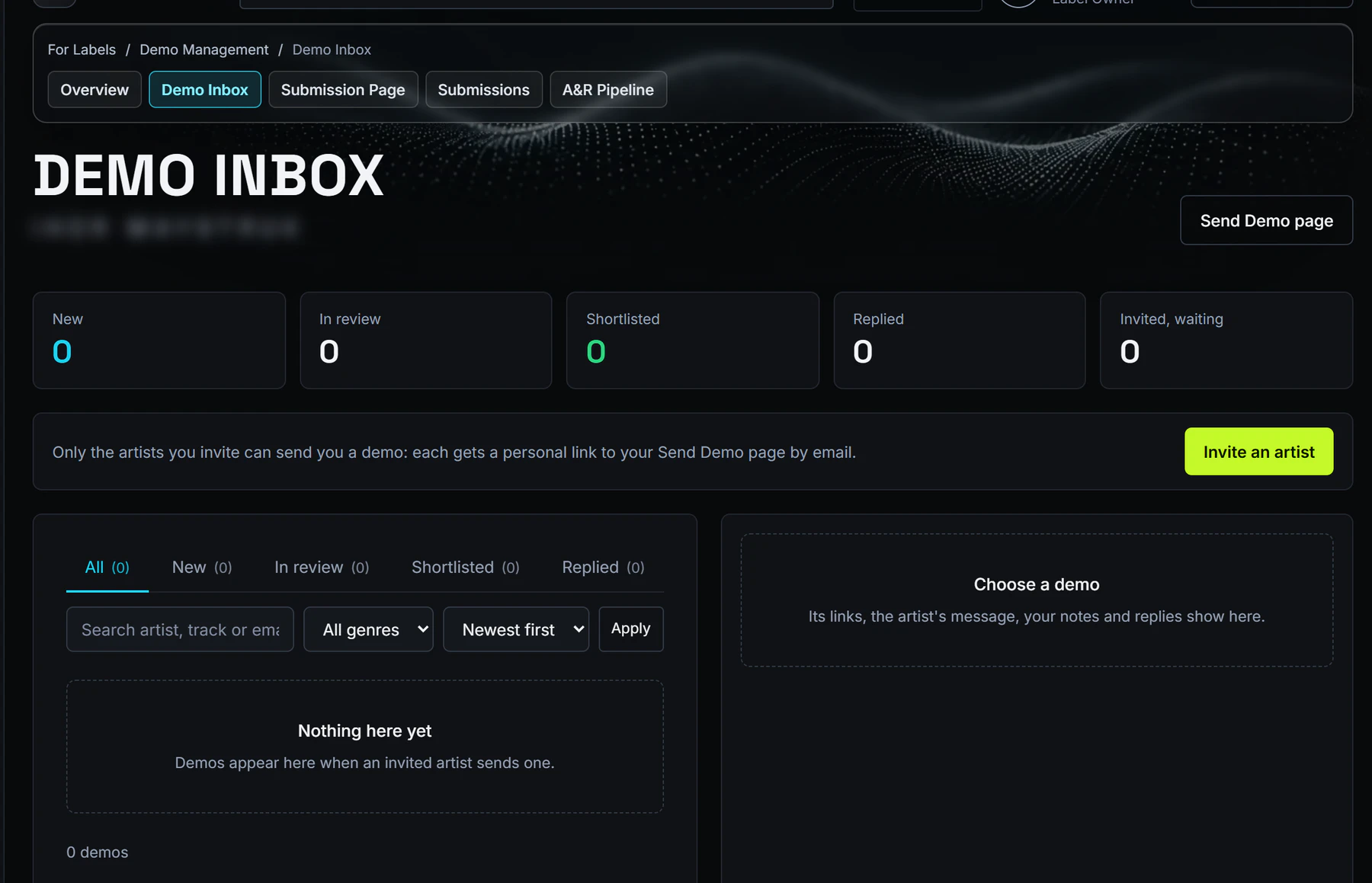
Demo Management is a module of the For Labels workspace on GYSNOIZE. The screenshots below come from the live site on 12 November 2026, in a label workspace with an empty inbox; no artist was invited and no email was sent for this article. Its tabs are Overview, Demo Inbox, Submission Page, Submissions and A&R Pipeline.
Step 1: The Demo Inbox
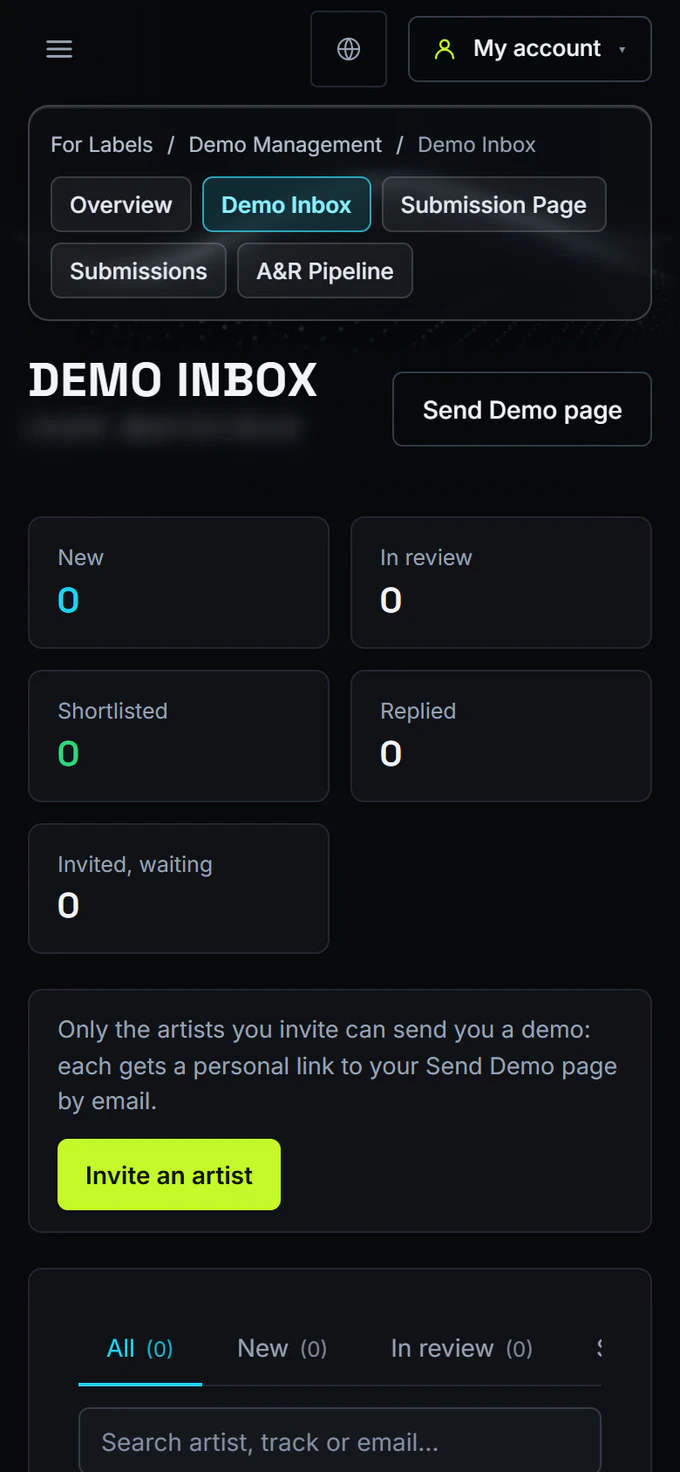
The inbox opens with five counters: New, In review, Shortlisted, Replied and Invited, waiting. Below them, tabs filter the list by status (All, New, In review, Shortlisted, Replied, Invited and Archived), with a search for artist, track or email, a genre filter and Newest or Oldest first. Selecting a demo shows its links, the artist's message, your notes and your replies on the right.
Step 2: Invite an artist
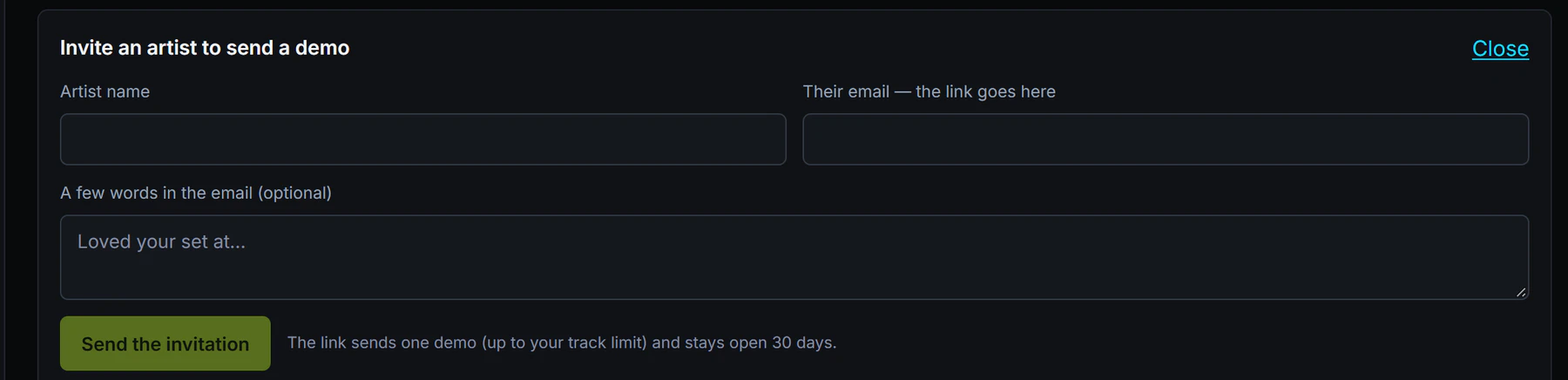
The inbox is invite-only: «Only the artists you invite can send you a demo». Invite an artist asks for the artist's name, their email and an optional line for the message. The artist receives a personal link to your Send Demo page; it sends one demo, up to your track limit, and stays open for 30 days. An invitation can be sent again or withdrawn. Open submission forms attract volume; invitations keep the inbox to music you asked for.
Step 3: Design the Send Demo page
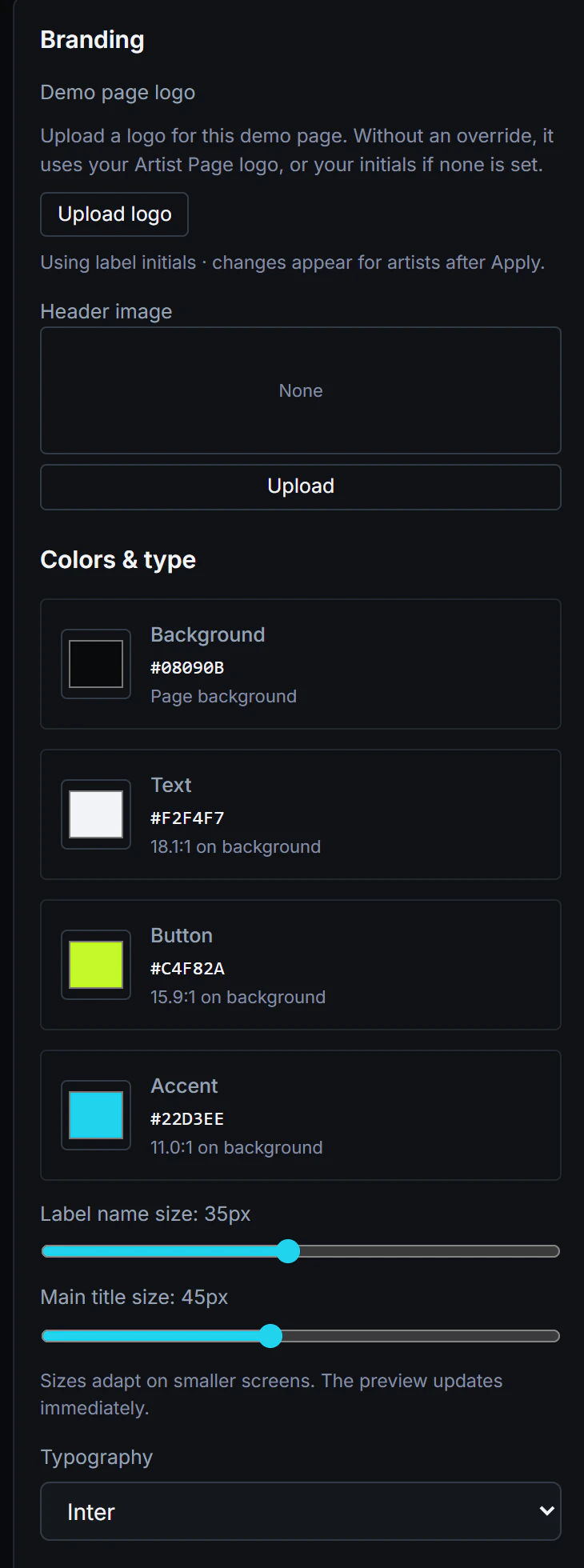
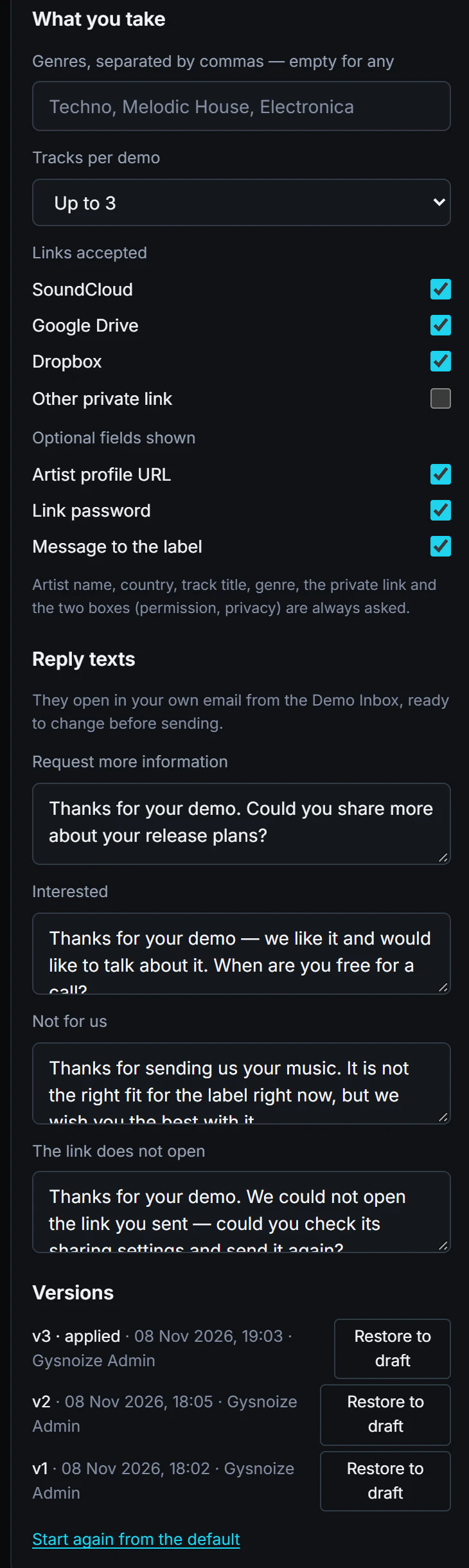
Submission Page is where you shape what invited artists see: a logo or your initials, a header image, four colours with their contrast ratio against the background, title sizes and typography, the page title and your guidelines, one per line.
What you take sets the genres, the number of tracks per demo (up to 1, 2 or 3), the accepted links (SoundCloud, Google Drive, Dropbox, other private links) and the optional fields: artist profile URL, link password and a message to the label. Artist name, country, track title, genre, the private link and the two consent boxes are always asked. Reply texts holds four ready answers: request more information, interested, not for us, and the link does not open. Changes are saved as a draft and go live with Apply; earlier versions can be restored.
Step 4: What the artist sees
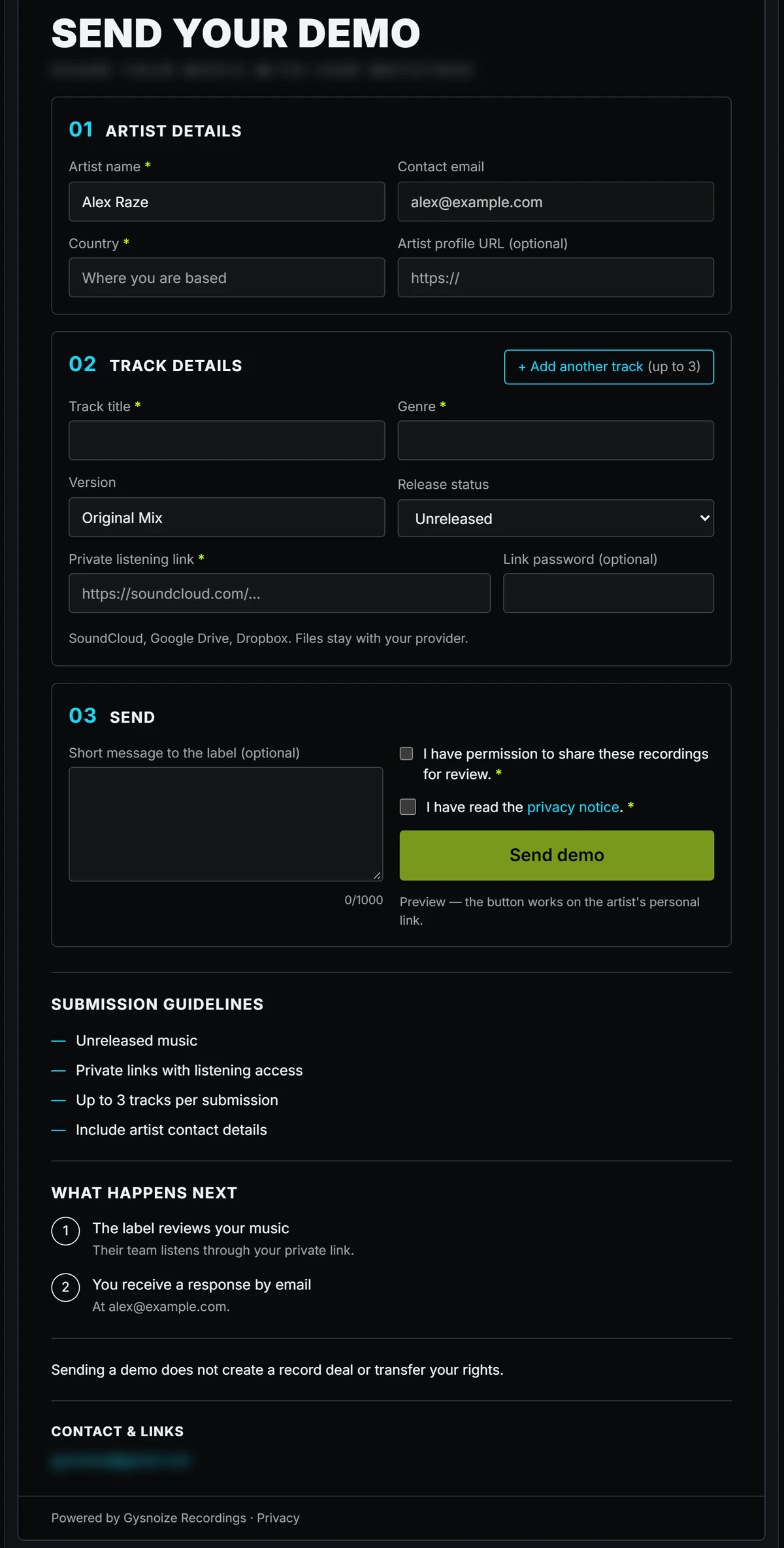
The preview shows the page an invited artist opens: artist details, track details with version and release status, a private listening link and optional link password, a short message, and two boxes confirming permission to share the recordings and that the privacy notice was read. Nothing is uploaded: «Files stay with your provider». The page also says that sending a demo does not create a record deal or transfer rights.
Step 5: Review, reply and keep only what you need
When a demo arrives, Listen opens the artist's own link. You can assign it, change its status, shortlist it and keep private notes that the artist never sees. Reply in my email opens a reply in your own email program, from your own address, with the reply text you chose; afterwards you confirm it was sent and the demo moves to Replied. Finally you choose how long demos are kept: 6 months, 1, 2 or 3 years, or until you delete them. A nightly job removes the older ones.

On a phone the inbox stacks into one column, with the same counters and filters.
What We Verified
| GYSNOIZE Demo Management | |
|---|---|
| Who it is for | Labels, inside the For Labels workspace. |
| How demos arrive | Only from invited artists, through a personal link valid for 30 days. |
| Audio | A private link to the artist's provider. Nothing is uploaded. |
| Statuses | New, In review, Shortlisted, Replied, Invited and Archived. |
| Replies | From the label's own email, with four editable reply texts. |
| Retention | 6 months, 1, 2 or 3 years, or until deleted. |
| Price | Listed on the For Labels page. |
Demo Management vs. Promo to DJs
The two point in opposite directions. Demo Management brings music to a label, to decide what to release. Promo to DJs sends a finished release from an artist or label to DJs, to get it played; our guide on how to send music to DJs covers that side.
Frequently asked questions
What is demo submission management software?
A tool that collects demos in one place, keeps a status and notes for each, and helps the label answer artists consistently.
How do I submit a demo to a record label?
Follow the label's own instructions. Send a private, working link to your strongest track, with your name, contact, title, genre and a two-line message.
Should I send an MP3 or a WAV?
Whatever the label asks for. Many labels, including those on GYSNOIZE, prefer a streaming or download link to an attachment.
Should demos be mastered?
Not necessarily. A clean, balanced mix is enough for a label to judge the music; mastering usually comes once a release is agreed.
Does submitting a demo transfer my copyright?
No. Rights change only with a signed agreement. The GYSNOIZE Send Demo page says so to every artist.
Can a demo guarantee a record deal?
No. A demo starts a conversation; the label decides what it releases.
Organize Your Label's Demo Workflow with GYSNOIZE
Invite the artists you want to hear, keep every demo with its status and notes, reply from your own address, and keep the inbox only as long as you decide.