
How to Send Music to DJs: The Complete Guide to Promo Campaigns & Feedback
A practical guide to sharing pre-release tracks with DJs, organizing targeted promotions, collecting useful feedback and presenting your music professionally.
A practical guide to sharing pre-release music with DJs: who to send it to, what a good promo contains, how to ask for feedback DJs will actually give, and how to read the results, with a real walkthrough of GYSNOIZE Promo to DJs.
A DJ playing your track in front of a crowd is still one of the strongest signals in electronic music. But DJs receive more music than they can hear, and most promos fail before the first second plays: a wrong genre, a missing release date, a dead link, an email that looks like spam. Sending music to DJs well is less about reaching more people and more about reaching the right ones, with everything they need in one place.
What is a DJ promo campaign?
A promo campaign sends one release to a chosen group of DJs, usually before release day. Each DJ gets a listening link, release details and a way to download the music, and is asked for feedback. The campaign then shows who received it, who opened it, who downloaded and what they said.
Before you send: get the basics right
- A finished master. Send what you will release, not a rough mix.
- Release details. Artist, title, label, genre and release date.
- Artwork. A cover makes a promo recognisable in a crowded inbox.
- A listening link that works. A private SoundCloud link or a Drive, Dropbox or WeTransfer folder, tested in a private browser window.
- A short note. One or two lines on the track and why you are sending it to this DJ.
Who to send it to
Relevance beats reach. A melodic techno track sent to fifty melodic techno DJs who agreed to hear from you will do more than the same track sent to five thousand addresses scraped from the internet. Send only to people who have agreed to receive promos from you, and make it easy for them to stop. This is good manners and, in many countries, the law on promotional email.
Asking for feedback DJs will actually give
- Make it quick. A star rating and «will you play it?» take seconds.
- Make the comment optional. Some DJs will write a line; many will not.
- Give a deadline. «Feedback by the 20th» gets more answers than an open request.
- Never fake it. Quote feedback publicly only with the DJ's permission.
Reading the results
Treat the numbers as signals, not verdicts. Hypothetical example: a campaign reaches 80 DJs and 12 leave feedback, a feedback rate of 12 ÷ 80 = 15%. That number alone says little; what matters is who answered and what they said. Three «Yes» votes from DJs who play the right rooms are worth more than a high open count, and opens can be inflated by mail filters that check links automatically.
Inside GYSNOIZE Promo to DJs: A Real Walkthrough
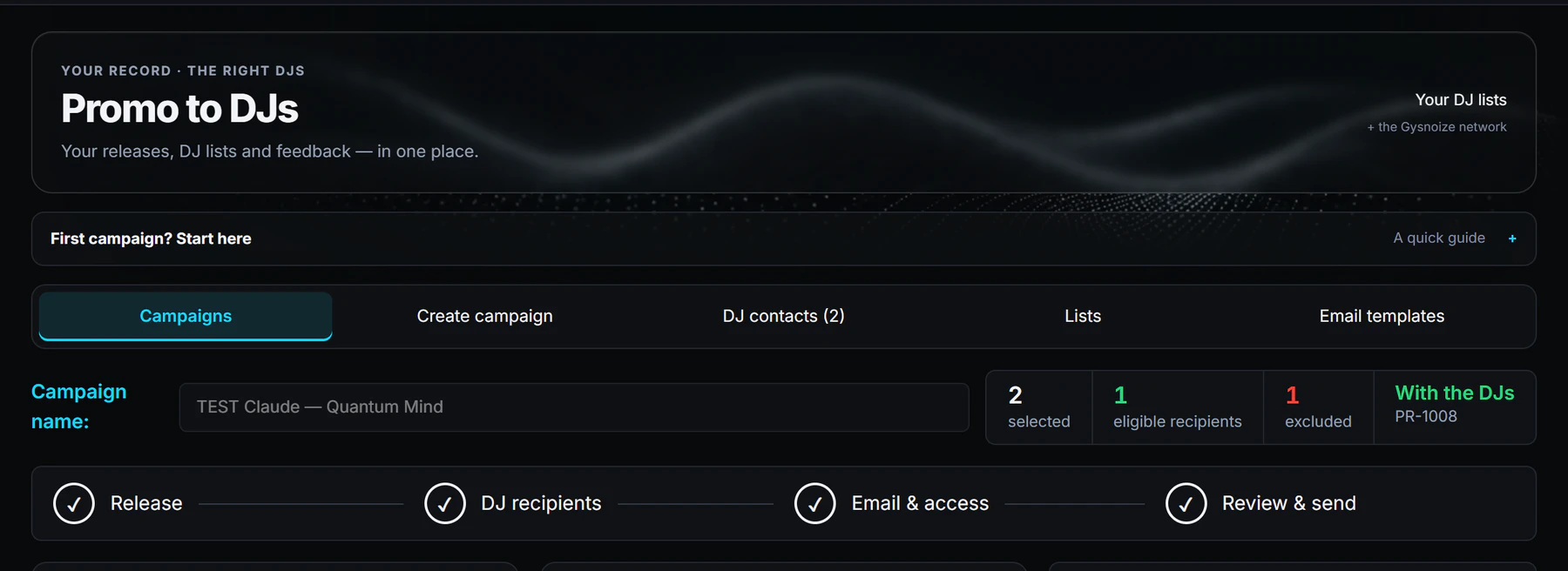
Promo to DJs lives in the Artist area of a GYSNOIZE account; labels have it in their For Labels workspace. The screenshots show a real test campaign on the live site, «Quantum Mind» by GYSNOIZE (PR-1008), sent to a test DJ. Email addresses are blurred.
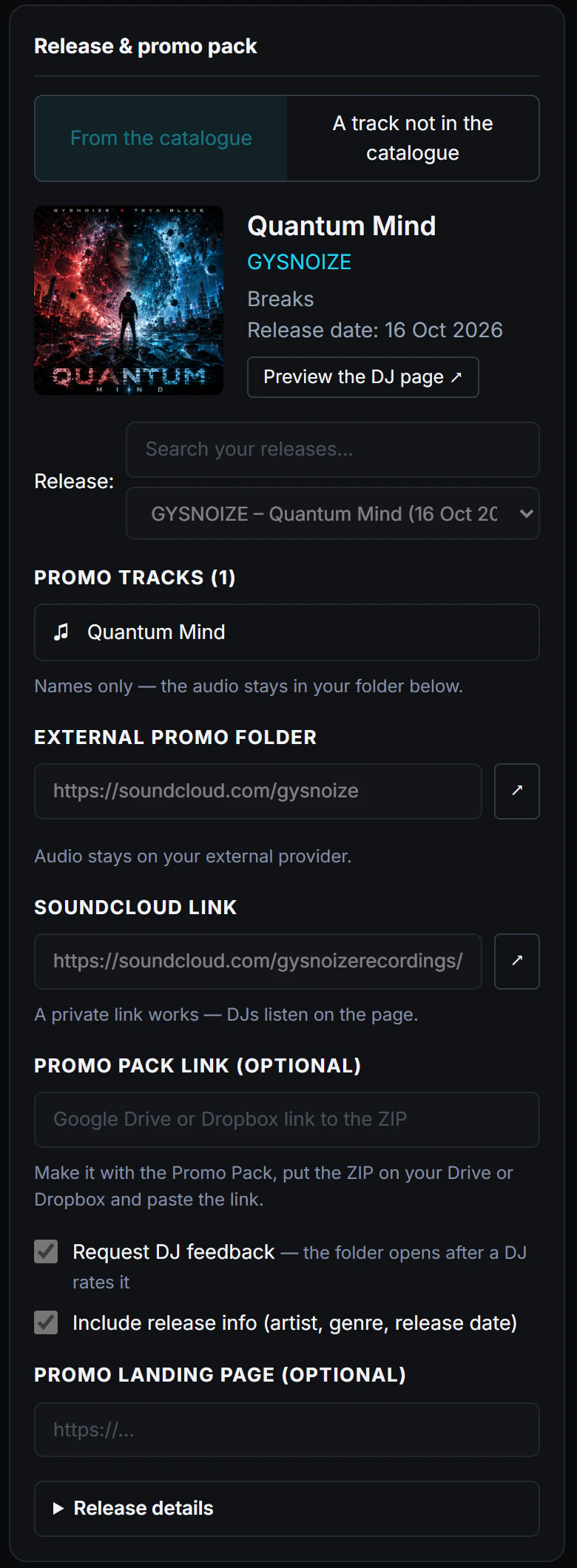
Step 1: Choose the release and the music
Pick a release from the catalogue, or describe a track not in the catalogue and upload a cover. Promo tracks are names only: the audio stays on your own provider. Add an external promo folder (Google Drive, Dropbox or WeTransfer) and a SoundCloud link; a private link works and DJs listen on the promo page. An optional Promo Pack link points to a ZIP made with the DJ Promo Pack. Tick Request DJ feedback and the folder opens only after a DJ rates the promo.
Step 2: Choose the DJs
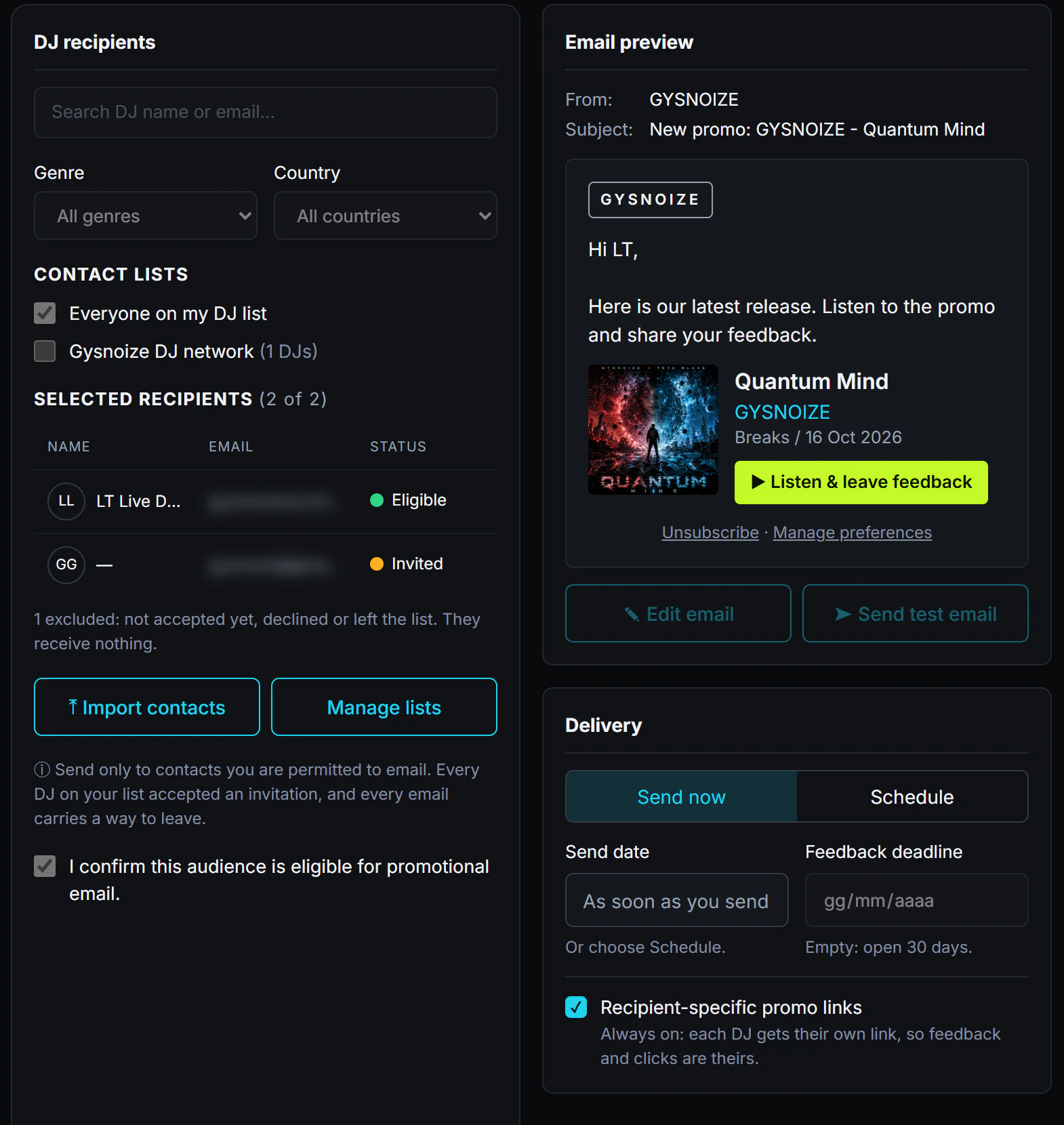
DJ recipients filters by genre and country and picks from your contact lists: Everyone on my DJ list and the Gysnoize DJ network. The network is a free extra, not a promise of a number of DJs. Every DJ on your list accepted an invitation first; until they do, they show as Invited and receive nothing. You can invite up to 200 DJs a day from DJ contacts. Before sending you confirm that the audience is eligible for promotional email.
Step 3: Check the email
Email preview shows exactly what the DJ receives: the sender name, the subject «New promo: GYSNOIZE - Quantum Mind», a greeting, the cover and a Listen & leave feedback button. Send test email sends it to you first. Every DJ gets their own link, so feedback and clicks are theirs.
Step 4: Schedule and set a deadline
Delivery sends now or on a day you choose. Feedback deadline sets when the promo closes; left empty, it stays open for 30 days.
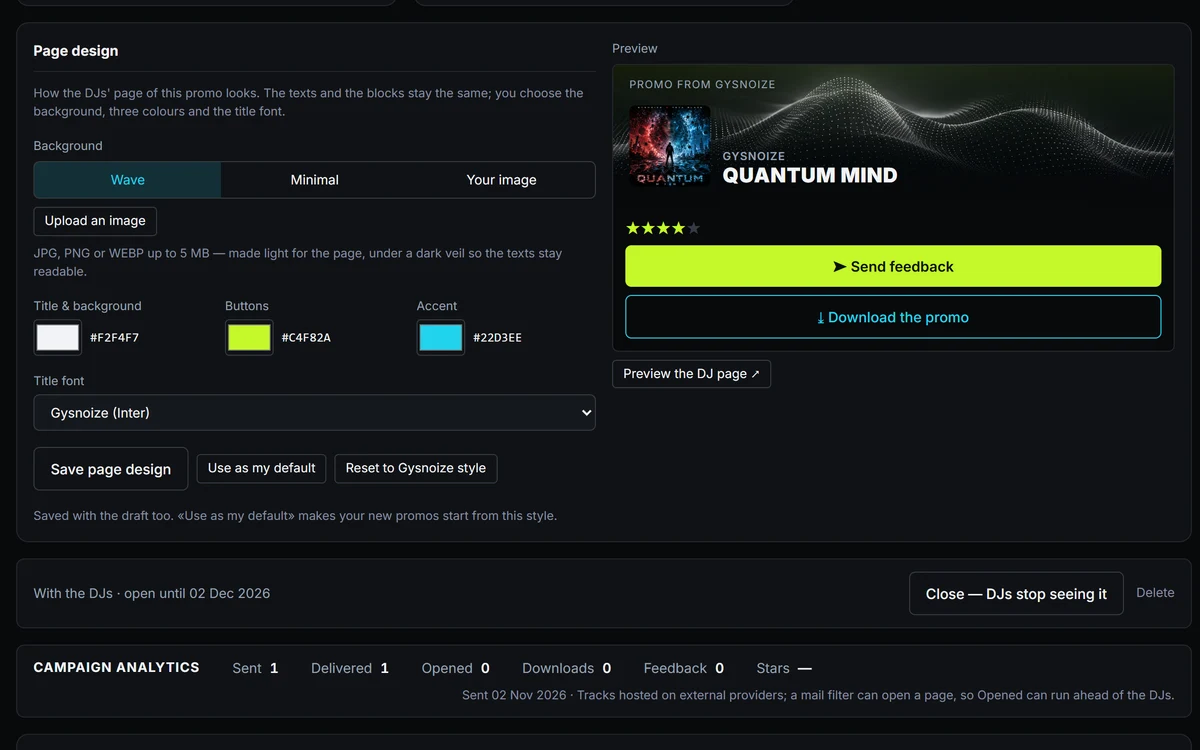
Step 5: Design the DJs' page
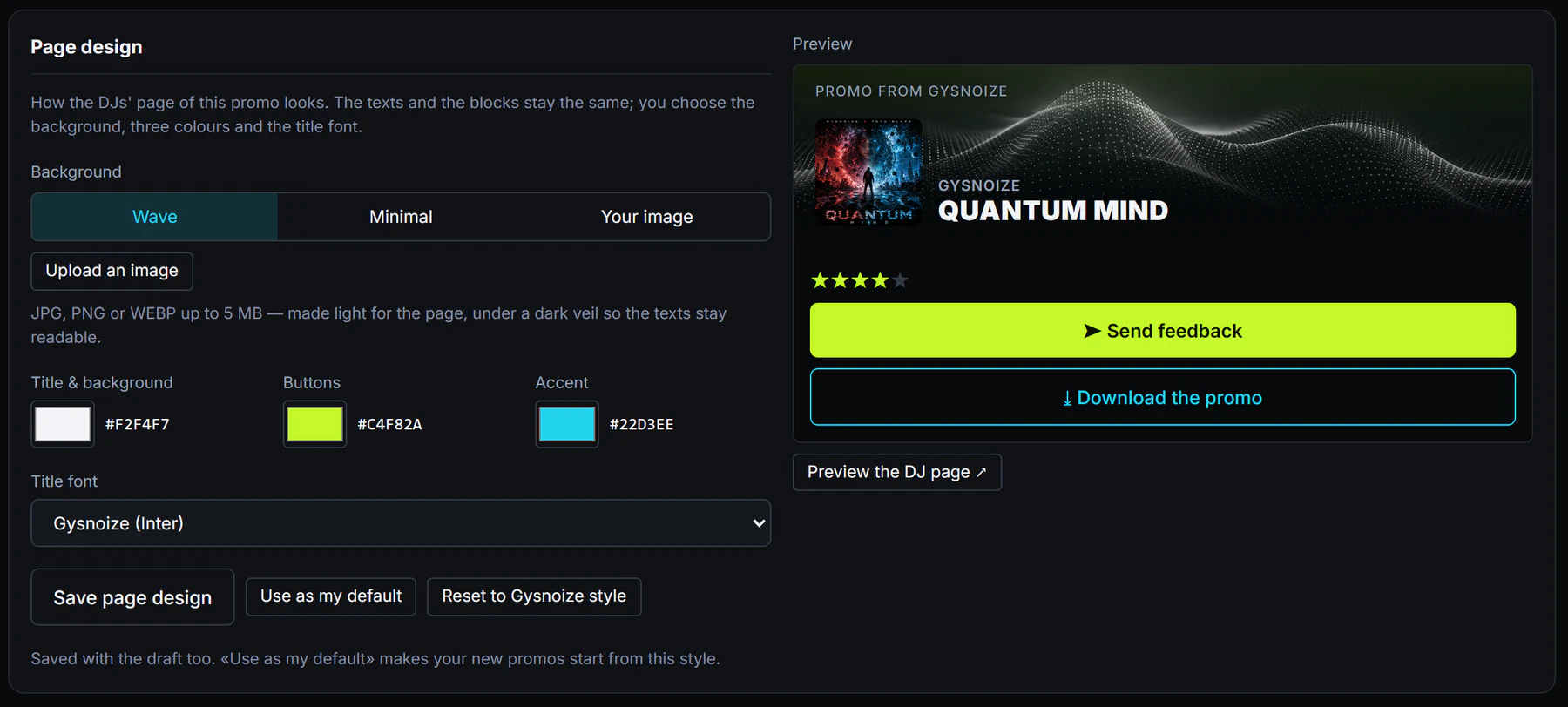
Page design styles the page DJs open: a Wave, Minimal or your own background image, three colours (title, buttons and accent) and a title font. The texts and blocks stay the same. Use as my default starts your next promos from this style.
Step 6: Follow the results
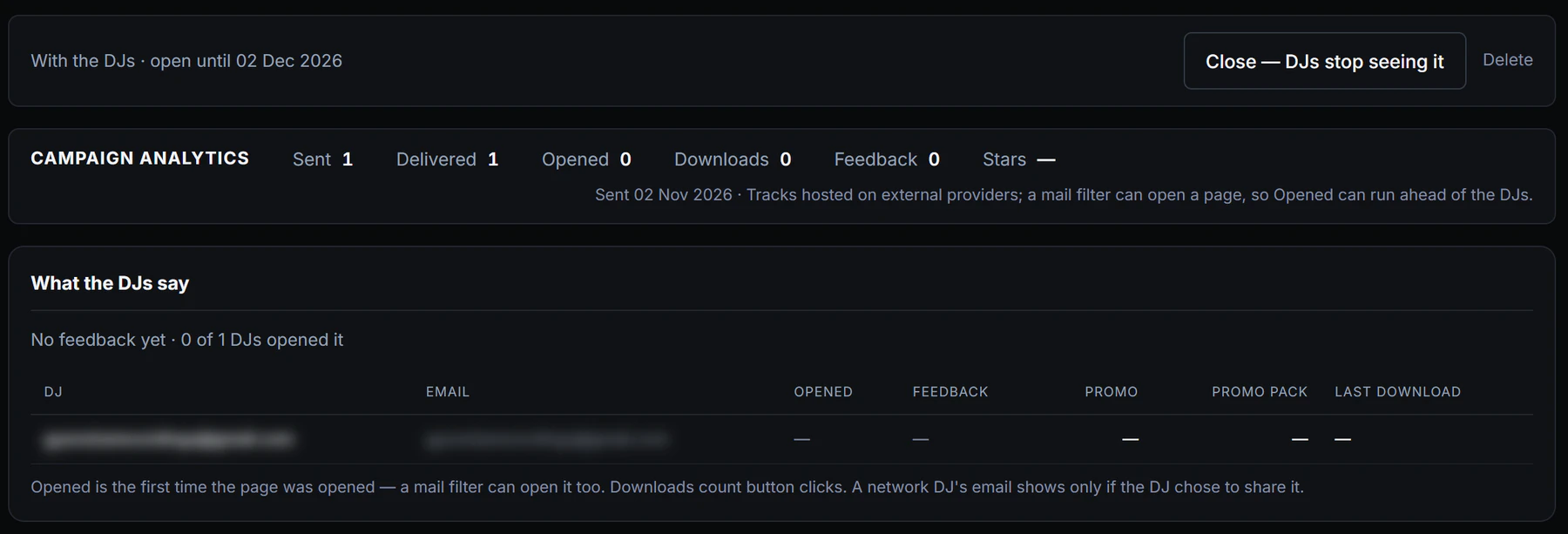
After sending, Campaign analytics counts Sent, Delivered, Opened, Downloads, Feedback and Stars, and What the DJs say lists each DJ's opening, feedback and downloads. The page itself warns that a mail filter can open a link, so Opened can run ahead of the DJs. Close ends the promo early; DJs stop seeing it.
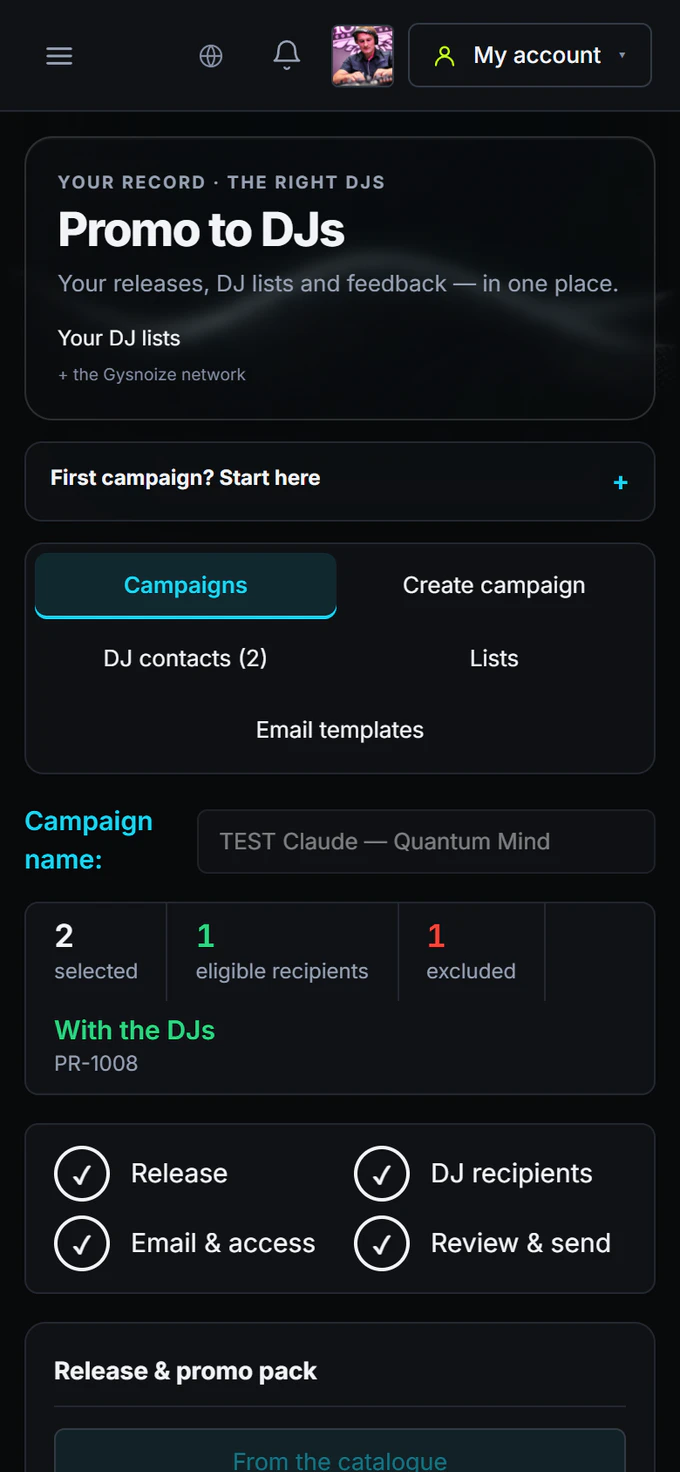
On a phone the same campaign stacks into one column, with the steps as a two-by-two grid.
What We Verified
| Promo to DJs | |
|---|---|
| Audio | Stays on your provider: an external folder and a SoundCloud link. Track names only on GYSNOIZE. |
| Recipients | DJs who accepted your invitation, plus the optional Gysnoize DJ network. Up to 200 invitations a day. |
| Feedback | Stars, will-you-play and a comment; the folder can open only after a rating. |
| Timing | Send now or on a chosen day; feedback open 30 days unless you set a deadline. |
| Analytics | Sent, delivered, opened, downloads, feedback and stars, per campaign and per DJ. |
How many campaigns a plan includes is shown in your account and on the For Artists plans.
The other side: what DJs see
DJs on GYSNOIZE receive promos in their Promo Inbox, where they listen, rate and reply. Many also run a public promo page where anyone can send them a track without an account. Knowing how a DJ works through promos is the best way to write one they will open.
Frequently asked questions
Can I send promos to DJs who have not agreed to receive them?
No. A DJ on your list receives your promos only after accepting your invitation, and every email carries a way to leave.
Do I upload my audio to GYSNOIZE?
No. The audio stays on your external folder or SoundCloud. GYSNOIZE stores the release details and track names.
How many DJs will the Gysnoize network add?
There is no promised number. The network is a free extra on top of your own list, matched by genre.
Can I test the email before sending?
Yes. Send test email sends the promo to your own address first.
Why is Opened higher than the feedback?
Opening is not listening, and a mail filter can open a link automatically. Feedback and downloads are the stronger signals.
Promote Your Music to DJs with GYSNOIZE
Send a finished release to DJs who said yes, make listening and replying easy, and read the answers rather than the counters. That is how a promo turns into plays.