
DJ Booking Management Software: How to Manage Gigs, Promoters, Contracts & Payments
Discover how DJs, artists and booking managers can organize performance requests, manage event schedules, negotiate fees and keep booking information in one place.
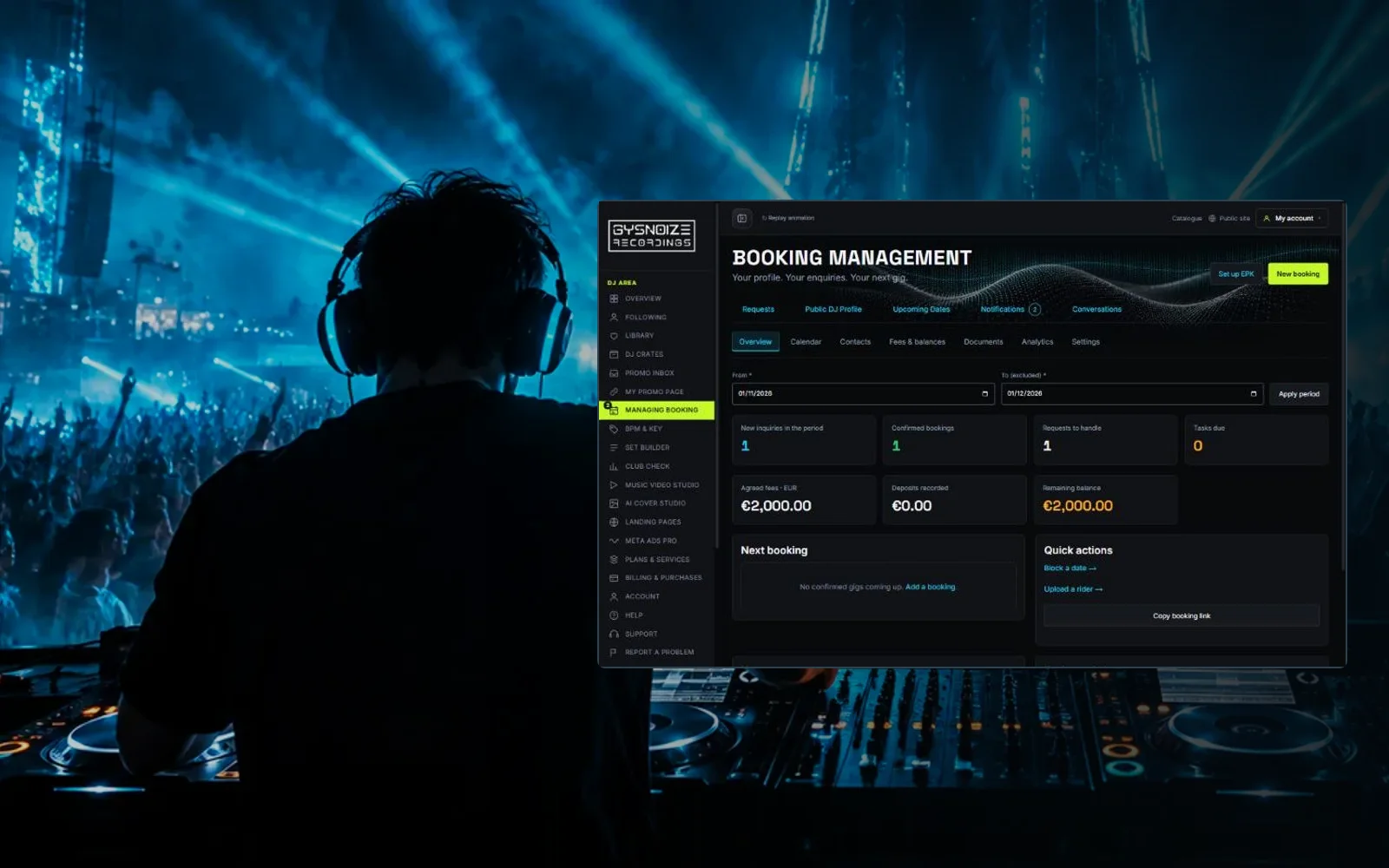
A practical guide for professional DJs, independent artists, booking agents and music managers who want to organise performance opportunities and manage the business behind live events.
Getting booked is one of the most exciting parts of building a career as a DJ or performing artist. Clubs, festivals, private events and international venues bring new audiences, new professional relationships and income. As a career grows, however, managing bookings becomes increasingly complicated.
Requests arrive by email, through social media messages, from booking agents and in direct conversations with promoters. Each opportunity can involve different dates, venues, fees, technical requirements, travel arrangements, contracts and payment conditions. Without a structured process, that information scatters quickly: an artist might accept two overlapping engagements, miss an enquiry, forget a payment deadline or lose an important event document.
This is where DJ booking management software becomes valuable. A booking system helps DJs, artists and music professionals organise performance opportunities, manage schedules, keep promoter relationships in order and track the essential details of every gig.
At GYSNOIZE Recordings we believe creative professionals should be able to focus on their music and their performances without being buried in administration. This guide explains how professional DJ booking management works, what information should be organised, and how specialised software can support the business side of live performance. Later in the article we show real screens from our own booking workspace and explain exactly what each part does.
What is DJ booking management software?
DJ booking management software is a specialised system for the administrative work around professional performances. Unlike a ticketing service, which deals with admission to an event, booking software focuses on the relationship between performers, event organisers and booking professionals.
Depending on its capabilities, a booking management platform may help you:
- Receive and organise booking enquiries.
- Manage event dates and availability.
- Keep relationships with promoters and venues in order.
- Organise offers and negotiations.
- Track which bookings are confirmed.
- Store agreements and event documents.
- Follow performance fees and deposits.
- Review upcoming performances and your booking history.
The purpose is a structured professional workflow. Instead of searching through disconnected messages and files, artists and managers keep one clear overview of their engagements. For an independent DJ this simplifies everyday administration; for an agency it helps coordinate artists and opportunities; for promoters, structured information makes communication with performers quicker.
Why professional DJs need booking management
At the start of a DJ career, bookings are easy to manage: a message arrives, a date is agreed, the gig happens. Professional work quickly adds variables. A single booking may involve:
- An event promoter.
- A venue or club.
- The artist or their representative.
- A performance fee.
- Deposit and payment conditions.
- Travel and accommodation.
- Technical equipment requirements.
- Set times and duration.
- Promotional materials.
- A written agreement.
- Coordination on the day of the event.
Handling all of this through informal messages alone creates unnecessary risk.
Example: a DJ managing several opportunities
Imagine an independent DJ who receives eight enquiries for upcoming shows. Three promoters are asking about the same weekend. Two requests are waiting for a fee negotiation. Another organiser has confirmed an event verbally but has not completed the agreed paperwork. One show requires international travel, and a different booking still has an outstanding deposit.
Without an organised system it becomes hard to see where each opportunity stands. A professional workflow separates enquiries, negotiations, tentative dates, confirmed shows and completed events. The benefit is not only convenience: it is better control over your professional commitments.
The DJ booking process: from enquiry to performance
A professional booking usually passes through several stages. Knowing them helps you build a repeatable process for every opportunity.
Step 1: Receive the booking enquiry
The process starts when a promoter, club manager, event organiser or booking representative contacts the artist. A useful enquiry contains enough information to evaluate the opportunity:
- Event name and date.
- Venue name and location.
- Organiser or promoter details.
- Proposed set time and duration.
- Type of event and expected attendance.
- Available budget.
- Technical requirements.
- Travel or accommodation expectations.
- Contact information.
Not every enquiry includes all of these details, but collecting what is missing early saves a lot of messages later.
Step 2: Check availability
Before discussing a commitment, the artist or manager should check availability. A calendar shows existing confirmed shows, tentatively held dates, travel days, personal unavailability and potential conflicts. A temporary hold should never be treated as a confirmed booking: a clear difference between available, held and confirmed dates prevents double bookings.
Step 3: Evaluate the opportunity
Not every request is equally suitable. Consider the location, the audience, the budget, the artistic fit, the travel involved and the overall professional value. A higher advertised fee is not necessarily more profitable once travel and accommodation are paid. On the other hand, a smaller event can be valuable because it reaches the right audience or starts a useful relationship with a promoter. Booking management is therefore a business decision as much as an administrative task.
Step 4: Negotiate the offer
After reviewing the enquiry, the artist or manager accepts the proposed terms, declines, or makes a counteroffer. Negotiations commonly cover:
- The performance fee.
- The payment schedule and any deposit.
- Travel expenses and accommodation.
- Set duration.
- Equipment and technical setup.
- Cancellation conditions.
- Promotional obligations.
Keeping a clear record of the terms discussed prevents misunderstandings, and the final agreement should reflect exactly what both parties accepted.
Step 5: Confirm the booking
A booking should move to confirmed only when the agreed conditions for confirmation are met. For some engagements written acceptance is enough; others require a signed contract, a deposit or further steps. A booking system helps keep confirmed commitments apart from enquiries still under negotiation.
Step 6: Organise the event documents
Once confirmed, the artist or representative needs the information to prepare: the performance agreement, technical rider, hospitality rider, travel and accommodation details, the event schedule, venue contacts and any payment documentation. Keeping these files attached to the right event makes preparation much simpler.
Step 7: Prepare for the performance
As the date approaches, review the essentials: arrival time, set times, equipment, venue instructions, travel arrangements and emergency contacts. A short pre-event checklist prevents avoidable problems.
Step 8: Close the booking and reconcile payments
After the show, the administration is not always finished. Check any outstanding amounts, keep the records and update the booking's status. A completed performance is not necessarily a fully settled one, so keeping the event status and the payment status apart preserves that distinction.
DJ booking calendar: avoiding conflicting dates
A booking calendar is one of the most useful tools in a DJ's workflow. Enquiries often arrive months before the event, and several promoters may be interested in overlapping dates. Without an organised schedule, the artist risks inconsistent commitments.
Availability, holds and confirmations
A practical calendar distinguishes different kinds of dates:
| Date state | What it means |
|---|---|
| Available | No known commitment prevents a new booking. |
| Tentative hold (option) | An organiser is interested, but the engagement is not confirmed yet. |
| Confirmed | The engagement has reached the agreed confirmation stage. |
| Unavailable | The artist is not accepting bookings for that date. |
These are workflow states, not legal definitions. Every artist or agency should decide when a tentative hold expires and what counts as a confirmed commitment. A well-kept calendar improves scheduling decisions and cuts unnecessary back-and-forth.
Managing promoters, clubs and booking contacts
Professional relationships are the foundation of a live career. A promoter who runs a well-organised night may become a recurring partner, a club may invite the same DJ several times a year, and an agency may coordinate bookings across cities or countries. A useful promoter record includes:
- The contact's name.
- The organisation or venue.
- Email address and business contact details.
- Location.
- Previous booking history.
- Notes from earlier conversations.
- Important event preferences.
This information should be handled with care and stored securely. A good contact database is not just a list of email addresses: it is a record of professional relationships that helps you communicate better.
DJ booking fees, deposits and payment tracking
You should always know how much was agreed for a show, which expenses are included, whether a deposit has been received and what remains outstanding.
Example: a €1,000 DJ booking
Consider a hypothetical booking with these agreed conditions:
| Item | Calculation | Amount |
|---|---|---|
| Agreed performance fee | Agreed with the promoter | €1,000.00 |
| Deposit | €1,000 × 20% | €200.00 |
| Remaining balance | €1,000 − €200 | €800.00 |
When the promoter pays the €200 deposit, the payment record should show that amount. The remaining €800 should not be marked as paid until the payment has actually been received. The example leaves out taxes, agency commissions, travel costs and other adjustments, which depend on the actual agreement.
Why financial tracking matters
A professional DJ may play dozens of events a year. Without clear records it becomes difficult to tell apart fees proposed, fees agreed, deposits requested, deposits received, outstanding balances and fully settled bookings.
Booking software can organise these records when it has the right functions. Recording a payment, however, is not the same as processing it: check whether a tool keeps records, handles payments, or both. Fees for live shows are a different subject from the royalties a label owes on recordings; if that side of the business concerns you, see our guide on how to calculate music royalties.
DJ booking contracts and event documents
Written agreements clarify what artists and organisers expect of each other. A booking contract may cover the date, location, services, fee, payment terms, cancellation procedure and other conditions. An international festival appearance usually involves far more logistics than a short set at a local club, so the most useful approach is to keep every document organised and attached to the right event.
Technical riders
A technical rider describes the equipment and technical conditions a performance needs. For a DJ this may include the preferred mixer and media players, monitoring, the booth layout and connections.
Hospitality riders
A hospitality rider sets out backstage, catering, accommodation and other hospitality arrangements.
Travel information
International shows need extra planning for flights, ground transport, accommodation and arrival times.
Cancellation terms
Clear cancellation provisions help both parties understand their obligations if an event is postponed or cancelled. Requirements depend on the actual agreement and the applicable law. Booking software can organise documents, but it does not replace a legal review when a contract needs one.
What is a DJ electronic press kit (EPK)?
A DJ electronic press kit, or EPK, is a collection of professional information and promotional material that presents an artist to bookers, promoters and media. It helps an organiser decide quickly whether the artist fits an event. A typical EPK includes:
- An artist biography.
- Professional photographs.
- Genres and performance style.
- Selected releases or mixes.
- Links to official artist profiles.
- Live performance material.
- Booking contact information.
- A technical rider, where appropriate.
An EPK should be professional, concise and easy to navigate. Promoters often decide fast, and having the essentials in one place saves everyone time.
Public DJ booking profiles
Some booking platforms combine the EPK with a public artist page and a booking form. Such a page becomes the single reference for promoters who want to learn about the artist or send an enquiry. A public profile does not guarantee bookings, though: its value is in making professional information easy to find and keeping enquiries organised.
Booking software vs. booking agencies vs. event marketplaces
These services are related, but they do different jobs.
| Service | What it does | Who acts |
|---|---|---|
| DJ booking software | Organises enquiries, calendars, negotiations, records and event information. | The artist or manager uses the tools and makes the decisions. |
| Booking agency | Represents artists and seeks, negotiates or coordinates shows on their behalf, usually for a commission. | The agency, under its agreement with the artist. |
| Event marketplace | Lets organisers discover and contact performers through a searchable network. | Depends on the marketplace and who takes part in it. |
Which is best depends on your situation. An established DJ with direct promoter relationships may mainly need administrative software; another artist may benefit from an agency; many professionals use more than one. Above all, understand what a product actually provides instead of assuming every booking platform finds gigs for its users.
What to look for in artist booking management software
Before choosing a booking system, check how well it fits the way you actually work.
- Organised enquiries: does it separate new opportunities from negotiations and confirmed shows?
- Clear scheduling: does it give an understandable overview of dates and availability, and does it warn you about clashes?
- Contact management: can promoter, venue and organiser details be kept consistently?
- Negotiation tracking: can you review the terms discussed before confirming?
- Fee and deposit records: does it clearly separate agreed amounts, recorded payments and outstanding balances?
- Event documents: can files be attached to the right event, and can you choose who sees them?
- Useful notifications: does it flag what needs action without overwhelming you?
- Mobile usability: can you check essential details while travelling?
- Transparent pricing: are subscriptions, commissions and transaction fees clearly explained?
- Appropriate security: are contacts, documents and financial records protected by proper access controls?
The most useful system is not the one with the longest feature list. It is the one that makes everyday booking work easier.
Inside GYSNOIZE Managing Booking: what it actually does
Managing Booking is the booking part of the GYSNOIZE platform for DJs. GYSNOIZE Recordings was founded in Italy in 2013 by GYSNOIZE, an electronic music producer, DJ, composer and audio engineer, and the tool was built around the way DJs and their managers really handle gigs. Rather than describe it in general terms, here is what each part of the workspace does today.
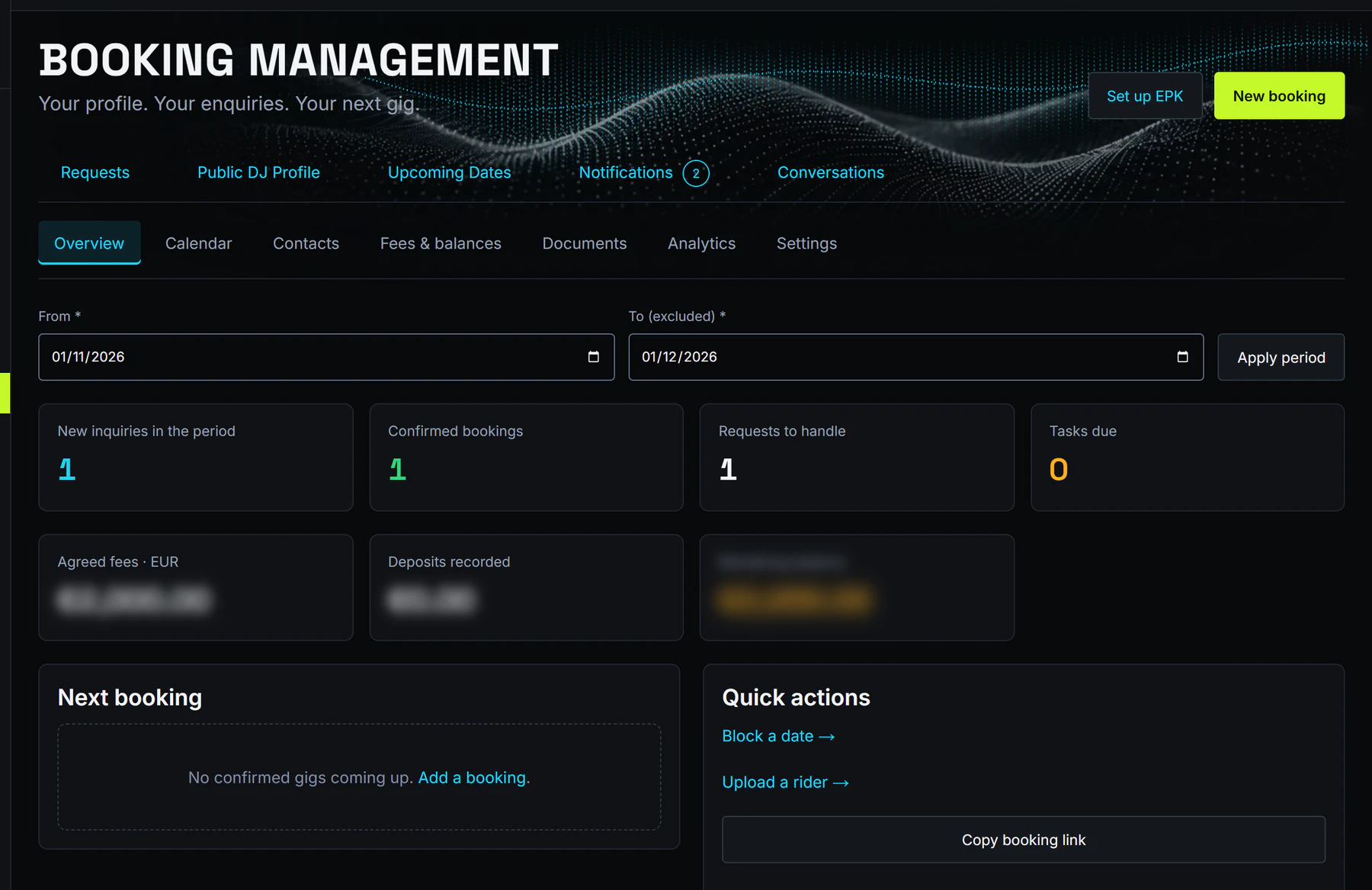
A public booking page that works as your EPK
Each DJ gets a public page with a hero photo, artist name, role and tagline, genres, an About section and biography, up to two featured SoundCloud mixes, selected releases, social links and, if you choose, your upcoming dates. Riders and press-kit files you mark as public appear under «Press kit and riders». You edit the page with a live desktop and mobile preview. Promoters book through a short form, with a clear note that a request is not a confirmed booking. If you prefer, the form can be switched off and the page shows your booking email or an external contact link instead.
Requests with clear statuses
Every enquiry, whether it comes from your public page or you add it by hand, gets a reference number and one of seven statuses: New inquiry, Option, Negotiating, Confirmed, Completed, Cancelled or Declined. An option can carry an expiry date, and cancelling asks for a reason. Requests can be searched, filtered by status and archived.
A calendar that refuses double bookings
The calendar shows month, week and list views, with every event in its own time zone. You can block periods when you are not available, including several dates at once. When you confirm a gig, the server checks it against your other bookings, your options and your blocked periods, and refuses a date that overlaps.
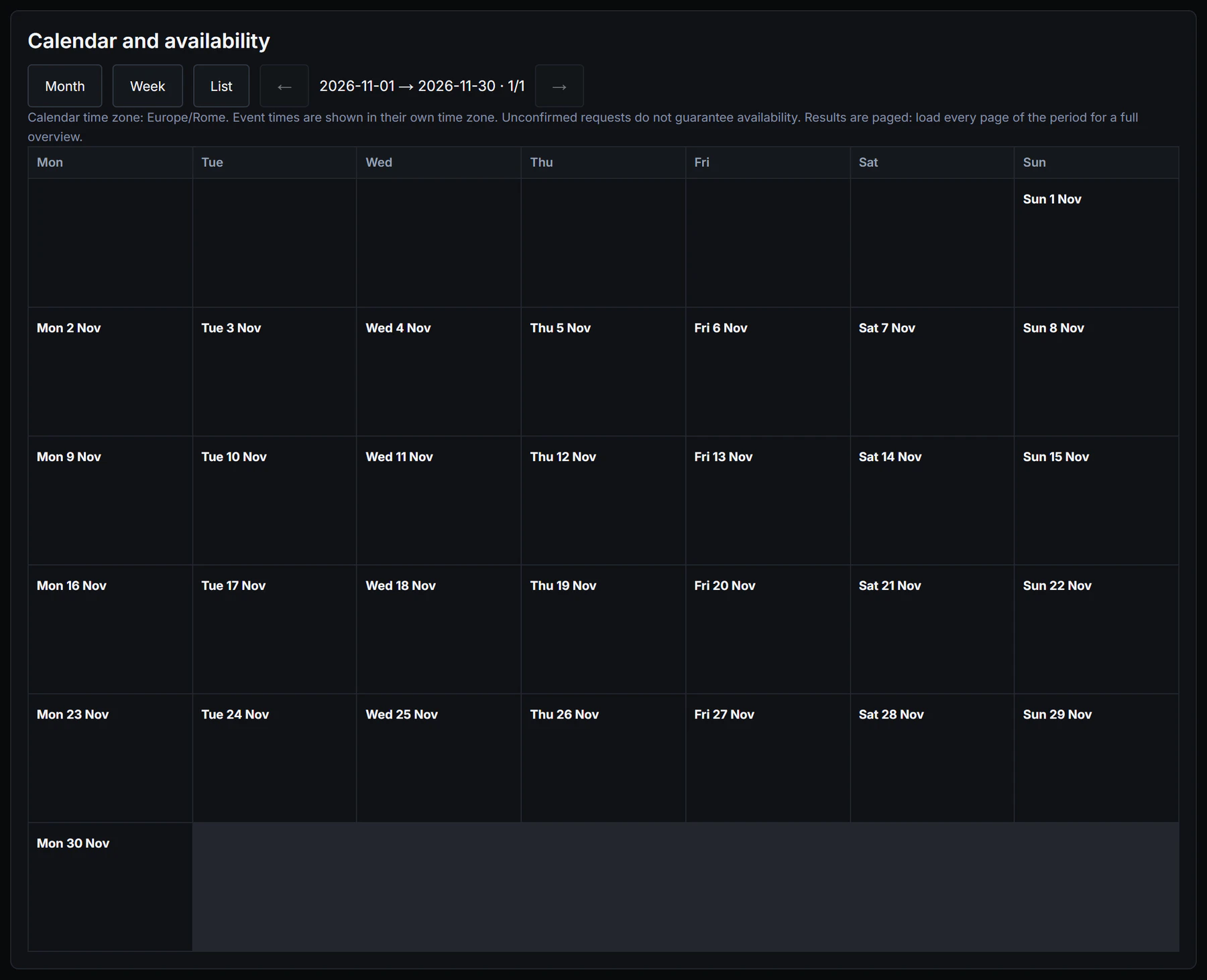
Offers, counteroffers and a private link for the organiser
From a request you send an offer with a fee, a currency, an expiry and the terms: duration, travel, hotel and equipment. The organiser receives a private link to a conversation limited to that one request. There they see the event details, the offers and any documents you shared, can reply, send their own proposal, and confirm the booking by accepting your terms. Earlier offers stay visible in the history.
Fees, deposits and balances as records
For each booking you record the agreed fee, the deposit requested and its status (not requested, requested, paid, overdue or waived), the balance and its status, the due dates, the payment method you use and private financial notes. This is an operational record: payments are made directly between the DJ and the organiser, and GYSNOIZE does not collect, hold or transfer booking fees.
Documents attached to the right gig
You can upload PDF and image files and label them as a technical rider, hospitality rider, EPK PDF, press photo, logo or artwork, contract, travel or hotel document, or other. Each file is private, shared with the booking contact, or public on your profile. A contract stored here is a document: Managing Booking does not sign contracts electronically.
Contacts, venues, checklists and history
Promoters and venues are kept in their own lists, with company, phone, notes, address, city and capacity, and linked to the requests they belong to. Each booking has its own checklist of tasks with due dates, and an activity log records what changed and when. Notifications collect what needs your attention.
Analytics
For any period you can see how many enquiries arrived, how many became confirmed bookings, the conversion rate, and the booked value and average fee in each currency.
What it does not do
Managing Booking is software, not an agency or a marketplace: it does not find gigs for you, guarantee bookings, process payments or deposits, sign contracts or synchronise with external calendars. You stay in charge of every decision and every payment.
Plans
Managing Booking comes with the Booking Pro plan on its own, or with DJ Pro + Booking together with the DJ tools, billed monthly or yearly. A free trial is available once per account, and without an active plan the workspace stays readable but cannot be edited. Current prices are on the plans and prices section of the For DJs page.
Explore GYSNOIZE for DJs See plans and prices
Part of a wider music platform
Managing Booking sits beside the other GYSNOIZE services, from royalty administration for labels to studio mastering. Each answers a different professional need; our guide to record label management software describes the wider platform.
How booking management helps different music professionals
The value of a booking system depends on who uses it.
- Independent DJs manage their own enquiries, schedules, contacts, agreements and payments, and a structured workflow keeps the business side in order.
- Touring artists juggle travel information, venue contacts and schedules in several cities or countries, and keeping it organised makes preparation easier.
- Artist managers coordinate communication, negotiate engagements and organise documents for performers, and consistent records help them do it reliably.
- Booking agents handling several performers need structured information about artists, opportunities and ongoing negotiations.
- Event promoters benefit from clear communication, accurate performance information and well-defined booking conditions.
The real value of any software depends on its actual features and on the user's responsibilities. Managing Booking, for example, is designed around one DJ's own bookings: an agency should check how well a single-artist workspace fits its roster.
Practical DJ booking checklist
Before confirming a professional show, review the following.
Event details
- Event date.
- Venue and city.
- Event organiser.
- Set start time.
- Set duration.
Commercial arrangements
- Agreed fee.
- Deposit conditions.
- Remaining balance.
- Payment deadlines.
- Who pays for travel and accommodation.
Technical requirements
- DJ equipment.
- Technical rider.
- Monitoring.
- Soundcheck or setup times.
Documentation
- Written booking confirmation.
- Contract, if applicable.
- Event documents.
- Organiser contact details.
Final preparation
- Travel schedule.
- Arrival time at the venue.
- Emergency contact.
- Performance logistics.
- Any remaining administrative tasks.
Not every event needs the same checklist, but a consistent review process prevents avoidable mistakes.
Frequently asked questions about DJ booking management
What does DJ booking management software do?
It helps artists and music professionals organise booking enquiries, performance schedules, contacts, agreements and the other administrative information around live engagements.
How can DJs manage multiple bookings?
With a structured workflow: clear statuses, a performance calendar, organised promoter contacts and consistent event records. This reduces reliance on scattered messages and manually maintained notes.
What is the difference between a tentative and a confirmed booking?
A tentative booking, or option, is a potential engagement or temporary reservation. A confirmed booking has met the agreed confirmation conditions. Exact definitions and obligations depend on the parties' agreement.
Can DJ booking software help manage deposits?
Many booking systems track agreed fees, deposits and outstanding balances. Whether they also process payments depends on the product: GYSNOIZE Managing Booking records them, while the payments themselves are made directly between the DJ and the organiser.
Do DJs need contracts for performances?
A written agreement helps define the fee, dates, responsibilities, payment conditions and cancellation arrangements. Legal requirements vary by jurisdiction and circumstances.
What is a DJ booking calendar?
A scheduling tool for performance dates, potential engagements, availability and other commitments.
What is a DJ EPK?
An electronic press kit: professional information such as a biography, photographs, music links, performance material and booking contact details.
Does booking management software find gigs automatically?
Not necessarily. Booking management software organises booking-related work. Gig discovery or marketplace features have to be evaluated separately, and GYSNOIZE Managing Booking does not offer them.
What is GYSNOIZE Managing Booking?
The booking workspace of the GYSNOIZE platform for DJs: a public booking page, requests with statuses, a calendar with conflict checks, offers and a private organiser conversation, fee and deposit records, documents, contacts, checklists and analytics.
Is booking management useful for artist managers and agencies?
Yes. Managers and agencies use booking systems to organise performance information, negotiations, schedules and other administrative work. How many artists one account can handle depends on the product, so check it before you choose.
The future of professional DJ booking management
Live music depends on relationships, communication, organisation and reliable commitments. Artists keep building careers through club nights, festivals, tours and collaborations with promoters around the world, and as those activities grow more complex, the systems behind them matter more.
Professional booking management is not only a calendar. It means understanding every stage of a performance opportunity, keeping important information accessible and making better-informed decisions. Technology can cut repetitive work, improve visibility and support more consistent communication: for independent artists that means more time for music and preparation, and for managers and booking professionals a more structured way to coordinate engagements.
At GYSNOIZE Recordings we believe music technology should grow out of real creative and professional needs. Our work combines independent music production with the development of specialised digital tools, and Managing Booking reflects that: professional organisation designed around the music industry.
Discover GYSNOIZE Managing Booking
Managing professional performances should not mean losing important information across messages, calendars and disconnected documents. Explore the GYSNOIZE tools for DJs, check the current plans and find the setup that fits your workflow.
Create independently. Perform professionally. Grow with GYSNOIZE.
About GYSNOIZE Recordings: an independent music label and technology project founded in Italy in 2013 by GYSNOIZE, an electronic music producer, DJ, composer and audio engineer. Its work combines electronic music production, studio engineering and digital tools for independent music professionals. Official profiles: GYSNOIZE on Beatport and GYSNOIZE Recordings on Beatport.
Editorial note: this article provides general educational information. Booking agreements, payment obligations, taxes and legal requirements depend on the applicable contract and jurisdiction.