
AI Album Cover Generator: How to Create Professional Music Artwork with GYSNOIZE
A practical guide to creating memorable single and album artwork with AI, preparing covers for streaming services, and exploring GYSNOIZE AI Cover Studio with real screenshots.
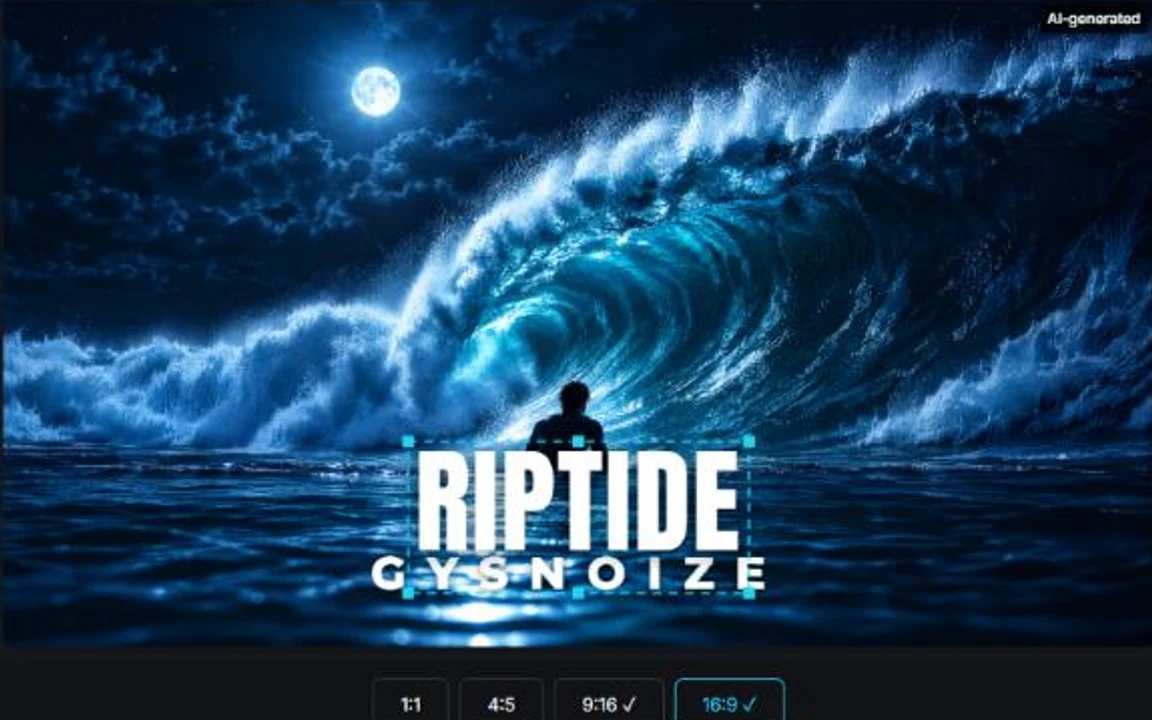
A practical guide to AI cover art for singles, EPs and albums — from the first creative idea to the artwork you deliver with a release. In this article «cover» always means the picture on a release, never an AI cover song.
Your music has a sound. Your artwork gives that sound a visual identity. Long before a new listener hears the first seconds of a track, they meet the release as a small square image on a streaming service, a music store, a social feed or a DJ chart. That image creates an impression of the artist and of the music behind it.
A striking cover cannot replace a great recording, but it can communicate atmosphere, make a release easier to recognise and give a campaign a consistent direction. For independent musicians, artwork is also one of the most demanding parts of preparing a release. Hiring a designer is the right choice for many projects, yet not every single has the same budget or schedule.
This is why AI album cover generators have become part of many release workflows. They help artists explore visual concepts, compare directions and develop imagery that reflects their sound. This guide covers what makes effective artwork, what a release-ready file needs, and how to judge an AI-assisted workflow. In the second half we walk through GYSNOIZE AI Cover Studio on a real project: the cover for the GYSNOIZE single «Riptide».
AI-generated images are not automatically accepted by distributors or streaming services. Acceptance depends on their technical, content and rights requirements.
What is an AI album cover generator?
An AI album cover generator is a tool that uses artificial intelligence to help create the picture for a music release. The artist starts with an idea — a mood, a scene, a colour palette, a genre, a central figure or a visual metaphor — and expresses it through the inputs the tool supports, usually a written description. The system then produces images that can be reviewed as possible covers.
AI-assisted artwork is useful for discovering concepts, but it does not remove the need for creative direction. The musician still decides which image represents the music, whether it contains mistakes, and whether it can legally and technically be used for the release.
Why cover art matters for independent musicians
- It communicates mood. A dark, high-contrast image suggests intensity; a soft, spacious one suggests atmosphere and introspection.
- It supports recognition. Related colours, treatments or motifs connect the releases in a catalogue.
- It makes promotion consistent. Artwork becomes the base for posts, video thumbnails and landing pages.
- It shows care. Carefully prepared artwork signals attention to detail, even for a fully independent artist.
Artwork does not guarantee more streams, sales or playlist placements. Its value is in communicating identity and making the release visually coherent.
Single, EP and album artwork
All three usually share the same technical need — a square image — but their creative purposes differ. A single often focuses on one central idea that still reads at thumbnail size. An EP can represent a group of related tracks or a transitional chapter. An album may carry a broader narrative or a complete visual identity. There is no rule that a single must be simple or an album elaborate; the strongest approach is the one that supports the music.
How to plan a cover before generating images
Good results start with a clear brief. Before opening any artwork tool, answer a few questions:
- What is the release title and the artist identity?
- Which emotions should the cover communicate?
- Should the image focus on a person, a landscape, an object or an abstract form?
- Which colours fit the sound?
- Does the artwork need space for the artist name and the title?
- What should a listener still recognise at thumbnail size?
A drum and bass release might call for a kinetic urban scene and a strong central silhouette. A blues album might suit intimate photography and restrained colours. An ambient record could use minimal forms and negative space. These are suggestions, not genre rules; originality comes from the artist's own choices.
Writing a useful AI cover art prompt
A practical prompt describes the subject, the scene, the emotional tone, the composition, the colours and the visual treatment. Three fictional examples, written for inspiration — they are not results generated for this article:
- Drum and bass single: «A lone figure under futuristic city lights, bold central composition, steel-blue and deep-red palette, atmospheric rain, cinematic lighting, readable at thumbnail size, no text.»
- Melodic house EP: «A peaceful horizon at twilight, soft gradients, restrained geometric architecture, warm violet and blue palette, space for optional typography, no text.»
- Intimate blues album: «An empty late-night street after rain, gentle reflections, intimate cinematic photography, melancholy but romantic, subtle film texture, teal and burgundy, no text.»
Treat these as starting points and adapt them to your own music. Avoid asking for the visual identity, artwork or characters of another artist or brand without permission.
How to create cover art with GYSNOIZE AI Cover Studio — step by step
AI Cover Studio is part of the GYSNOIZE workspace for artists, and it is also available in the DJ area and to client labels. The steps below follow a real project in an artist account: the cover for «Riptide». Every screenshot is from that project; account balances are hidden.
Step 1: Open AI Cover Studio and start a project
Open AI Cover Studio in the menu and press New cover. Every cover is a project with its own number, saved in your account, so you can come back to it later. Starting a project is free; pictures are paid from your AI credit. At the time of writing the studio lists €0.50 per draft, €1.50 per full-size cover, €1.50 per 4:5, 9:16 or 16:9 frame and €0.20 to transcribe lyrics. A picture that fails costs nothing.
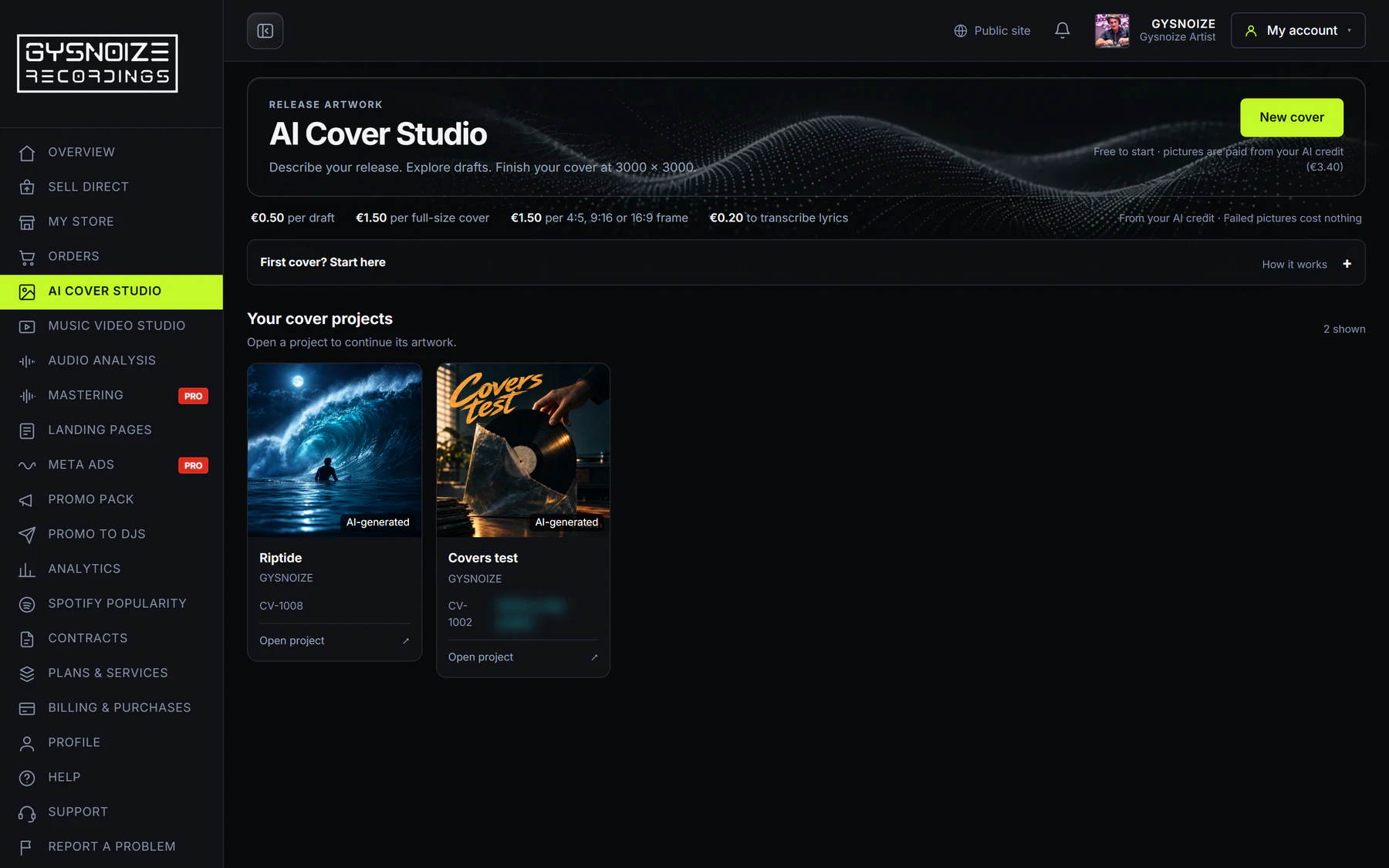
AI credit is separate from any subscription: in GYSNOIZE, AI tools are always paid with AI credit, in every plan, and the credit can be topped up without a plan.
Step 2: Describe the release and write the brief
Under Artwork, choose what the release is (Single, EP, Album, Remix or DJ mix), add an optional genre and the release name, which is required. Then write the Prompt — up to 900 characters. Style & colours adds a style (cinematic photo, dark / industrial, neon / night city, abstract 3D, illustration, collage, minimal / geometric, retro analog, surreal / dreamlike or nature / landscape), a mood, a colour palette and a list of things to avoid.
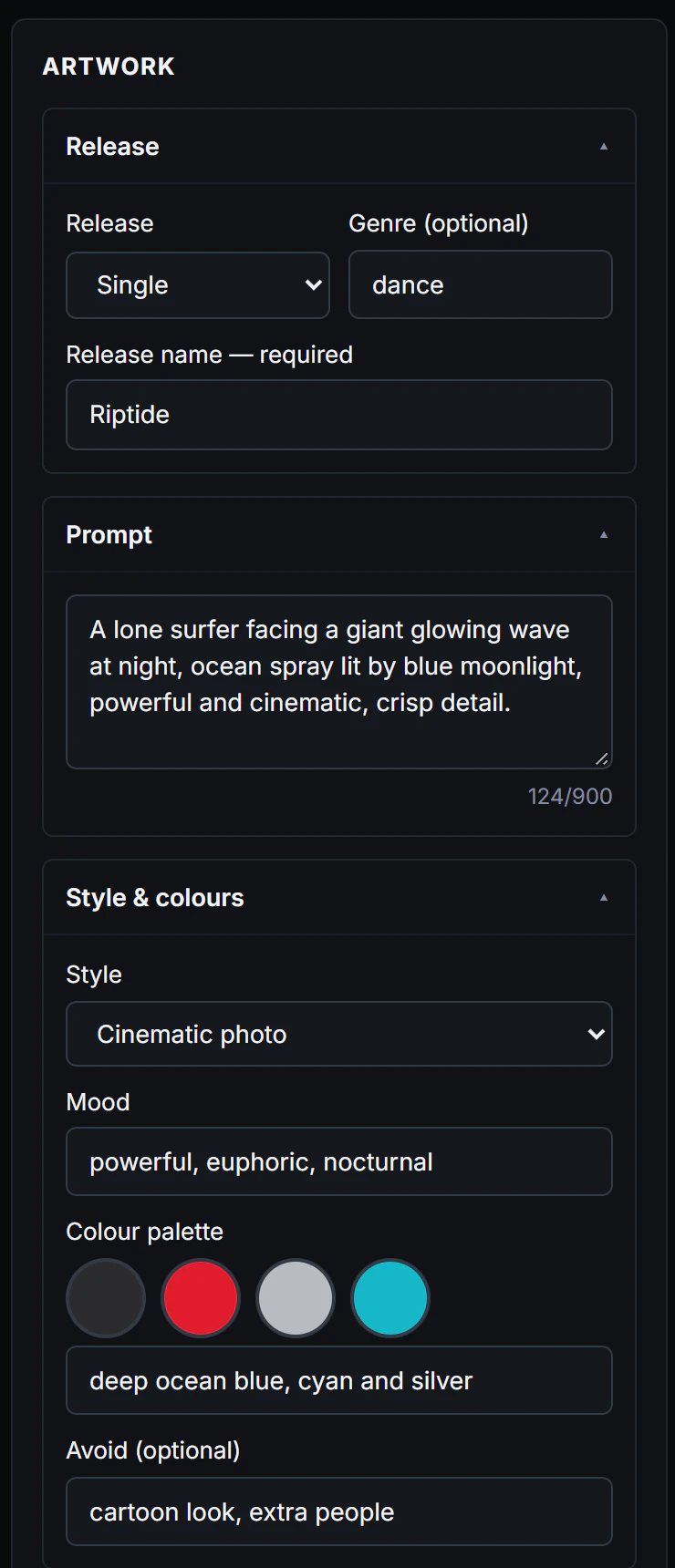
Optional folds add more context: Artists (including an artist logo for the AI to draw), Lyrics, Reference images and Listen to the music. Listening reads the track in your browser and writes a short description of its sound — tempo, mood and energy — which you can edit before generating. Writing down the lyrics sends a copy of the song for transcription only after you tick a separate consent box.
Step 3: Generate drafts and choose one
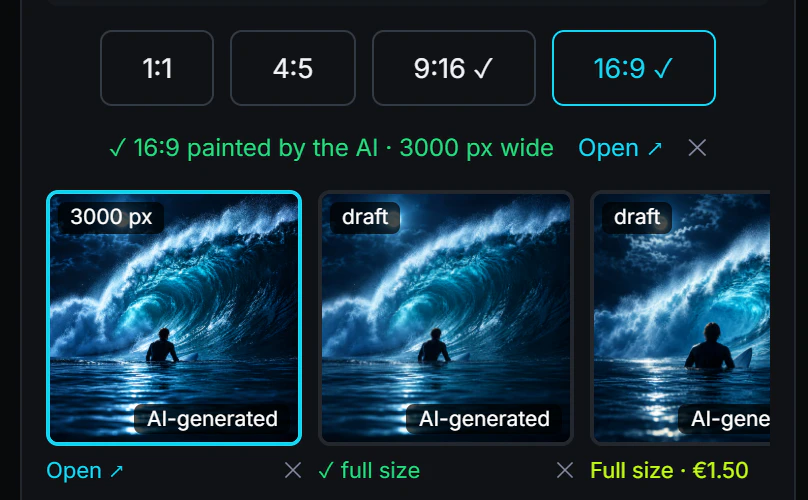
Generate artwork makes two drafts per round, and the cost is confirmed before anything is generated. Drafts are 1024 px. Pick the one that works and make it full size for a sharp 3000 × 3000 picture. Regenerate starts another round when nothing fits.
Step 4: Get frames for other formats
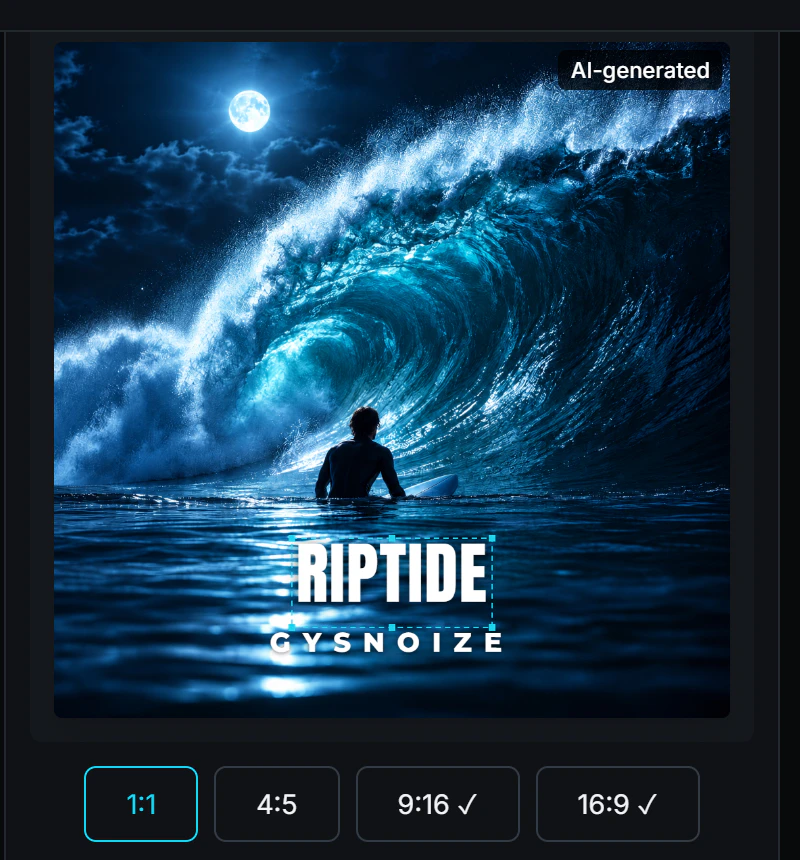
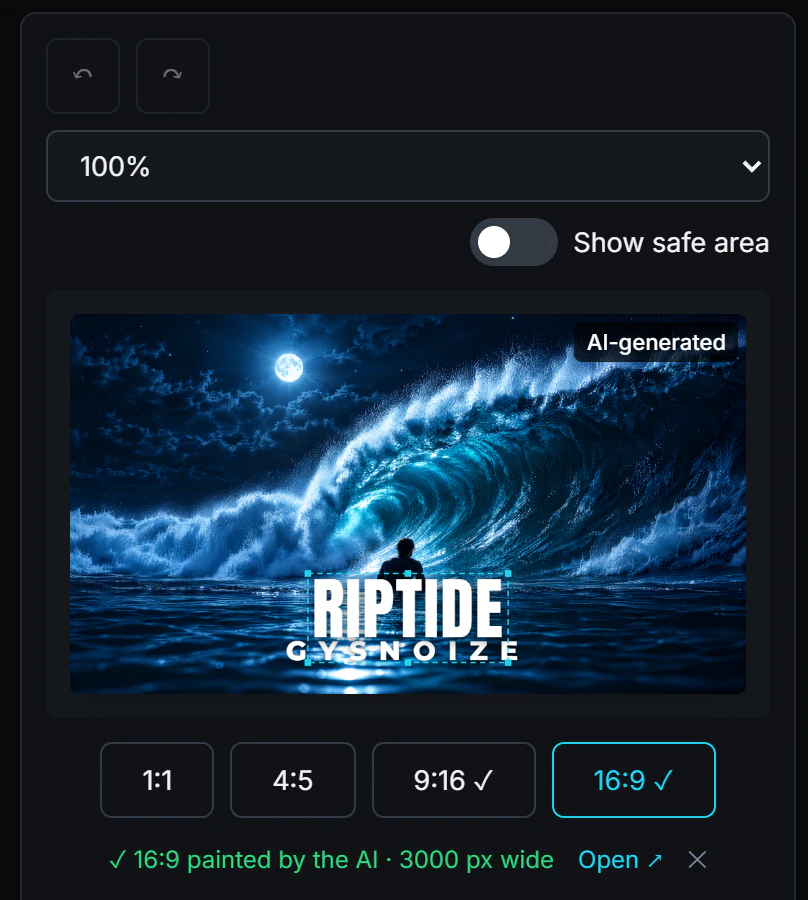
The same project can produce 4:5, 9:16 and 16:9 frames. They are not crops: the AI paints the picture again for that shape, and the type stays editable on each. A 16:9 frame works as a YouTube background or thumbnail; 9:16 suits stories and short vertical video.
Step 5: Set the text and branding yourself
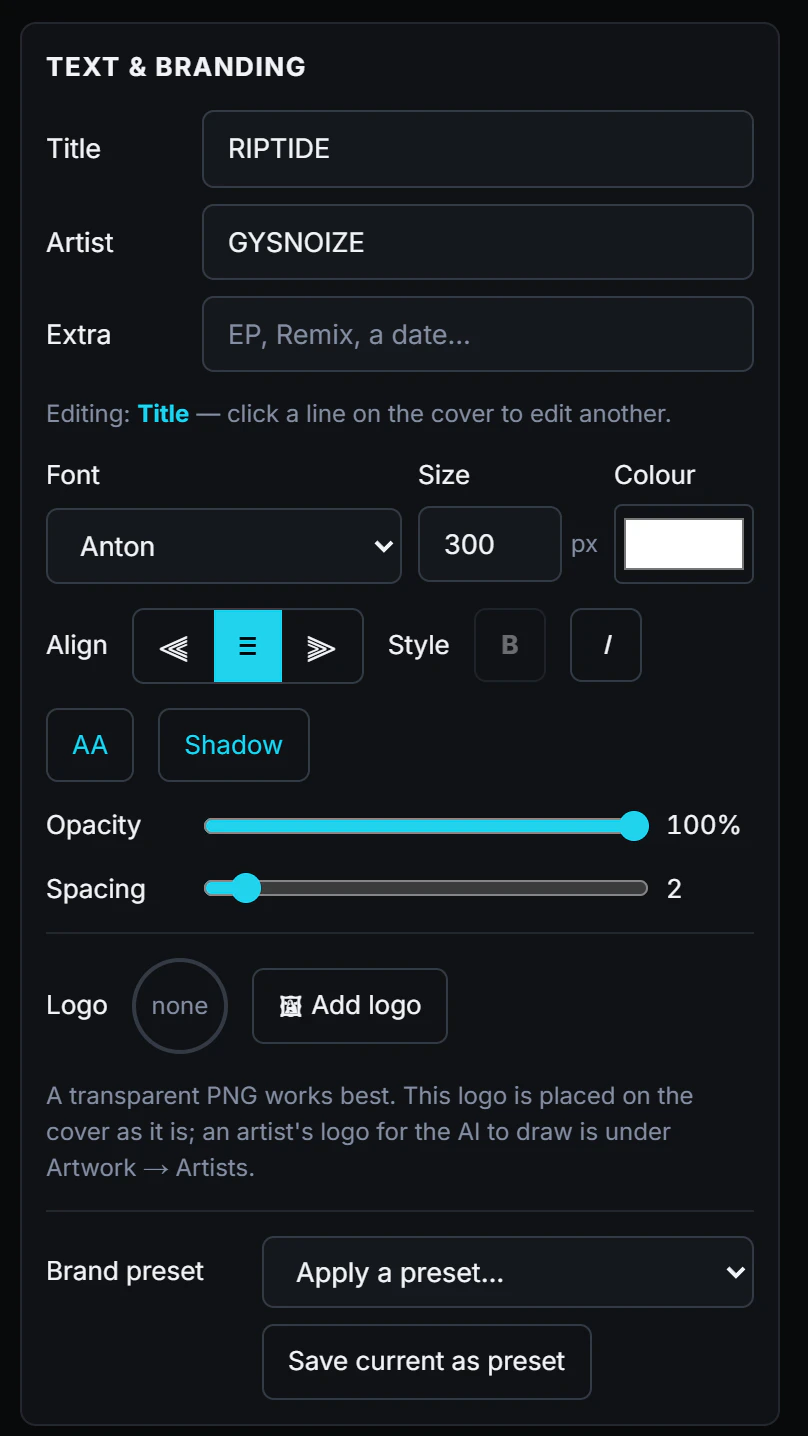
AI image models often distort letters, so the studio keeps typography out of the picture. Under Text & branding the title, artist and an extra line are separate layers with a font (Anton, Bebas Neue, Archivo Black, Montserrat, Oswald, Unbounded, Syne, Space Grotesk, Playfair Display or Cormorant), size, colour, alignment, style, shadow, opacity and letter spacing. A transparent PNG logo can be added, a safe area guide shows what stays visible when stores crop the corners, and a brand preset saves the look for the next release. Text and logo changes cost nothing.
Step 6: Export the cover
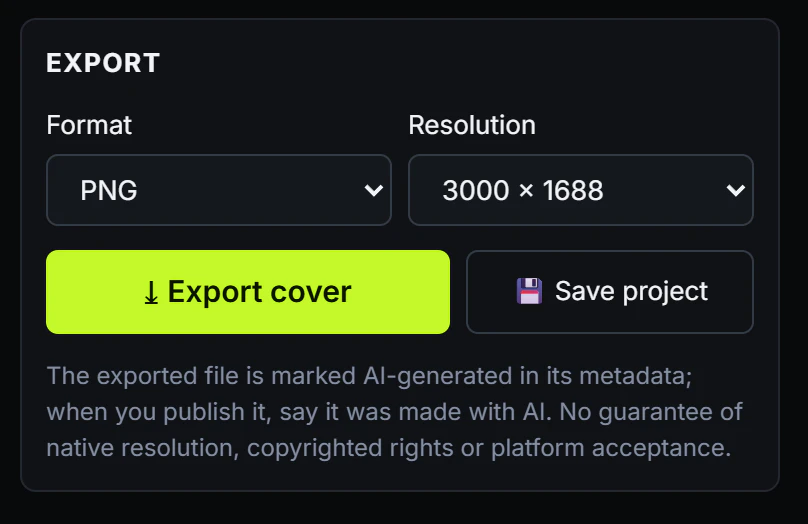
Export offers PNG or JPG. For the square cover the resolutions are 3000 × 3000, 2000 × 2000, 1500 × 1500 and 1000 × 1000; the wide and tall frames export at their own sizes, such as 3000 × 1688 for 16:9. Save project keeps everything for later. The exported file is marked AI-generated in its metadata, and the studio asks you to say it was made with AI when you publish it. It also states plainly that it gives no guarantee of native resolution, rights or platform acceptance.
From brief to finished artwork: what the «Riptide» project shows
| Stage | What was done in the real project |
|---|---|
| Brief | Single, «Riptide», a one-sentence prompt, cinematic photo style, nocturnal mood, ocean colours |
| Drafts | Several 1024 px drafts across rounds; one chosen |
| Full size | The chosen draft enlarged to 3000 × 3000 |
| Other shapes | 16:9 and 9:16 frames painted by the AI for their shape |
| Typography | Title and artist set as editable layers, not drawn by the AI |
| Next use | The same artwork became the background of the «Riptide» music video |
The last row matters: the artwork was reused in Music Video Studio as the background of the video for the same track, and it can be the cover on an artist landing page. One concept, carried across the release.
What makes a good AI music cover?
- A recognisable focal point that still reads at thumbnail size.
- A mood that fits the release — or a deliberate contrast, chosen on purpose.
- A consistent identity across releases, without copying the same cover each time.
- Correct, legible typography. Check every letter of the artist and release names.
- Technically clean artwork: no distorted anatomy, strange objects, unintended logos or blurry details.
- Appropriate rights for any photographs, logos, faces or references you used.
Cover art requirements for streaming platforms
Check the current specifications of your distributor and target stores before release; distributors may apply stricter checks than a store's general rules. A practical baseline is a sharp, square (1:1) image in RGB, at a high native resolution. Many distributors recommend around 3000 × 3000 pixels, often as JPG, with a lower minimum. Spotify and Apple publish their own cover art guidance, and Apple's documentation differs between its provider and artist materials — check the exact route your release takes.
A larger export does not create real detail: upscaling a weak source is not the same as a sharp original. Common reasons for rejection or corrections include blurry imagery, artwork that misidentifies the artist or release, website addresses, QR codes or advertising, unauthorised logos, characters or photographs, and duplicate artwork where a distributor wants release-specific images.
Official references to check at the time of release: Spotify cover art requirements, Apple Music digital packaging, Apple Music for Artists — cover art and DistroKid artwork requirements. They are not a promise that any particular AI cover will be accepted.
Can you use AI-generated album art commercially?
It depends on the AI service terms, any third-party material used, the applicable law and the distributor's rules. Before releasing a cover, check:
- the terms for commercial use of images made with the tool;
- whether input photographs or references are licensed for that use;
- whether visible people have agreed to the use of their likeness;
- whether the artwork contains protected logos, images or characters;
- whether your distributor requires AI artwork to be disclosed — DistroKid, for example, explains what counts as AI-generated artwork;
- whether the result could mislead listeners about who is featured.
Commercial-use permission, copyright ownership and exclusivity are separate questions, and no AI service guarantees all of them. For an important commercial release, rights advice can be worth it. This article is educational, not legal advice.
AI cover art or a professional designer?
They are not necessarily competitors. AI helps explore many directions quickly; a designer brings art direction, precise typography and rights-aware asset production. A hybrid also works: AI imagery as one ingredient, finished with careful typography — which is exactly why AI Cover Studio keeps the text as editable layers.
Five common mistakes with AI album artwork
- Generating without a concept. Start from the mood of the music, not from random styles.
- Ignoring thumbnail size. Check the cover as small as listeners will see it.
- Trusting AI lettering. Set names and titles as real text and check every character.
- Assuming rights are clear. Confirm tool terms, likeness permissions and distributor policy.
- Skipping technical checks. Confirm dimensions, colour mode, format and metadata before delivery.
Using cover artwork across a release campaign
Once approved, the cover becomes the visual reference for the campaign: announcements, video thumbnails, teaser clips, press material and landing pages, where your rights and each platform's rules allow. Keep the core colours, composition and character across formats, and do not add store logos or extra text to the cover you deliver to a distributor when they are not permitted.
Frequently asked questions
What is an AI album cover generator?
A tool that uses AI to help create the artwork for a single, EP or album. The artist still reviews the design and checks it is suitable for publication.
Can AI create cover art for Spotify?
AI-assisted artwork can be used for a release if it meets the distributor's and the store's requirements and the relevant rights and content rules. Acceptance is never guaranteed.
What size does GYSNOIZE AI Cover Studio export?
Drafts are 1024 px; a draft made full size is 3000 × 3000. The square cover exports as PNG or JPG at 3000, 2000, 1500 or 1000 pixels square, and the 4:5, 9:16 and 16:9 frames at their own sizes, for example 3000 × 1688 for 16:9.
Can I put my artist name and title on the cover?
Generally yes, if the text is accurate and meets the receiving platform's artwork rules. In AI Cover Studio the text is set as editable layers, so spelling stays under your control.
Is AI-generated artwork automatically copyright-free?
No. Rights depend on the source material, the tool's terms and the applicable law. Do not assume a generated image is exclusive or free of third-party rights.
Do I need to say my artwork was made with AI?
Requirements differ between distributors; some ask for it explicitly. GYSNOIZE marks every exported cover as AI-generated in the file's metadata and asks you to say so when you publish it.
Is AI Cover Studio included in a GYSNOIZE plan?
Starting projects, editing text and exporting are part of the workspace; the pictures themselves are paid from AI credit in every plan. The current prices are shown in the studio before anything is generated.
Give your music a visual identity
A memorable release begins with a clear idea of what the music should communicate. AI tools can support that process, but good artwork still depends on artistic judgement, careful checks and respect for rights. GYSNOIZE Recordings is an independent label founded in Italy in 2013 by electronic music producer and DJ GYSNOIZE; the studio was built from that experience of releasing music, with the type left in the artist's hands.