
Artist Landing Pages: How to Promote Your Music, Grow Your Fanbase & Build Your Brand
What an artist landing page is, why it beats a scattered set of links, and how to build one step by step, with real screens from the GYSNOIZE landing page editor and a live release page on a phone.
A practical guide for independent artists, producers, DJs and small labels who want every release to have one clear place to send listeners.
Releasing music has never been easier. Getting people to actually listen is another matter. A new single lands on Spotify, Apple Music, Deezer, TIDAL, Beatport and YouTube on the same day, and every listener prefers a different one. Post a Spotify link and the Apple Music listeners scroll past. Post five links and nobody clicks any of them.
An artist landing page solves that problem. It is one web address for one release (or for the artist as a whole) where every listener chooses the service they already use. Done well, it also carries the artwork, the visual identity and the story of the record, and it tells the artist which channels and which promotion actually worked.
This guide explains what artist landing pages are, why musicians need them, how to use them in a release campaign, and what separates a page that converts from one that is ignored. In the second half we build a real page in the GYSNOIZE landing page editor, step by step, and show the published result on a phone. Every screenshot comes from a real, working page: the album «No Time To Thinks» by GYSNOIZE.
What is an artist landing page?
An artist landing page is a single web page built for one purpose: to take a visitor from interest to listening. A visitor arrives from an Instagram story, a TikTok bio, a newsletter, a QR code on a flyer or a paid advert, sees the artwork and the title, and presses the button for the streaming service or store they prefer.
Music marketers use several names for the same idea: smart link, pre-save page, release page, link page or fan link. The details vary, but a good artist landing page usually includes:
- the release artwork, large and sharp, so the visitor instantly recognises what they came for;
- the release title, the artist name and the kind of release (single, EP, album or playlist);
- one button per streaming service or store, each opening the release directly, not a search page;
- optional extras: a video, a short audio preview and a link to follow the artist;
- social profile links for visitors who want more than one record;
- a share card, so the link looks right when it is pasted into a chat or a social feed;
- measurement: how many people opened the page and which buttons they pressed.
What a landing page should not include is everything else. It is not a full website, a blog or a biography archive. Each extra element competes with the one action that matters: pressing play.
Why musicians need artist landing pages
One link that works for every listener
Listeners are loyal to their platform. Someone who keeps playlists in Apple Music is unlikely to install Spotify for one track. A landing page lets each listener open the record where their library, playlists and listening habits already live, which makes a save or a follow far more likely.
A home for the release that you control
Streaming profiles belong to the platforms: their layout, their colours, their recommendations of other artists. A landing page is the artist's own space. The artwork, the typography and the atmosphere are chosen by the artist, and nothing on the page sends the visitor to a competitor's record.
Cleaner promotion on social media
Most social platforms allow only one link in a profile, and stories, captions and comments make long URLs awkward. A short, memorable landing page address can be used everywhere: the bio, a story link sticker, the description of a YouTube video, a press release, a poster or the back of a T-shirt.
Evidence instead of guesses
Without a landing page, an artist knows that streams went up but not why. With one, it becomes visible how many people opened the page after a post, a newsletter or an advert, and how many of them continued to a streaming service or a store. That turns promotion from guesswork into something that can be improved.
Artist landing page vs link in bio: what is the difference?
Link-in-bio tools and artist landing pages look similar, and many artists use both. They solve different problems:
| Link-in-bio page | Release landing page | |
|---|---|---|
| Purpose | A menu of everything the artist does | One release, one action: listen or buy |
| Typical content | Website, shop, tour, newsletter, socials | Artwork, title, streaming and store buttons |
| Best used for | The permanent link in a social profile | Release campaigns, adverts, QR codes, press |
| Visual focus | A list of buttons | The release artwork and its atmosphere |
| What you learn | Which menu item was clicked | How many people opened the release and which service they chose |
A practical approach is to keep a permanent profile link and point it, during a campaign, at the landing page of the newest release. When the campaign ends, the page stays online as the long-term home of that record.
Music promotion strategies that work with a landing page
A landing page does not promote music on its own. It makes every other form of promotion more effective, because every post, advert and mention leads to the same, well-prepared destination. These are the channels where it pays off most:
- Social media posts and stories. Use the same landing page address in every post about the release, so all attention flows to one place.
- Short-form video. TikTok, Reels and Shorts create interest quickly; the landing page converts that interest into a listen on the viewer's own platform.
- Newsletters. Fans on a mailing list are the most likely to listen; give them one button instead of five links.
- Paid adverts. An advert that leads to a landing page can be measured beyond the click: how many visitors went on to a streaming service.
- DJ promotion and press. A clean page with the artwork and every store link makes a release easy to feature.
- Offline promotion. A QR code on a poster, flyer, sticker or merchandise takes people straight to the release.
Streaming links: getting the buttons right
The buttons are the core of the page, and small mistakes cost listeners. A few rules make a large difference:
- Link to the release itself. Every button should open the exact track, album or playlist, not an artist profile or a search result.
- Use direct links, not shortened ones. Shortened or redirected links hide the destination, look suspicious to some visitors and can break when the shortening service changes.
- Put the most important service first. If most of your audience uses Spotify, it belongs at the top. Electronic music for DJs often belongs on Beatport too.
- Show only services where the release really is. A button that leads to an error page damages trust in every other button.
- Check every link after release day. Store pages sometimes change address once a release goes live.
Branding: making the page feel like your music
A landing page is often the first visual contact between a new listener and an artist. A generic white page with a list of logos says nothing about the music. A page that carries the artwork, the colours and the mood of the release creates an expectation before the first note plays.
Good branding on a landing page is consistent rather than complicated: the same artwork as on the streaming services, a typeface that fits the genre, and a background that supports the cover instead of competing with it. A techno release and an ambient album should not look the same, and neither should look like a template.
Mobile usability: most visitors arrive on a phone
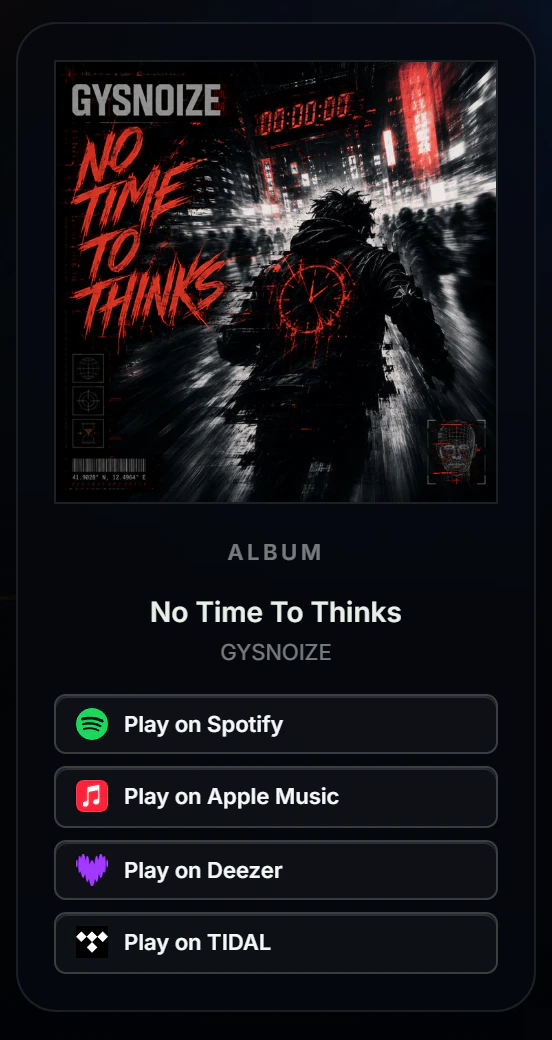
Most visitors come from social apps on a phone, often inside the app's own browser. A landing page has to work in that situation first: large artwork that loads quickly, readable text, and buttons big enough to press with a thumb. The visitor should see the cover, the title and the first streaming button without effort.
SEO for musicians: helping people find the release
Most traffic to a landing page comes from links the artist shares, but search engines and link previews still matter. A few basics help a release page be found and look trustworthy when it is shared:
- A clear, readable address. A slug like /go/no-time-to-thinks tells people and search engines what they will find.
- The right page title. The release title and the artist name, exactly as fans would type them.
- A share title, description and picture. When a link is pasted into a chat or posted on a social network, these decide whether it looks like a release or like spam.
- Consistency. Use the same artist name and release title everywhere: streaming services, social profiles and the landing page.
- Links to the page. Mention the landing page in press releases, interviews and your own website, so it is connected to the rest of your online presence.
How to use a landing page in a release campaign
A landing page works best when it is part of a plan rather than a link created on release day. A simple campaign around one release might look like this:
| When | What to do with the landing page |
|---|---|
| Two to three weeks before | Prepare the page as a private draft: artwork, title, look and share card |
| One week before | Collect the store and streaming links as they become available |
| Release day | Add the final links, check every button, publish and share the address everywhere |
| First week | Watch page views and button clicks after each post or advert |
| Afterwards | Keep the page live; use it in playlist pitches, DJ promotion and future posts |
After the campaign, compare the results of different channels. If a newsletter brought fewer visitors than a story but a higher share of streaming clicks, that is useful to know for the next release.
The editor and the result: what you build in GYSNOIZE
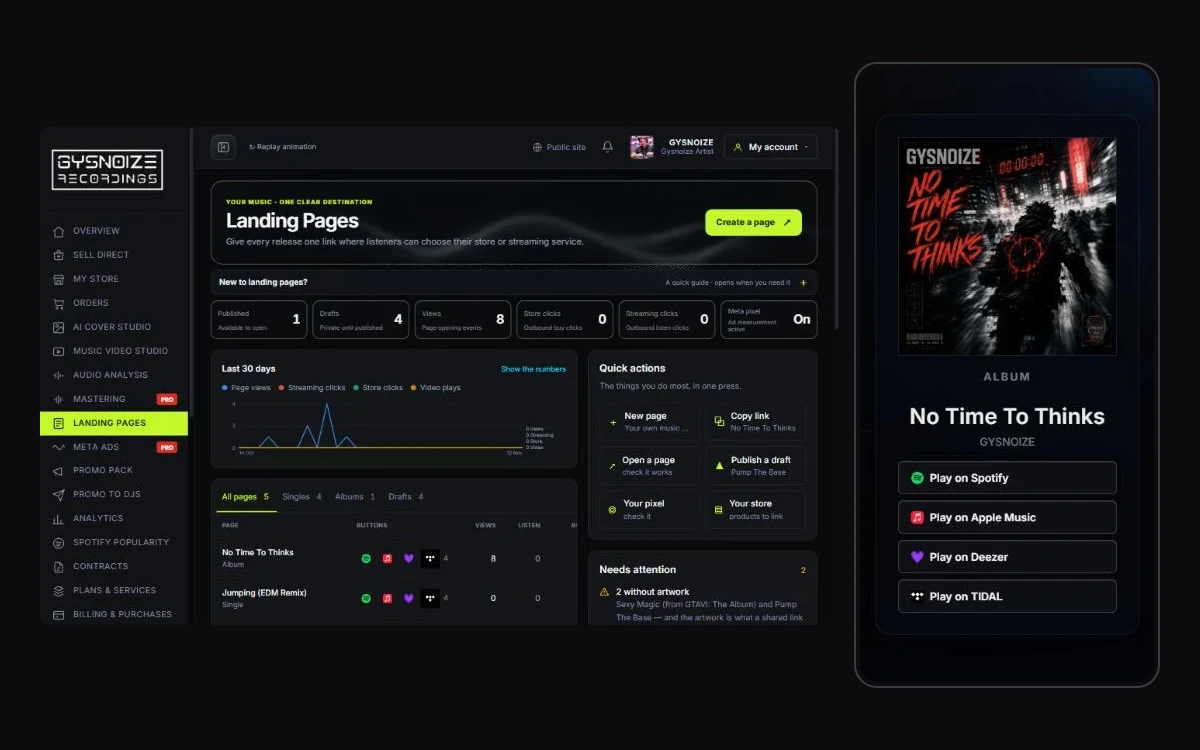
Before the step-by-step guide, here is the whole idea in one picture. On the left is the GYSNOIZE landing page editor with the album «No Time To Thinks» open. On the right is the same page as a visitor sees it on a phone. Both are real screens from a working page, not mock-ups.
How to create an artist landing page with GYSNOIZE — step by step
Landing pages are part of the GYSNOIZE artist workspace. The steps below follow the real editor. Where a step depends on a plan or has a limit, it is stated.
Step 1: Open Landing Pages in your artist workspace
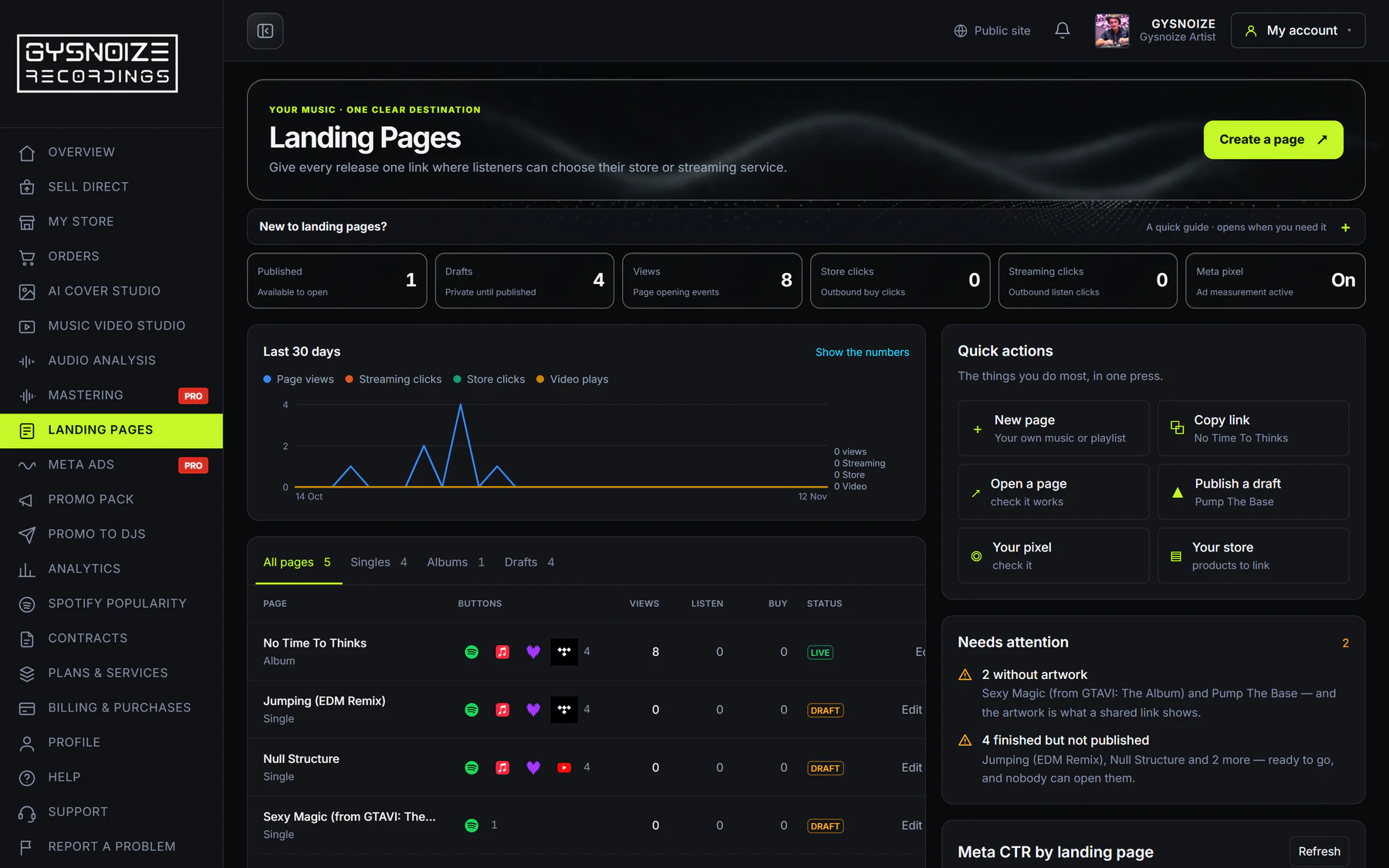
Create an artist account (or sign in) and open Landing Pages in the menu. The overview shows how many pages are published and how many are drafts, page views, store clicks and streaming clicks, a chart of the last 30 days, a table of every page with its buttons, views and clicks, quick actions, and a «Needs attention» list that points out problems such as a page without artwork or a finished page that was never published.
Landing pages are included in every artist plan (Artist Start, Base and Pro). The number of pages that can be live at the same time depends on the plan; at the time of writing a free artist account can publish one. Current plans and limits are listed on the For Artists page.
Step 2: Pick a release — the buttons are filled in for you
Under Make a page, search your releases and pick one. The editor then fills in the store and streaming buttons it already knows for that release, and each release in the list shows how many links are ready. A release that is not in the catalogue can still get a page with + Your own Single, EP, Album or Playlist.
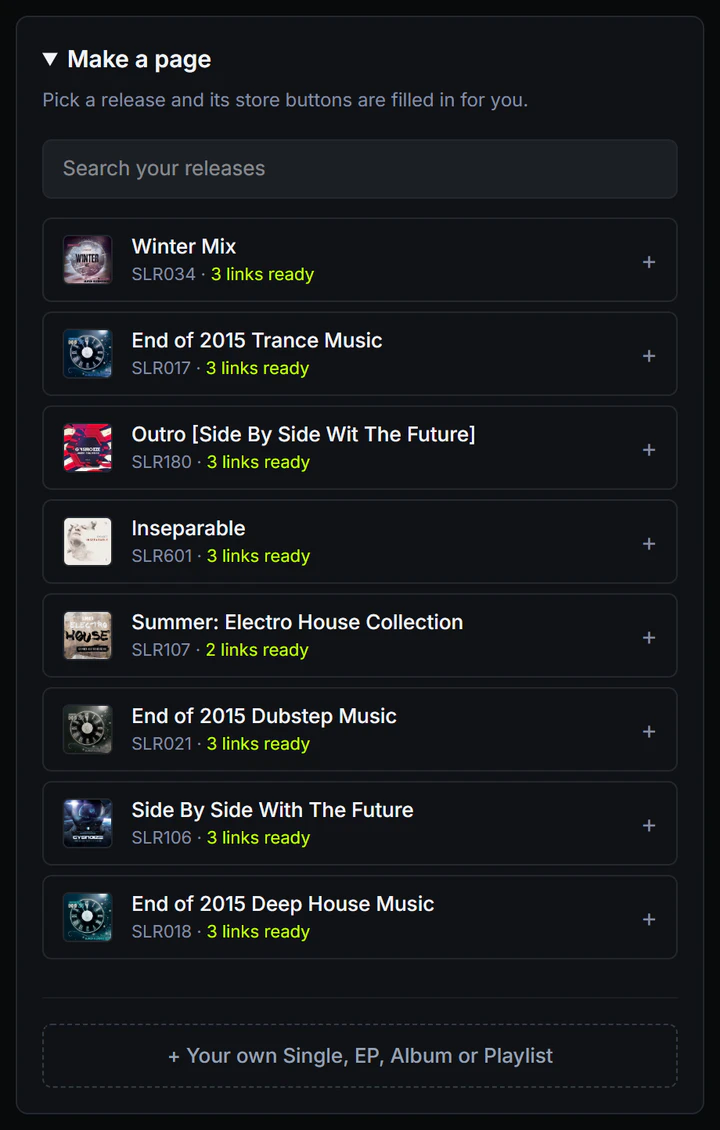
Step 3: Set the title, address and style
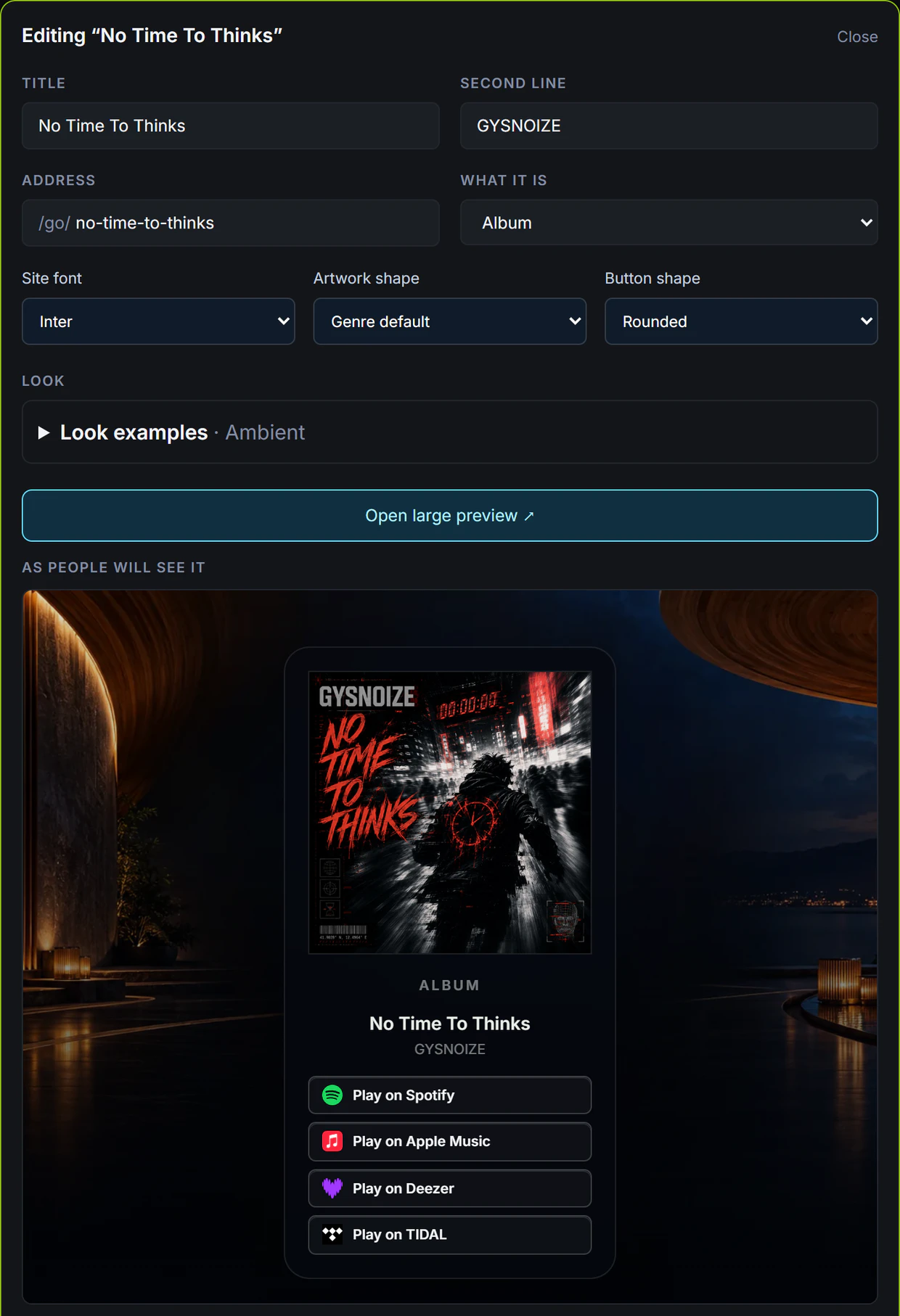
The editor opens with the essentials: Title and Second line (usually the release and the artist), the Address of the page under /go/, and What it is, which labels the page as a Single, EP, Album or Playlist, or shows nothing. Three choices shape the style: the Site font (Inter, Space Grotesk and a set of display typefaces), the Artwork shape (genre default, square, rounded or circle) and the Button shape (square, rounded or pill).
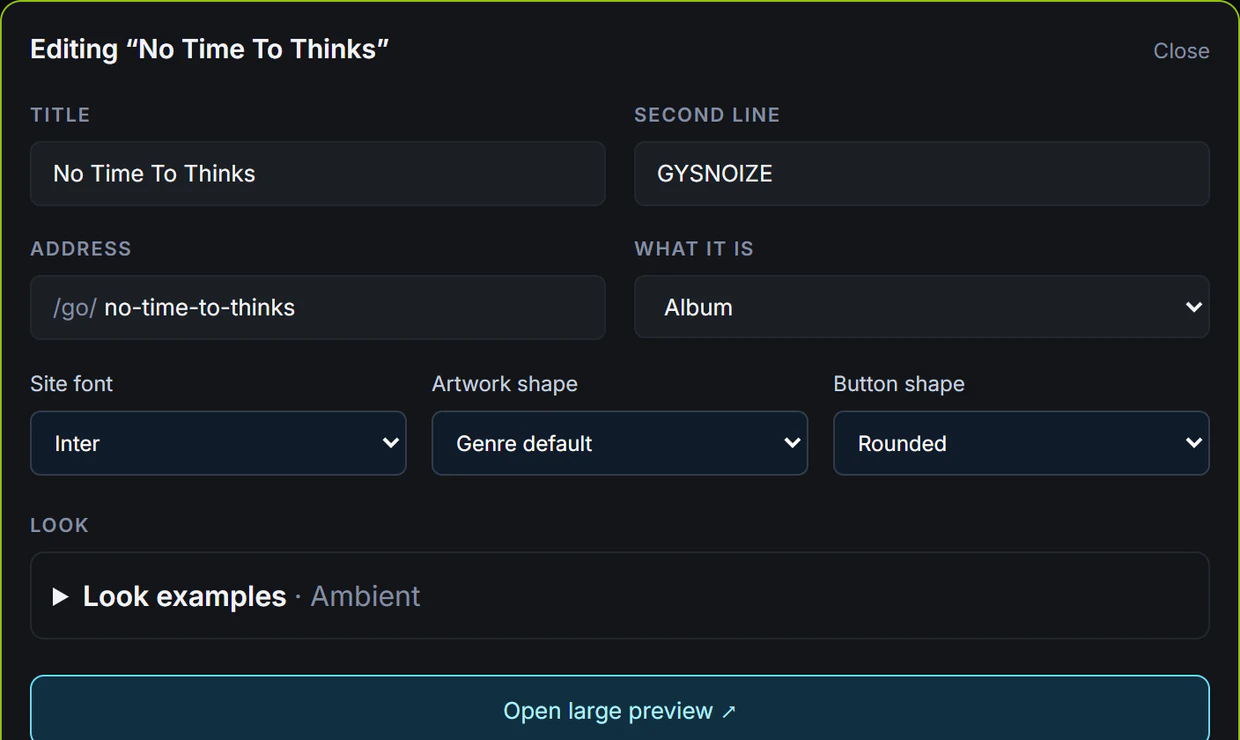
Step 4: Choose a look for the page
Look examples opens the visual environments behind the page: the 24 genres of the GYSNOIZE Music Video Studio plus extra looks, from Standard, Techno, Tech House and Deep House to Breaks, Drum & Bass, EDM, Trance, Ambient and more. Each animated environment has its own procedural light sculpture, so a page feels like its genre without designing anything by hand. An artist who prefers their own background can upload a JPG, PNG, WebP or MP4 file of up to 3 MB, and Restore defaults brings the original look back.
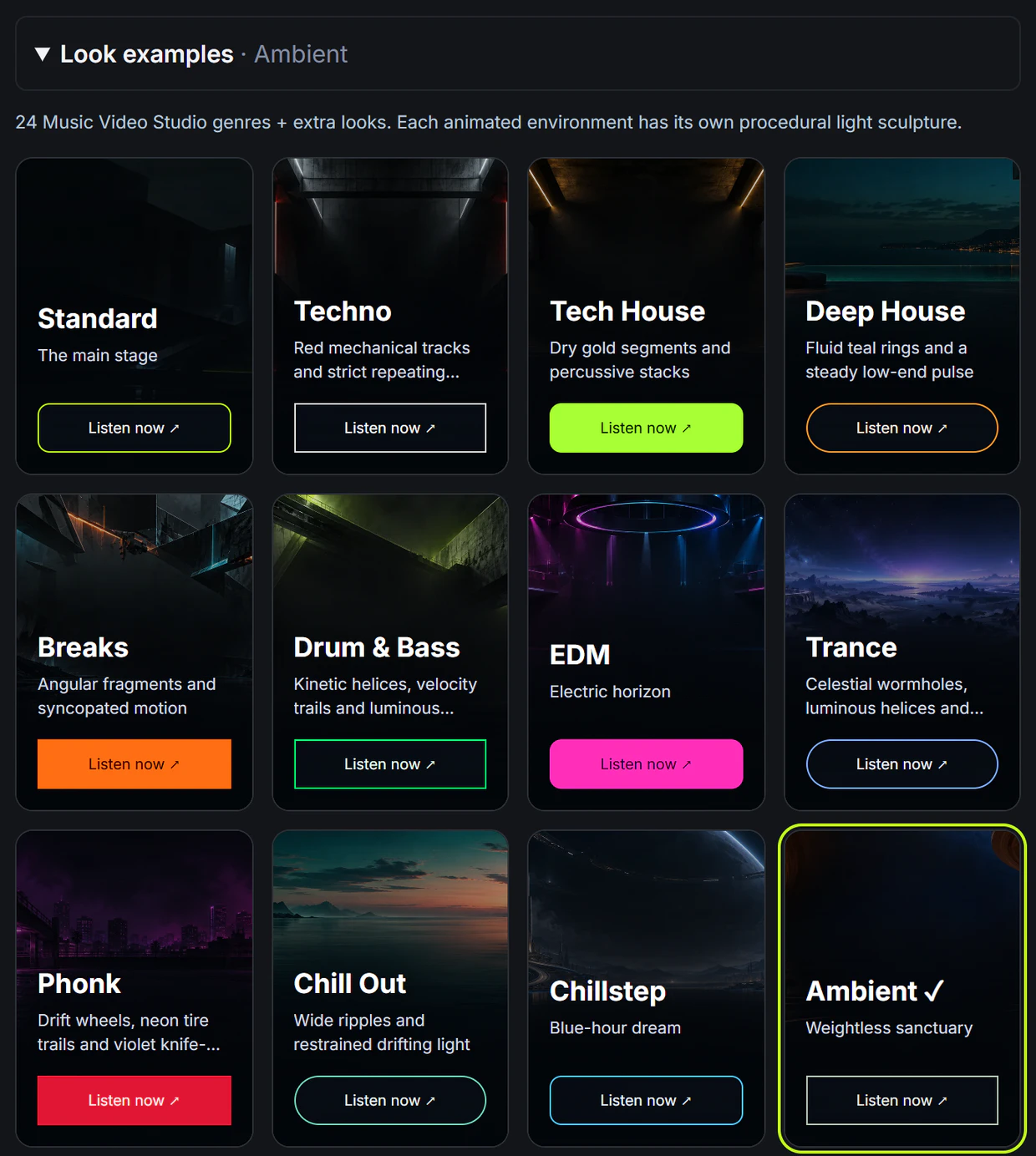
Step 5: Add and order the buttons
The buttons accept direct music-service links (Spotify, Apple Music, Beatport, Deezer, TIDAL, SoundCloud, YouTube, Bandcamp and other stores), a published product from the artist's own store on GYSNOIZE, and Facebook, Instagram, TikTok and X profiles, which appear as round icons at the bottom of the page. Buttons are ordered by dragging them. External stores and shortened links are not accepted, so every button leads where it says.
Three optional links add secondary buttons under the main ones: a Video link (a YouTube video, shown as «Watch the video»), a Preview link («Listen to a preview») and a Follow link, for example the artist's Spotify profile («Follow the artist»). A Cover image can replace the release artwork; left empty, the release artwork is used.
Step 6: Prepare the share card
Most people see a link before they ever open it: in a chat, a group or a social feed. When somebody shares the link sets what they see: a Share title, a Share description and a Share picture in the 1200×630 format that feeds expect. Left empty, the title, second line and artwork from above are used. The editor checks the lengths as you type and warns when a square sleeve would be letterboxed or cropped in a wide preview, and it shows a preview of the card «in a chat or a feed».
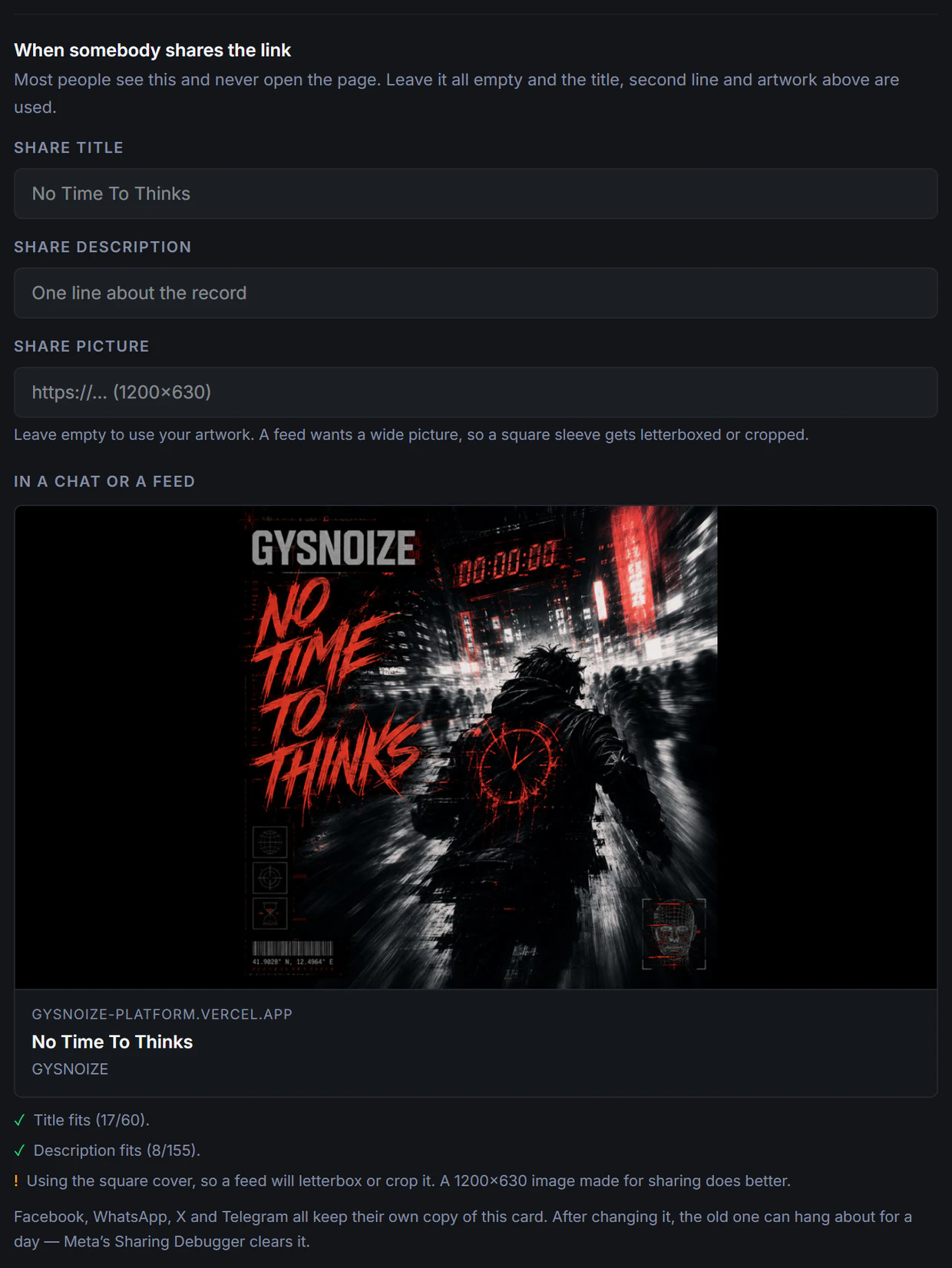
Step 7: Preview, publish and share
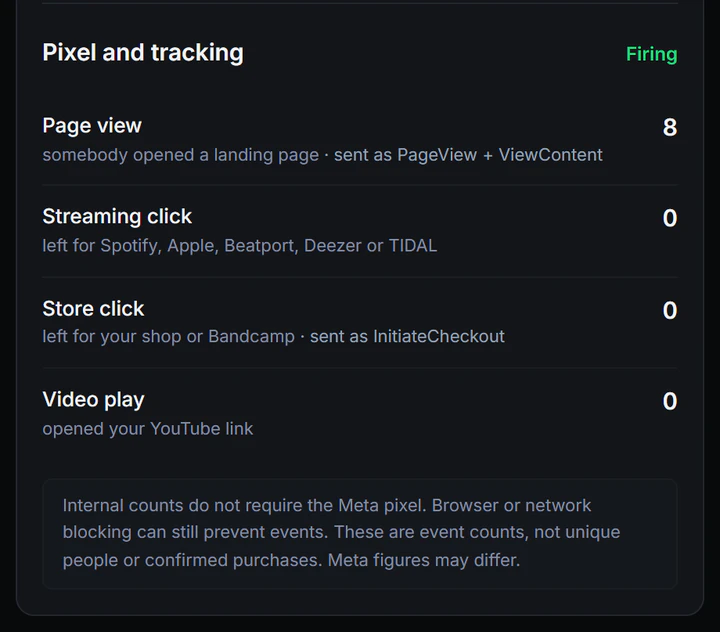
As people will see it shows a live preview under the editor, and Open large preview shows the page full size without publishing or counting anything. Drafts stay private. Once a page is live it has a link you can copy and a QR code you can download as an SVG file for posters and flyers. From then on, the overview counts page views, streaming clicks, store clicks and video plays.
Views are counted in the visitor's browser once the page is really on a screen, so link checkers and chat previews do not inflate the numbers. Internal counts do not require any advertising pixel. Artists who use Meta Ads Pro can also send events to their own Meta pixel: a page view as PageView and ViewContent, a streaming click, a store click as InitiateCheckout, and a video play.
What makes GYSNOIZE artist landing pages different?
There are many smart-link services. These are the differences that come from building landing pages inside a label platform rather than as a stand-alone tool:
- Built from your releases. Pick a release from your catalogue and its known store buttons are filled in, instead of pasting every link by hand.
- A look per genre. Animated environments from the Music Video Studio genres, with fonts, artwork shapes and button shapes, instead of one template for every style of music.
- Your own store on the same page. A product from your GYSNOIZE store can sit next to the streaming buttons.
- Honest buttons. Direct links only: no shortened links and no buttons that send visitors to unrelated external stores.
- Share cards checked before you post. Length checks and a warning when square artwork will be cropped in a wide preview.
- Counts you can trust. Views counted in the browser, so bots and link previews stay out, with streaming clicks, store clicks and video plays per page.
- Optional Meta pixel events for artists who advertise with Meta Ads Pro, mapped to standard events.
- One workspace. The same account holds the artwork tools, Music Video Studio, the store and DJ promotion, so the landing page is part of the release rather than an extra tool to manage.
A landing page is where all the work on a release meets the listener. It should look like the music and lead straight to it.
A practical example: promoting one album
Take the album shown in this guide. The page /go/no-time-to-thinks shows the artwork, the label «Album», the title and the artist, with buttons for Spotify, Apple Music, Deezer and TIDAL. A realistic campaign around it could run like this:
- Build the page as a draft from the release, choose a look that fits the record and check the large preview on a phone-sized screen.
- Set a share title and description, and check how the card looks in a chat.
- Publish on release day and put the same address in the social bio, every post and the newsletter.
- Print the QR code on flyers for a live show.
- After a week, compare page views with streaming clicks. If many people open the page but few press a button, the artwork, the order of the buttons or the audience of the advert needs another look.
- Keep the page live as the permanent home of the album.
None of this needs a web designer or a separate analytics tool, and the result is a page that looks like the record and numbers that show what the promotion achieved.
Common mistakes to avoid
- Too many buttons. Offer the services your listeners use, not every service that exists.
- Low-quality artwork. A blurred or stretched cover makes the whole release look careless.
- Broken or generic links. Every button must open the release itself.
- No share card. A bare address in a chat is easy to ignore.
- Building the page on release day. Prepare it as a draft in advance and publish when the links are live.
- Never looking at the numbers. The data is what turns one campaign into a better next one.
Landing pages are one part of running a release. If you work as a label as well, our guides to record label management software and calculating music royalties cover the business side, and DJs who perform live will find the DJ booking management guide useful.
Frequently asked questions
What is the difference between a smart link and an artist landing page?
Usually none: both describe one page that sends listeners to the streaming service or store of their choice. «Landing page» tends to mean a page with more design and context around the release, «smart link» a simpler list of buttons.
Do I need a separate landing page for every release?
For releases you actively promote, yes. A page per release keeps the artwork, the links and the numbers of each campaign separate. Older releases can keep their pages live as their permanent home.
Which streaming services should my page include?
The services your audience uses, in order of importance. For most artists that starts with Spotify and Apple Music; electronic music for DJs often needs Beatport, and Bandcamp suits fans who want to buy. Leave out services where the release is not available.
Can I use my own background or font?
In GYSNOIZE you choose a site font from the available typefaces and can upload your own background as a JPG, PNG, WebP or MP4 file of up to 3 MB. You can also use your own cover image instead of the release artwork.
Does a landing page replace my website?
No. A website tells the whole story of an artist; a landing page does one job for one release. They work best together, with the website linking to the newest landing page.
How do I know if my landing page works?
Compare page views with streaming and store clicks. A page that many people open but few leave through a button has a problem with its design, its links or the audience reaching it. In GYSNOIZE these numbers are shown per page and for the last 30 days.
Do I need the Meta pixel to see my numbers?
No. GYSNOIZE counts page views and clicks itself. The Meta pixel is optional and useful only for artists who run Meta adverts through Meta Ads Pro.
Create your artist landing page with GYSNOIZE
Give your next release one link that works for every listener, looks like your music and shows you what your promotion achieved. Landing pages are included in every GYSNOIZE artist plan.